
Every missed call at a trades business is a job that might go to the next name on the list. AI answering can fix that, but only if it does more than pick up. It has to ask the right questions, book within your rules, follow up fast and hand the caller to a person when it should. Here’s what the call data says, and what “done right” looks like.
What the call data says
Three companies that see millions of business calls have published numbers this year, and they point the same way.
- A lot of calls never reach anyone. CallRail says that, on average, 28% of business calls go unanswered, “often when a team is under a sink, on a customer call, or away from the phone” (CallRail). Invoca’s 2026 home services report found that only 52% of inbound calls reach a person (Invoca).
- Answered calls often don’t turn into jobs. Invoca found 55% of home services businesses don’t ask the caller to book on the call.
- Small shops book the fewest. ServiceTitan says shops with 50 or more technicians book 58% of the calls they receive, while shops with 1 to 10 techs book 30%. “Each unbooked call is a job that didn’t make it onto the board” (ServiceTitan on X).
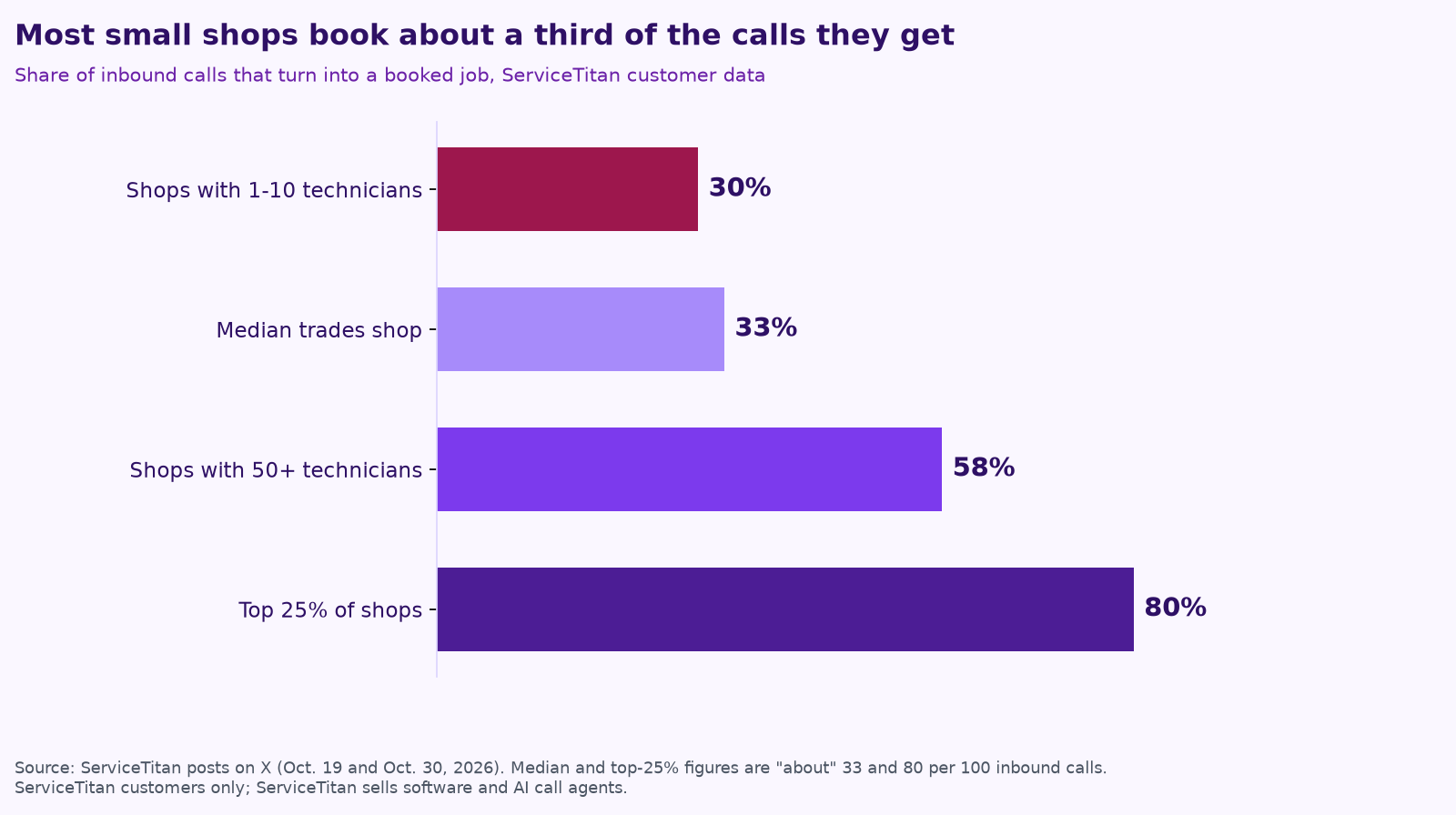
ServiceTitan’s explanation is about staffing, not skill: “At smaller shops, one CSR or dispatcher often covers three techs. At bigger shops, each one supports seven.” Put another way, it says that out of 100 inbound calls a week, the median shop books about 33 and the top quarter books about 80, “roughly 45 jobs a week from phones that were already ringing” (ServiceTitan on X).
A fair warning on all three sources: they sell call tracking or AI phone agents, and their data comes from their own customers. The direction is consistent, though, and you can check your own numbers in an afternoon.
Speed matters as much as answering
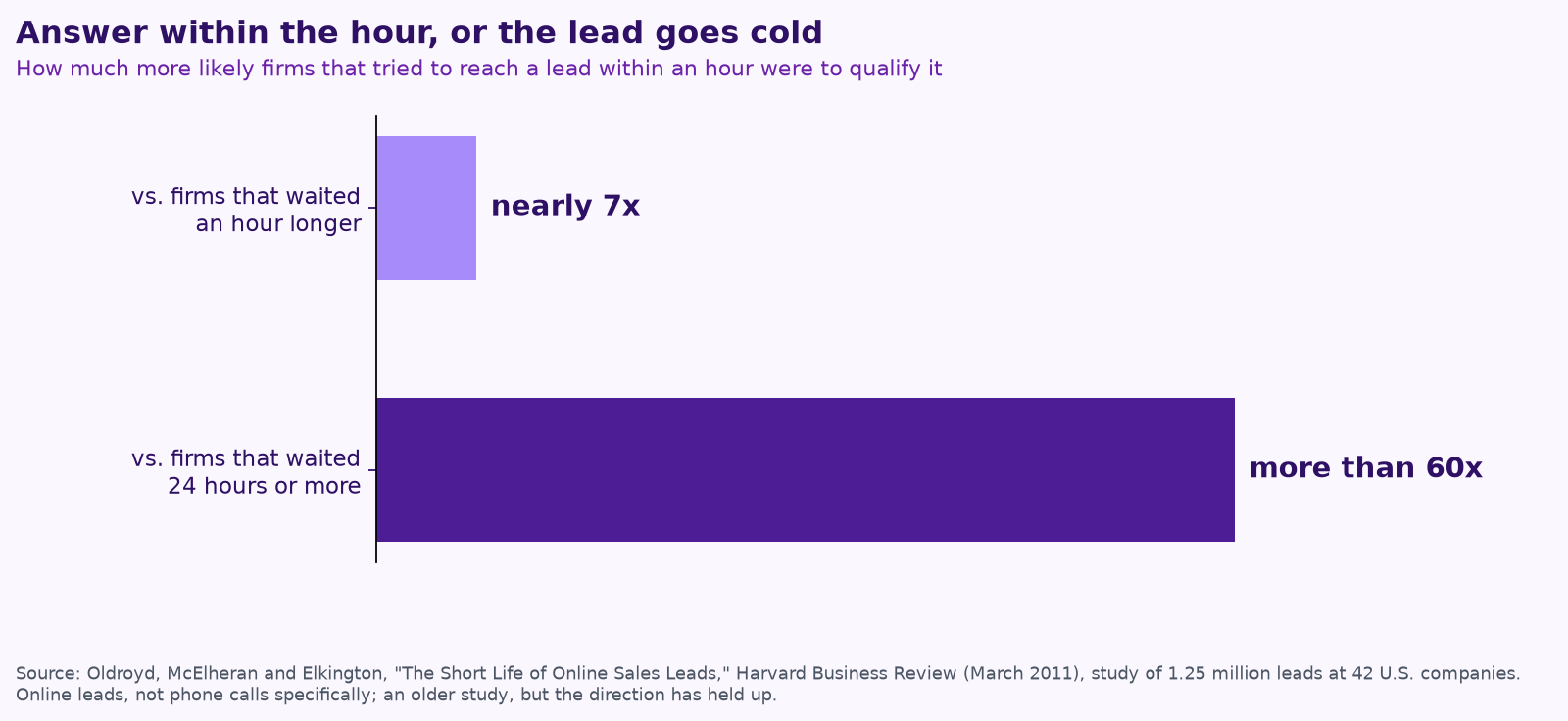
When a caller hangs up or a web form comes in, the clock starts. A Harvard Business Review study of 1.25 million sales leads at 42 U.S. companies found that firms that tried to reach a lead within an hour were nearly seven times as likely to qualify it as firms that waited even an hour longer, and more than 60 times as likely as firms that waited 24 hours or more. The same researchers audited 2,241 companies and found 23% never responded to a web lead at all (Harvard Business Review).
What “done right” looks like
An AI receptionist that answers and takes a message is a better voicemail. To win jobs, the setup needs four parts working together.
1. Answering
- Decide when the AI picks up: after hours, on weekends, after a set number of rings, or whenever the office line is busy. Many owners start with overflow and after-hours only.
- Have it say up front that it’s an automated assistant for your company. Callers handle that fine; they don’t like finding out later.
- Give it your real service area, hours, services and what you don’t do, so it never promises work you won’t take.
2. Intake
- Ask what a good CSR asks: name, address, callback number, what’s wrong, how urgent, equipment make and age, and whether they’re a current customer or have a service plan.
- Text a link for photos when it helps the tech prepare.
- Write a clean summary into your field software, not a transcript someone has to read.
3. Booking and follow-up
- Book only into slots and job types you’ve approved. Everything else becomes a request for a person to confirm.
- Text back missed calls and hang-ups within a minute or two, with a link to book or a simple question.
- Follow up on unsold estimates on a schedule you set, and stop the moment the customer replies or books.
4. Human handoff
This is the part most setups skip, and it’s the part that protects your reputation. Write down the triggers that send a caller straight to a person:
- Safety: gas smell, carbon monoxide alarm, sparking or burning smell, flooding. The script should tell the caller what to do right away (for a gas smell, leave the building and call the gas company or 911) and then alert your on-call tech.
- Emergencies you want: no heat in winter, no cooling for an elderly customer, a burst pipe. Jobber, for example, lets owners choose keywords like these so its Receptionist transfers the call or sends a text alert (Jobber).
- Money and exceptions: a pricing dispute, a discount request, a warranty claim or anything outside your rules.
- Upset callers and key accounts: complaints, commercial customers and property managers who expect a person.
- “Can I talk to a person?” The answer should always be yes, either now or with a callback time the AI can actually commit to.
A good handoff passes the whole story along. The person who picks up should see who’s calling, what they need and what the AI already said, so the customer never has to repeat themselves.
Rules to know before you turn it on
- Outbound AI calls need consent. Under a 2024 FCC ruling, AI-generated voices count as “artificial” voices under federal robocall law, so AI calls to customers generally need their prior consent (FCC). Answering inbound calls and texting back someone who just called you is a different situation from cold outreach, but ask your attorney how the rules apply to your follow-up.
- Recording rules vary by state. Some states require everyone on a call to agree to recording. Announce it at the start.
- Keep the record. Save a summary, transcript and outcome for every call so you can check the AI’s work and settle any dispute.
Measure it every week
- Answer rate: share of calls that reach a person or the AI.
- Booking rate: booked jobs divided by calls from potential customers.
- Time to first response on missed calls, texts and web forms.
- Handoffs: how many, why and how fast someone picked up.
- Mistakes: wrong bookings, wrong info or upset callers. Read five transcripts a week.
Missed-call checklist
- ☐ We know our current answer rate and booking rate.
- ☐ The AI says it’s an automated assistant and knows our area, hours and services.
- ☐ It books only into approved slots and job types.
- ☐ Missed calls get a text back within two minutes.
- ☐ Safety and emergency triggers go straight to a person, with the full story.
- ☐ Anyone can reach a human by asking.
- ☐ Someone reads transcripts and checks the numbers weekly.
How Purple AI sets this up
You may already have an AI receptionist in your software. Jobber, ServiceTitan and CallRail all offer one, and we’ll help you configure what you have before adding anything (see what Procore, ServiceTitan, Jobber and Buildertrend’s AI covers). Where we add value is the work around the call: the intake questions for your trade, the handoff rules, the follow-up on estimates, and a weekly report that shows answer rate, booking rate and what the AI got wrong. A person on your team approves anything that matters.
For the full picture of where agents help a shop, read AI for trades businesses. For how we keep people in control, see how to keep a human in charge of AI agents.
By trade: see how agent teams work for HVAC companies, plumbers, electrical contractors, roofing companies and remodelers.
Keep reading
- AI for construction companies: 7 workflows
- AI for property management: maintenance, leasing follow-up and owner reports
- Give your AI agent a job, not a to-do list
- AI for accounting and bookkeeping firms
- How to run an AI assessment for your small business in one week
- Your AI team shouldn’t copy your org chart
- What does fractional AI cost?
- AI agents vs. chatbots vs. automation: what a small business actually needs
- AI receptionists for contractors: Jobber vs. ServiceTitan vs. standalone tools
- A free AI use policy template for small businesses
- AI for construction estimating and takeoffs
- How to measure AI agent ROI with the hours-back method
- AI for HVAC maintenance agreements and renewals
- AI for construction safety documentation and toolbox talks
- AI for lien waivers and pay applications
- AI for roofing storm-season leads and claim reports
How we do this at Purple AI
Purple AI is an AI consulting firm for small businesses, and we start with construction and trades. We set up a small team of AI agents inside the tools you already use, give each agent one job, and keep a person in charge of anything that matters. Then we stay on to tune it as your business and the AI tools change.
The easiest first step is a free 15-minute AI mini-audit. We’ll look at where your week goes and name the one or two jobs we’d hand to an agent first. Book your mini-audit here.
If it’s a fit, ongoing plans are Starter at $750 a month (one workflow or dashboard), Core at $1,000 a month (an ongoing agent team, our most popular plan) and Growth at $1,250 a month (agents across several departments). If you want a deeper look first, there’s an optional $2,500 assessment, and $1,000 of it is credited to your first month.
Sources
- CallRail, CallRail Opens Voice Assist to Every Business, Now With Contextual AI Texting (July 28, 2026).
- Invoca, The Invoca Home Services Lead Conversion Benchmarks Report 2026.
- ServiceTitan (@ServiceTitan), posts on X about booking rates by shop size (Oct 30, 2026) and median and top-quartile booking (Oct 19, 2026).
- James B. Oldroyd, Kristina McElheran and David Elkington, The Short Life of Online Sales Leads, Harvard Business Review (March 2011).
- Jobber, Receptionist feature page.
- Federal Communications Commission, FCC Confirms that TCPA Applies to AI Technologies that Generate Human Voices (Feb 8, 2024).
Free checklist
Find 10 hours a week: the AI checklist for contractors
30 places construction and trades businesses lose time every week, and what an AI agent can take off your plate. On the page or as a printable PDF.
Get the checklist →