

AI takeoff tools can draft quantities in minutes. They should not be the one signing the bid. A growing set of construction takeoff products will trace rooms, walls, doors and symbols for you. Used well, that can shorten the blank-page part of an estimate. Used carelessly, it can put a confident-looking number on a bid that is missing scope. This is an honest look at what the tools actually do, what one academic comparison found, and where an AI agent fits around the estimate, not in place of the estimator.
What the takeoff tools are doing now
Most of the products in this category are doing the same first job: read a plan sheet and propose counts, lengths and areas, which a person then edits. The details differ.
- STACK calls this AI Takeoff. You set the scale, and it detects walls, rooms, doors and windows on a sheet. The company says architectural floor plans give it the most to work with, most sheets process in a few minutes, and every measurement lands in the ordinary takeoff tools so you can adjust it before it reaches the bid. It is included in STACK’s Premium and Pro plans, with a seven-day trial (STACK).
- PlanSwift (ConstructConnect) offers Auto Takeoff, part of its Takeoff BOOST tools. It generates a first pass of walls, areas, ceilings, windows, doors and counts when the plan supports detection, and returns ordinary PlanSwift takeoff items you can edit. The product page is blunt: “It is your responsibility to verify results to ensure accuracy,” and Auto Takeoff “does not complete the entire estimate for you” (PlanSwift).
- Autodesk Forma Takeoff is a cloud takeoff product for 2D sheets and 3D models in one place, with conceptual estimates that update as quantities change. Autodesk’s AI features here include Automated Symbol Detection (trace one symbol, count the matches on the sheet) and Autodesk Assistant for published specifications. List pricing on Autodesk’s product page starts at $108 a month (Autodesk).
- Togal.AI is a cloud takeoff tool built around an AI first pass on architectural drawings, with manual tools to correct the result. That is the product tested in the study below.
Plenty of shops still do digital takeoff in Bluebeam or an older desktop tool such as On-Screen Takeoff, then price in a spreadsheet or a separate estimating package. That is a valid setup. A new AI takeoff product is only a good buy if it beats the workflow you already have, including the time you spend fixing it. If you already run Procore, Buildertrend or similar, start by learning the estimating features you pay for; we walked through that in Procore, ServiceTitan, Jobber and Buildertrend have AI now.
What one careful study actually found
Independent head-to-head tests are still rare. The most useful public comparison we found is a 2025 paper by researchers at the University of Kansas and partner universities, published in the Simplar Journal of Applied Research and Practice. A first-time user ran quantity takeoffs of general areas, linear elements and item counts on architectural floor plans in Togal.AI and in On-Screen Takeoff. After manual adjustments, Togal.AI took about 70% less time, and quantities stayed within about a 5% margin of the On-Screen Takeoff results, with the larger percentage gaps on smaller quantities (Marulanda S. et al., 2025).
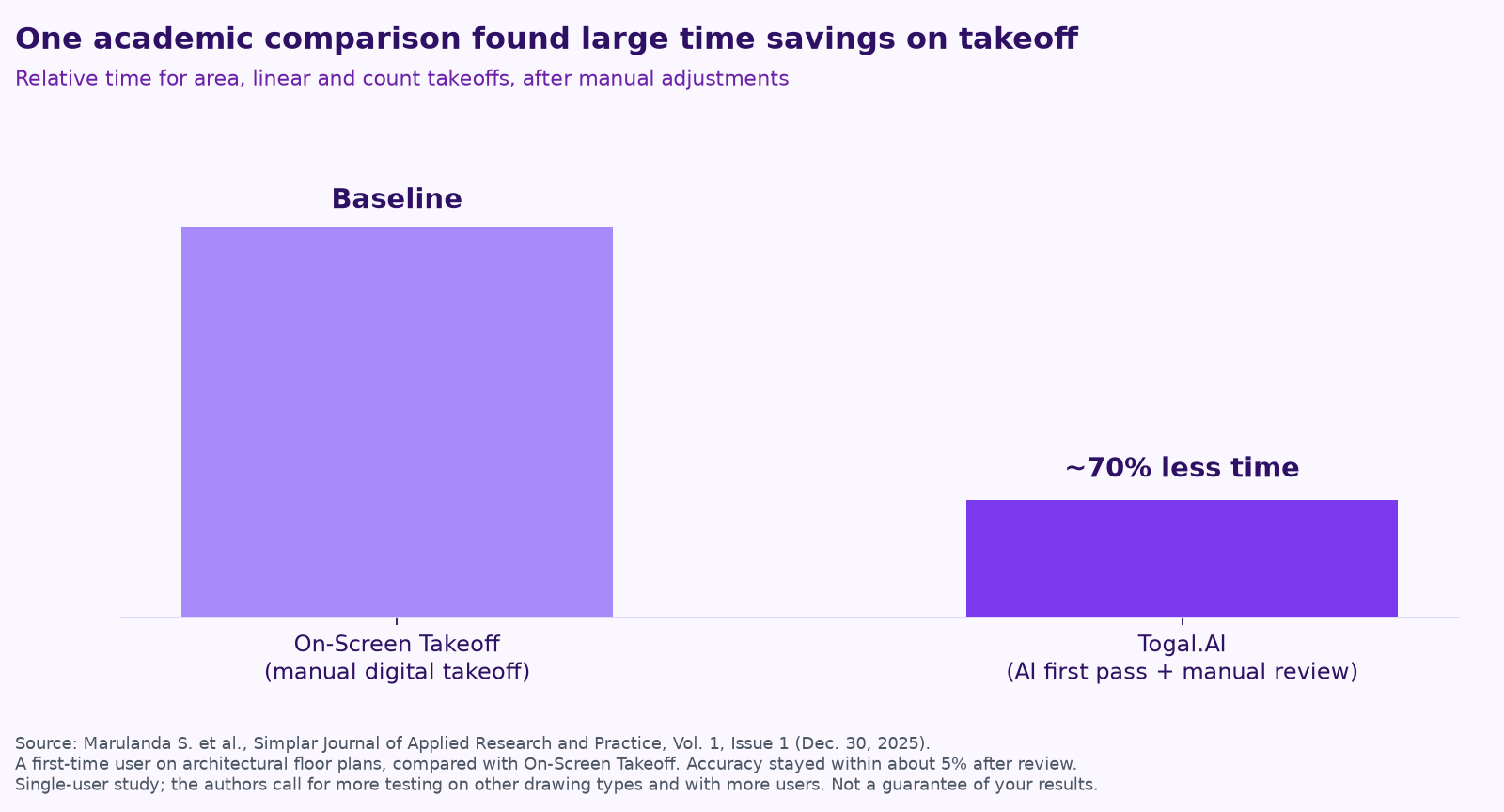
The authors are careful, and you should be too. The work was done by one user in March 2025. Togal.AI’s automated takeoff was limited to architectural drawings. Accuracy is reported after a person corrected the AI traces, and the authors say professional review should be standard practice, ideally by more than one person, before anyone relies on the quantities. They also recommend more tests on other drawing types and with more users. Vendor case studies sometimes advertise larger savings; treat those as marketing until you have run the same job through your own process.
What these tools still do not do
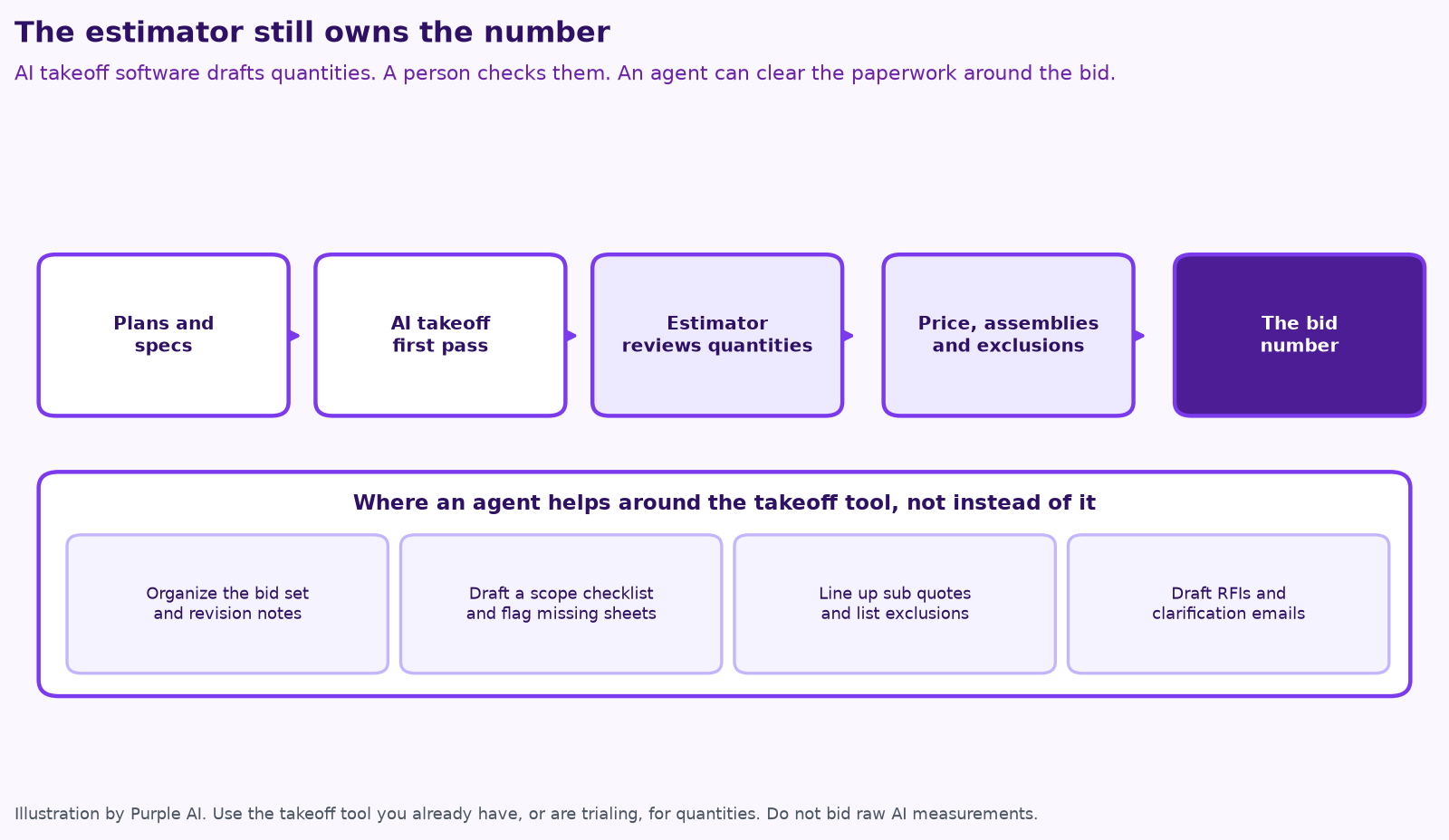
A first-pass takeoff is not an estimate. The software does not decide what the drawing left out, how your crew actually builds the assembly, what the site will do to labor, which alternates to carry, or whether you should bid at all. Labor, equipment, burden, waste, escalation and markup still come from your cost data and your judgment. A 5% miss on a quantity can be a rounding issue on a count of fasteners, or the difference between a decent job and a job you will regret winning. That is why the estimator, not the tool, owns the number.
The U.S. Bureau of Labor Statistics still describes the job that way. Cost estimators “read blueprints and technical documents in order to prepare estimates,” then “calculate, analyze, and adjust” them. The median wage for the occupation was $78,740 a year, or $37.86 an hour, in May 2025, and specialty trade contractors are the largest industry group (BLS). In the 2025 AGC and NCCER workforce survey, 80% of hiring firms had open salaried positions, the project managers, estimators and office staff who carry this work. The tool should give that person time back. It should not quietly replace the review.
Where an agent actually fits
In our earlier post on seven AI workflows for small contractors, we put “estimating prep” on the list and left the takeoff review and the number with you. That still holds. An agent is useful around the takeoff tool, on work that is repeated, documented and easy to check:
- Organizing the bid set, naming sheets, and noting which drawings were revised since the last addendum.
- Drafting a scope checklist by trade and flagging rooms, details or schedules that appear to be missing.
- Pulling similar past jobs and what they actually cost, so you can sanity-check the new number.
- Lining up subcontractor quotes side by side and listing gaps, exclusions and stale dates.
- Drafting RFIs and clarification emails for you to send.
None of that should go out, or into the bid, without a person looking at it. For the approval line, see how to keep a human in charge of AI agents. If you are choosing the first job to hand off, the contractor AI checklist is a practical starting point, and the same pattern shows up on our pages for AI for construction and remodelers, where takeoffs and allowances come up constantly.
How to trial a tool without fooling yourself
- Pick a job you have already taken off and priced, with a clear sheet, a dense sheet and a revision if you have one.
- Run the AI first pass. Time the upload, the processing, the corrections and the export separately. The only number that matters is time to a reviewed quantity list, not time to the first colorful overlay.
- Compare counts, lengths and areas to your checked reference. Note misses, duplicates, wrong types and anything the drawing never showed.
- Confirm the quantities survive the handoff into your estimate with units and sheet references intact.
- Do not bid the raw AI quantities. If the tool only wins on clean architectural plans and your work is structural, civil or a messy scan, say so and move on.
Estimating and takeoff checklist
- ☐ We set and confirmed the scale before trusting any measurement.
- ☐ A person reviews every AI quantity before it enters the estimate.
- ☐ We time correction and export, not just the first pass.
- ☐ The estimator owns the bid number, including exclusions and markup.
- ☐ An agent, if we use one, handles bid-pack organization, quote comparison and draft RFIs, not the final quantities.
If you want help picking that first workflow, or wiring an agent into the bid paperwork you already do, that is a good use of a free mini-audit. The same idea applies if your work leans more toward roofing, HVAC, plumbing, electrical or the trades than general contracting: start with the takeoff or quote tools you have, then automate the follow-through.
Keep reading
- 7 AI workflows for small contractors
- How to measure AI agent ROI with the hours-back method
- How to keep a human in charge of AI agents
- Procore, ServiceTitan, Jobber and Buildertrend have AI now
- How to run an AI assessment for your small business in one week
- AI for HVAC maintenance agreements and renewals
- Give your AI agent a job, not a to-do list
- Your AI team shouldn’t copy your org chart
- What does fractional AI cost?
- AI for dispatch and quotes: where trades shops save hours
- AI for construction safety documentation and toolbox talks
- AI for lien waivers and pay applications
- AI for roofing storm-season leads and claim reports
How we do this at Purple AI
Purple AI is an AI consulting firm for small businesses, and we start with construction and trades. We set up a small team of AI agents inside the tools you already use, give each agent one job, and keep a person in charge of anything that matters. Then we stay on to tune it as your business and the AI tools change.
The easiest first step is a free 15-minute AI mini-audit. We’ll look at where your week goes and name the one or two jobs we’d hand to an agent first. Book your mini-audit here.
If it’s a fit, ongoing plans are Starter at $750 a month (one workflow or dashboard), Core at $1,000 a month (an ongoing agent team, our most popular plan) and Growth at $1,250 a month (agents across several departments). If you want a deeper look first, there’s an optional $2,500 assessment, and $1,000 of it is credited to your first month.
Sources
- Marulanda S., V. V., Lines, B., Kassa, R., Smithwick, J., and Sullivan, K., Togal.AI vs On-Screen Takeoff: A Comparative Analysis of Time Efficiency and Accuracy, Simplar Journal of Applied Research and Practice, Volume 1, Issue 1 (Dec. 30, 2025). PDF: simplarfoundation.org.
- STACK, AI Takeoff product page (retrieved Nov. 19, 2026).
- PlanSwift, Auto Takeoff product page (retrieved Nov. 19, 2026).
- Autodesk, Forma Takeoff product page (retrieved Nov. 19, 2026).
- U.S. Bureau of Labor Statistics, Occupational Outlook Handbook: Cost Estimators (2025 median pay).
- Associated General Contractors of America and NCCER, 2025 Workforce Survey news release (Aug. 28, 2025) and national results.
Free checklist
Find 10 hours a week: the AI checklist for contractors
30 places construction and trades businesses lose time every week, and what an AI agent can take off your plate. On the page or as a printable PDF.
Get the checklist →