
“Chatbot,” “automation” and “AI agent” get used as if they mean the same thing. They don’t, and the difference decides what you pay and what can go wrong. Even the analysts are frustrated. Gartner has called out vendors for “agent washing,” rebranding ordinary assistants, chatbots and automation tools as agents, and estimated that only about 130 of the thousands of “agentic AI” vendors are real.
Here’s a plain-English guide to the three, what each is good at, and how a small business should mix them.
The three, in plain words
1. A chatbot (or AI assistant): you ask, it answers
ChatGPT, Claude, Gemini and Copilot in their basic form. You type a question or paste in a document, and it writes, summarizes or explains. It’s great for drafting an email, cleaning up a proposal or summarizing a long contract. But it waits for you, it usually can’t act inside your other systems, and unless it’s set up to, it doesn’t remember how your business works from one chat to the next.
2. Automation: if this happens, do that
Tools like Zapier, Make and Microsoft Power Automate. When a trigger happens (a form is submitted, an invoice is marked paid, an email arrives), it runs the same fixed steps every time: copy the lead into your CRM, send the receipt, create the folder. It’s cheap, fast and predictable. It also has no judgment. If the input is messy or something unexpected happens, it does the wrong thing or stops.
3. An AI agent: here’s the goal, figure out the steps
An agent is given a goal and a set of tools, and decides for itself what to do next. Anthropic draws the line clearly in its guide “Building effective agents”: workflows are “orchestrated through predefined code paths,” while agents “dynamically direct their own processes and tool usage.” That flexibility is the point. An agent can read a messy customer email, look up the job, check the schedule and draft a sensible reply. The trade-off is that it costs more to run and won’t do things exactly the same way twice.
Zapier CEO Wade Foster put that trade-off well on X on November 2: “Agents are ‘probabilistic.’ That means they probably work. Your business processes need to be deterministic.” Research and brainstorming can vary, he wrote, but “updating the CRM, sending the invoice, routing the ticket” need to “happen the same way every time.”
Side by side
| Chatbot / assistant | Automation | AI agent | |
|---|---|---|---|
| Who starts it | A person asks | A trigger fires | A trigger, a schedule or a person |
| Who decides the steps | The person | Whoever built it, in advance | The AI, each time |
| Good at | Drafting, summarizing, answering questions | Moving data, routine steps, high volume | Messy inputs and multi-step judgment |
| Weak at | Doing anything on its own | Anything unexpected | Doing it identically every time |
| Running cost | Per seat | Lowest per task | Highest per task |
What the numbers say
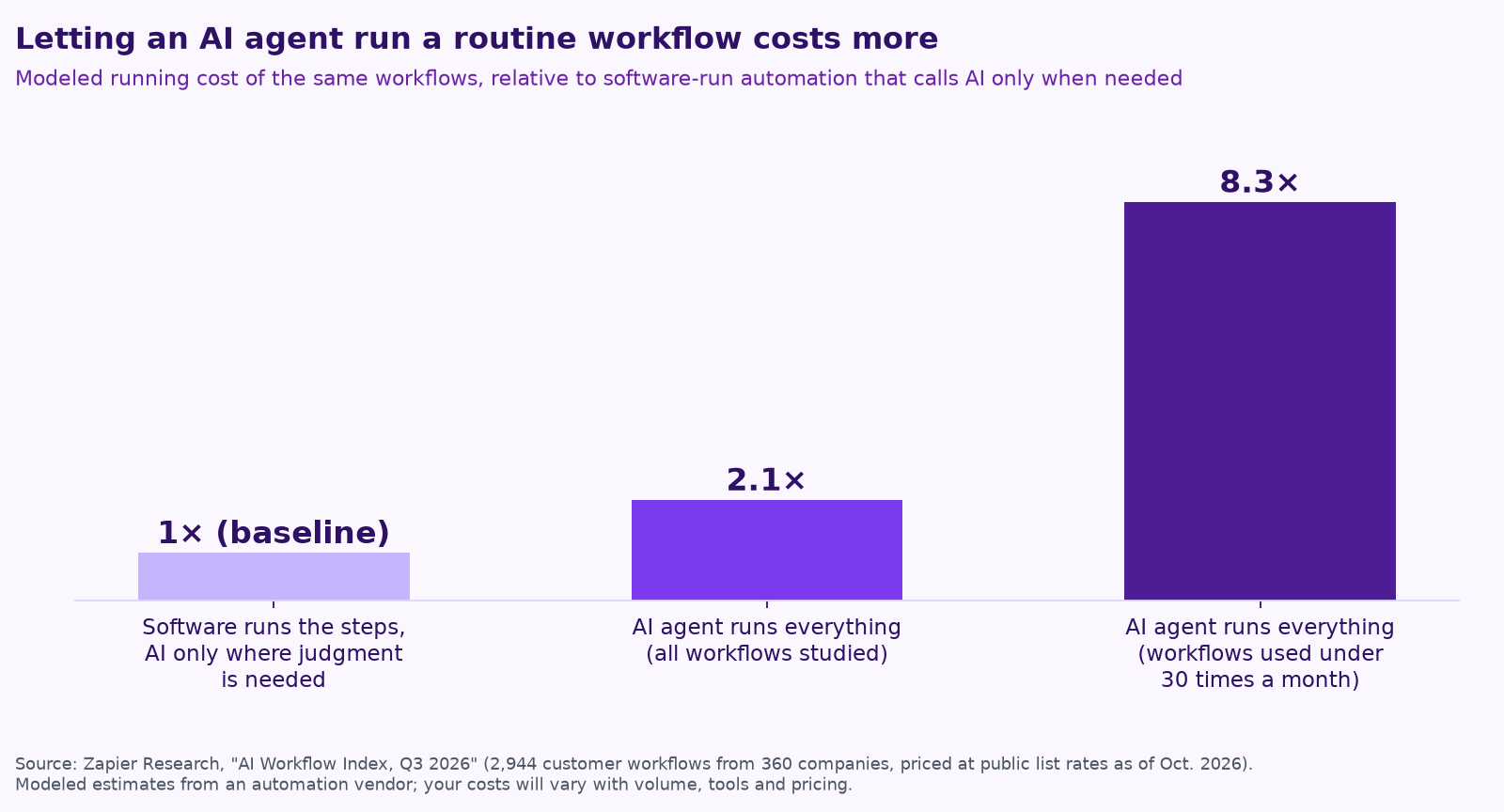
Cost is a real difference, not a rounding error. Zapier’s research team rebuilt 2,944 customer workflows from 360 companies and modeled what they’d cost if an AI agent ran each one, versus conventional automation that calls AI only for the steps needing judgment. On its central estimate, letting the agent run everything cost 2.1 times as much overall, and 8.3 times as much for workflows that run fewer than 30 times a month, mostly because agents kept checking for work that wasn’t there (Zapier AI Workflow Index, Q3 2026). Zapier sells automation, so read it with that in mind, but its conclusion matches what we see: “use AI to build the workflow and handle reasoning. Let conventional software run it.”
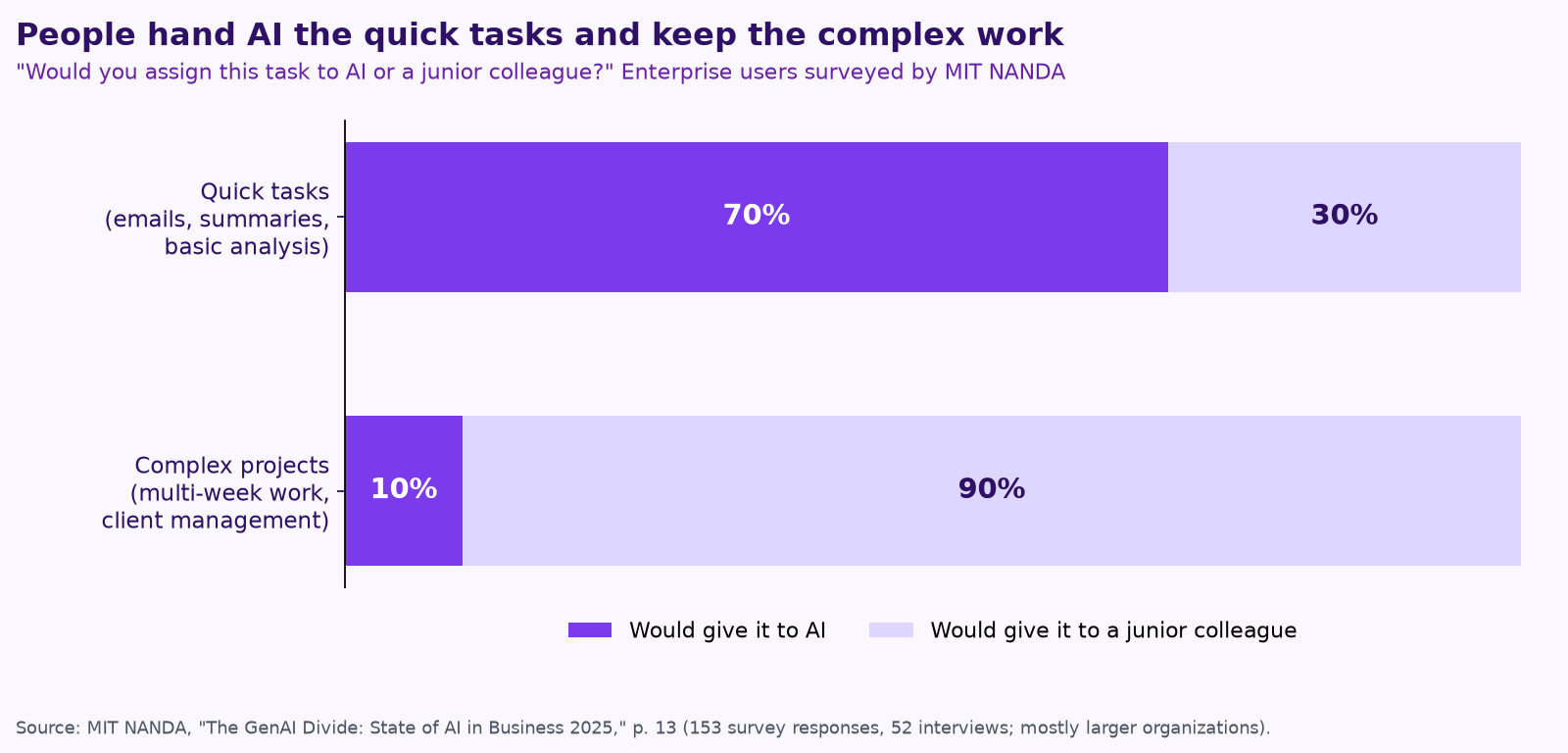
People already sort the work this way on their own. MIT’s NANDA initiative asked enterprise users whether they’d give a task to AI or to a junior colleague. For quick tasks like emails and summaries, 70% chose AI. For complex, multi-week work and client management, 90% chose the person (MIT NANDA, The GenAI Divide, via VentureBeat). The researchers’ explanation is that general chatbots don’t remember or learn from feedback. That’s exactly the gap a well-built agent with written procedures and a human approver is meant to close.
The rule of thumb
Gartner’s advice fits in one sentence: use “AI agents when decisions are needed, automation for routine workflows and assistants for simple retrieval.” Anthropic says much the same to builders: find “the simplest solution possible, and only [increase] complexity when needed.”
In practice, the best setup for most small businesses is a mix in one workflow. Zapier summed it up on X in three steps: start with AI to figure out the job, move the steps that repeat into automation, and keep AI in the parts that need judgment.
A real-world example: following up on estimates
- Automation notices an estimate was sent three days ago with no reply and starts the follow-up. Same trigger, every time.
- The AI step reads the job notes and the customer’s last message and drafts a short, specific follow-up, not a generic template.
- A person approves it with one click.
- Automation sends it, logs it in your CRM and sets the next reminder.
- An agent only comes in when the customer replies with something unexpected, like a question about a different job or a request to change the scope, and it hands a person a summary and a suggested answer.
Small trades businesses are already doing versions of this. Zapier, for example, shared the story of a plumbing company owner who built his own AI and automation setup as the business grew. That’s Zapier’s customer story, so treat it as an example of what’s possible rather than a typical result.
Which one do you need? Five questions
- ☐ Is the input the same shape every time? (a web form, a paid invoice) Use automation.
- ☐ Does it need reading or judgment? (a customer email, a field note) Add an AI step.
- ☐ Does it take several decisions across several tools? That’s where an agent earns its cost.
- ☐ How often does it run? Rare jobs are cheaper as triggered automation than as an agent that keeps checking.
- ☐ What happens if it’s wrong? If a mistake reaches a customer or moves money, put a person on the approval. See how to keep a human in charge of AI agents.
When we talk about “a team of AI agents” at Purple AI, this is what we mean in practice: agents for the judgment, plain automation for the repeats, and a person in charge. Most teams start with just one or two jobs. We explain why in Your AI team shouldn’t copy your org chart.
Keep reading
- How to keep a human in charge of AI agents: approvals, audit trails and guardrails
- How to run an AI assessment for your small business in one week
- What does fractional AI cost? Hiring vs. a fractional AI partner vs. DIY
- AI for construction companies: 7 workflows to hand to AI agents
- AI for trades businesses: dispatch, quotes, follow-ups and reviews
- AI for property management: maintenance requests, leasing follow-up and owner reports
- Give your AI agent a job, not a to-do list
- Procore, ServiceTitan, Jobber and Buildertrend have AI now. Where does an agent team fit?
- Missed calls cost trades businesses jobs: AI answering, intake and follow-up done right
- AI for accounting and bookkeeping firms: close, client follow-up and document chase
- AI receptionists for contractors: Jobber vs. ServiceTitan vs. standalone tools
- A free AI use policy template for small businesses
- AI for construction estimating and takeoffs
- How to measure AI agent ROI with the hours-back method
- AI for HVAC maintenance agreements and renewals
- AI for construction safety documentation and toolbox talks
- AI for lien waivers and pay applications
- AI for roofing storm-season leads and claim reports
How we do this at Purple AI
Purple AI is an AI consulting firm for small businesses, and we start with construction and trades. We set up a small team of AI agents inside the tools you already use, give each agent one job, and keep a person in charge of anything that matters. Then we stay on to tune it as your business and the AI tools change.
The easiest first step is a free 15-minute AI mini-audit. We’ll look at where your week goes and name the one or two jobs we’d hand to an agent first. Book your mini-audit here.
If it’s a fit, ongoing plans are Starter at $750 a month (one workflow or dashboard), Core at $1,000 a month (an ongoing agent team, our most popular plan) and Growth at $1,250 a month (agents across several departments). If you want a deeper look first, there’s an optional $2,500 assessment, and $1,000 of it is credited to your first month.
Sources
- Gartner, Gartner Predicts Over 40% of Agentic AI Projects Will Be Canceled by End of 2027 (June 25, 2025).
- Anthropic, Building effective agents.
- Wade Foster (@wadefoster), post on X about probabilistic agents and deterministic processes (Nov 2, 2026).
- Zapier Research, The Cost of AI Orchestration: AI Workflow Index, Q3 2026, shared by @zapier on X (Nov 16, 2026).
- VentureBeat, MIT report misunderstood: Shadow AI economy booms while headlines cry failure, on MIT NANDA’s “The GenAI Divide: State of AI in Business 2025.”
- Zapier (@zapier), post on X on combining AI and automation (Oct 13, 2026) and customer story post (Oct 16, 2026).
Free checklist
Find 10 hours a week: the AI checklist for contractors
30 places construction and trades businesses lose time every week, and what an AI agent can take off your plate. On the page or as a printable PDF.
Get the checklist →