

Accounting and bookkeeping firms already use AI more than almost any other small business. What most haven’t done is put it to work on the jobs that drain the month: chasing client documents, prepping the close and answering “where are we on this?” Those are exactly the jobs AI agents handle well, as long as a professional reviews the work. This guide to AI for accounting firms covers where to start, what stays human and the rules to set first.
Firms use AI. Few have set it up as a system.
Karbon’s 2026 State of AI in Accounting report, based on nearly 600 accounting professionals, found that 98% of firms now use AI, most of them daily, and staff save an average of 60 minutes a day. But only 21% have an AI policy or strategy, and fewer than half invest in training. Firms that do invest in training, policies and strategy see bigger time savings (Karbon).
A separate survey of 207 firm leaders by BILL and NewtonX, reported by CPA.com, found 92% save at least an hour a week with AI, with a median of five hours. The top priority is automating routine tasks (65%), and the survey found that “smaller firms struggle with system integration” (CPA.com).
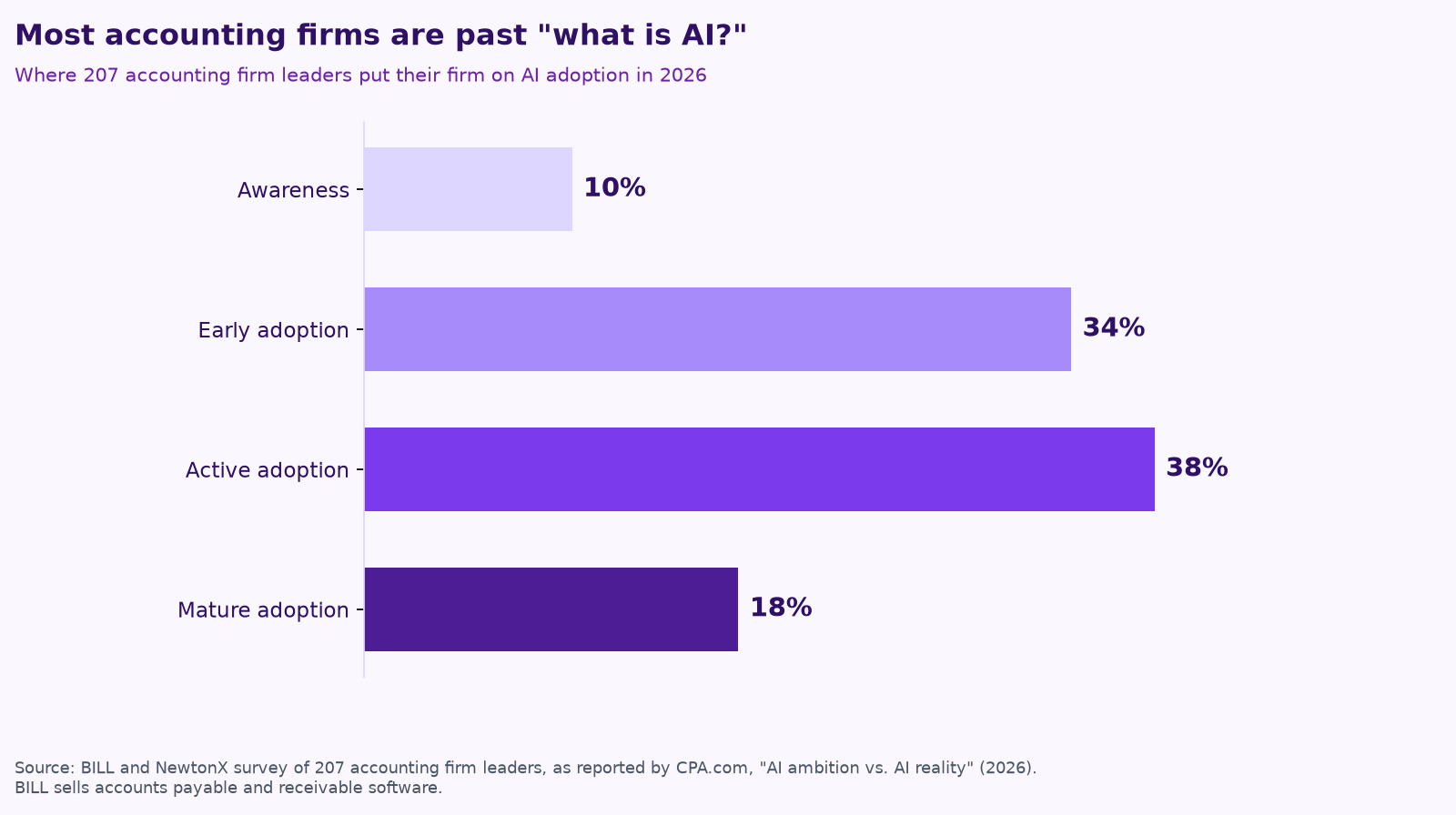
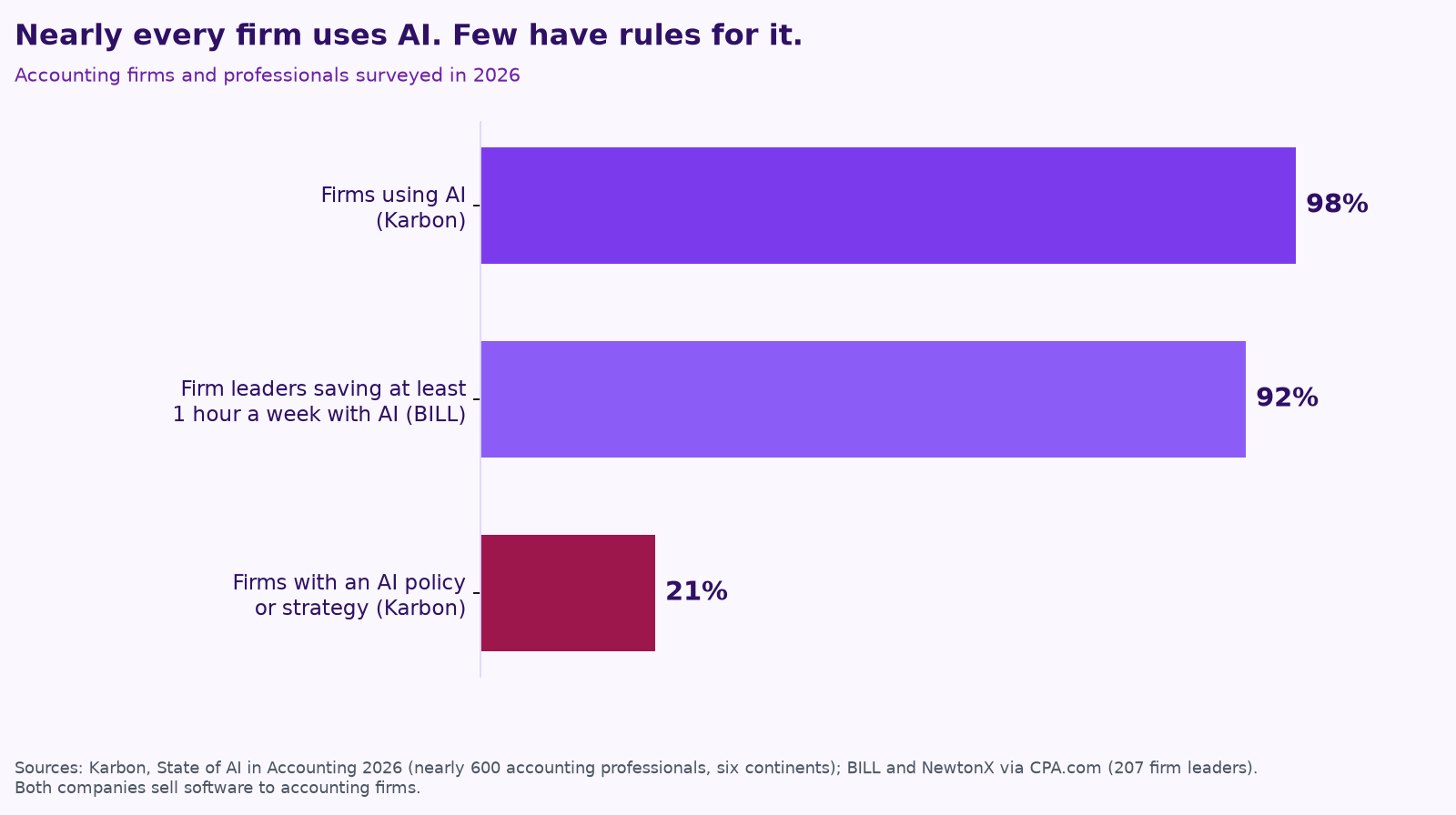
That gap is the opportunity. Chat tools save someone an hour drafting an email. An agent with a clear job, the right access and a reviewer can take a whole recurring workflow off the team’s plate.
Job 1: Document chase
Every firm knows this one. Bank statements, 1099s, receipts, payroll reports and signed engagement letters come in late, incomplete or as a phone photo of the wrong year. An agent can:
- Keep a live list of what’s missing for each client, based on last year’s file and this year’s checklist.
- Send reminders on a schedule you set, in your firm’s voice, through the portal or email your clients already use.
- Check each upload: right client, right account, right period, readable. Flag anything that isn’t and ask the client for the fix.
- File it where it belongs and update the job status in your practice management tool.
- Escalate to a staff member after a set number of reminders, with a short history, so the call to the client is a quick one.
Job 2: Month-end close prep
The software you already use is moving here fast. In October, Intuit announced Agentic Books Close, which “runs more of the monthly close process automatically, following a firm’s own standard operating procedures and tracking actions in an audit log, while accountants supervise, review, approve, and manage exceptions.” It’s in pilot with select Intuit Accountant Suite customers (Intuit). Use those features where they fit. Agents can help with the work around them:
- Suggest categories for uncategorized transactions based on the client’s history, for a bookkeeper to approve.
- Prepare reconciliations and list the items that don’t match.
- Draft plain-English questions for the client (“What was the $4,200 payment to Home Depot on the 12th for?”) and collect the answers.
- Draft notes on big changes from last month for the reviewer.
- Track close status across every client in one view.
Job 3: Client follow-up and communication
- Weekly status updates to clients: what’s done, what’s waiting on them and what’s next.
- Meeting prep: a one-page summary of the client’s numbers, open items and recent emails before every call.
- Onboarding: collecting the information, access and documents a new client needs, in order.
- A first draft of replies to routine questions, for staff to approve before sending.
The pattern in all three jobs is the same: the agent does the gathering, checking and drafting. A professional makes the call and signs off.
What stays with your professionals
Agents are not ready to do the professional work on their own, and the evidence says so. In DAYJOB: Tax, a benchmark from Surge AI built on 50 real-world tax assignments, the best AI agent passed just 10.8% of attempts under a strict grading rule. As Surge put it, “Agents haven’t yet passed the audit” (Surge AI). Tax positions, judgment calls, anything that goes to a taxing authority and anything you sign stays with a person. Agents make that person faster by doing the prep.
Set the rules first
- Tax return information has special rules. If you prepare returns, Section 7216 of the tax code restricts how return information can be used and disclosed, and some uses require the client’s written consent. Check how it applies to any AI tool or vendor before client tax data touches it (IRS Section 7216 information center).
- Update your security plan. The IRS notes that under the FTC Safeguards Rule, tax and accounting professionals are considered financial institutions and must maintain a written information security plan. Add your AI tools to it (IRS Publication 5708).
- Least access. Give each agent only the client folders and systems its job needs, and read-only where possible.
- Review before anything leaves the firm. Client messages, entries posted to the books and anything filed go through a person.
- Keep a log. Record what the agent did, for which client and who approved it.
Firm readiness checklist
- ☐ We have a written AI policy that names approved tools.
- ☐ We know which AI features our accounting and practice management software already includes.
- ☐ Section 7216 consent and our security plan cover the tools we use.
- ☐ We picked one workflow (usually document chase) to start.
- ☐ Every client-facing message and posted entry has a named reviewer.
- ☐ We’ll track hours saved and days to close after 60 days.
How Purple AI works with accounting firms
We build small agent teams inside the tools a firm already runs, like Google Workspace, Microsoft 365, QuickBooks and your practice management software, with a professional approving anything that matters. You own what we build, and plans are month-to-month. For the controls we use, see how to keep a human in charge of AI agents.
For firms that serve contractors and trades: a lot of our clients’ best AI ideas start with their accountant. If your firm works with construction, trades or property management businesses and you’d like a partner for the AI side, we’d love to compare notes. We work alongside the advisors our clients already trust. Talk to us about partnering.
Keep reading
- AI agents vs. chatbots vs. automation: what a small business actually needs
- Give your AI agent a job, not a to-do list
- Your AI team shouldn’t copy your org chart
- What does fractional AI cost?
- Procore, ServiceTitan, Jobber and Buildertrend have AI now. Where does an agent team fit?
- AI for construction companies: 7 workflows
- How to run an AI assessment for your small business in one week
- AI for trades businesses: where agents save hours
- AI for property management: maintenance, leasing follow-up and owner reports
- Missed calls cost trades businesses jobs: AI answering, intake and follow-up done right
- AI receptionists for contractors: Jobber vs. ServiceTitan vs. standalone tools
- A free AI use policy template for small businesses
- AI for construction estimating and takeoffs
- How to measure AI agent ROI with the hours-back method
- AI for HVAC maintenance agreements and renewals
- AI for construction safety documentation and toolbox talks
- AI for lien waivers and pay applications
- AI for roofing storm-season leads and claim reports
How we do this at Purple AI
Purple AI is an AI consulting firm for small businesses, and we start with construction and trades. We set up a small team of AI agents inside the tools you already use, give each agent one job, and keep a person in charge of anything that matters. Then we stay on to tune it as your business and the AI tools change.
The easiest first step is a free 15-minute AI mini-audit. We’ll look at where your week goes and name the one or two jobs we’d hand to an agent first. Book your mini-audit here.
If it’s a fit, ongoing plans are Starter at $750 a month (one workflow or dashboard), Core at $1,000 a month (an ongoing agent team, our most popular plan) and Growth at $1,250 a month (agents across several departments). If you want a deeper look first, there’s an optional $2,500 assessment, and $1,000 of it is credited to your first month.
Sources
- Karbon, Karbon State of AI in Accounting 2026 Report (Jan 20, 2026).
- CPA.com, AI tools are spreading. Capability decides who leads (2026), on the BILL and NewtonX survey of 207 accounting firm leaders.
- Intuit, Intuit Expands Intelligence Platform to Power the Next Era of Accounting Firm and Business Growth (Oct 27, 2026).
- Surge AI, DAYJOB: Tax, Benchmarking AI Agents on Professional Tax Work.
- Internal Revenue Service, Section 7216 information center.
- Internal Revenue Service, Publication 5708, Creating a Written Information Security Plan for your Tax & Accounting Practice.
Free checklist
Find 10 hours a week: the AI checklist for contractors
30 places construction and trades businesses lose time every week, and what an AI agent can take off your plate. On the page or as a printable PDF.
Get the checklist →