
The fastest way to lose trust in AI is to let it do something you didn’t know about. The fix isn’t to avoid agents. It’s to set them up the way you’d set up a new hire: clear limits on what they can touch, a person who signs off on anything that matters, and a record of what they did. This guide covers how a small business can do that without an IT department.
Why this matters more than the AI itself
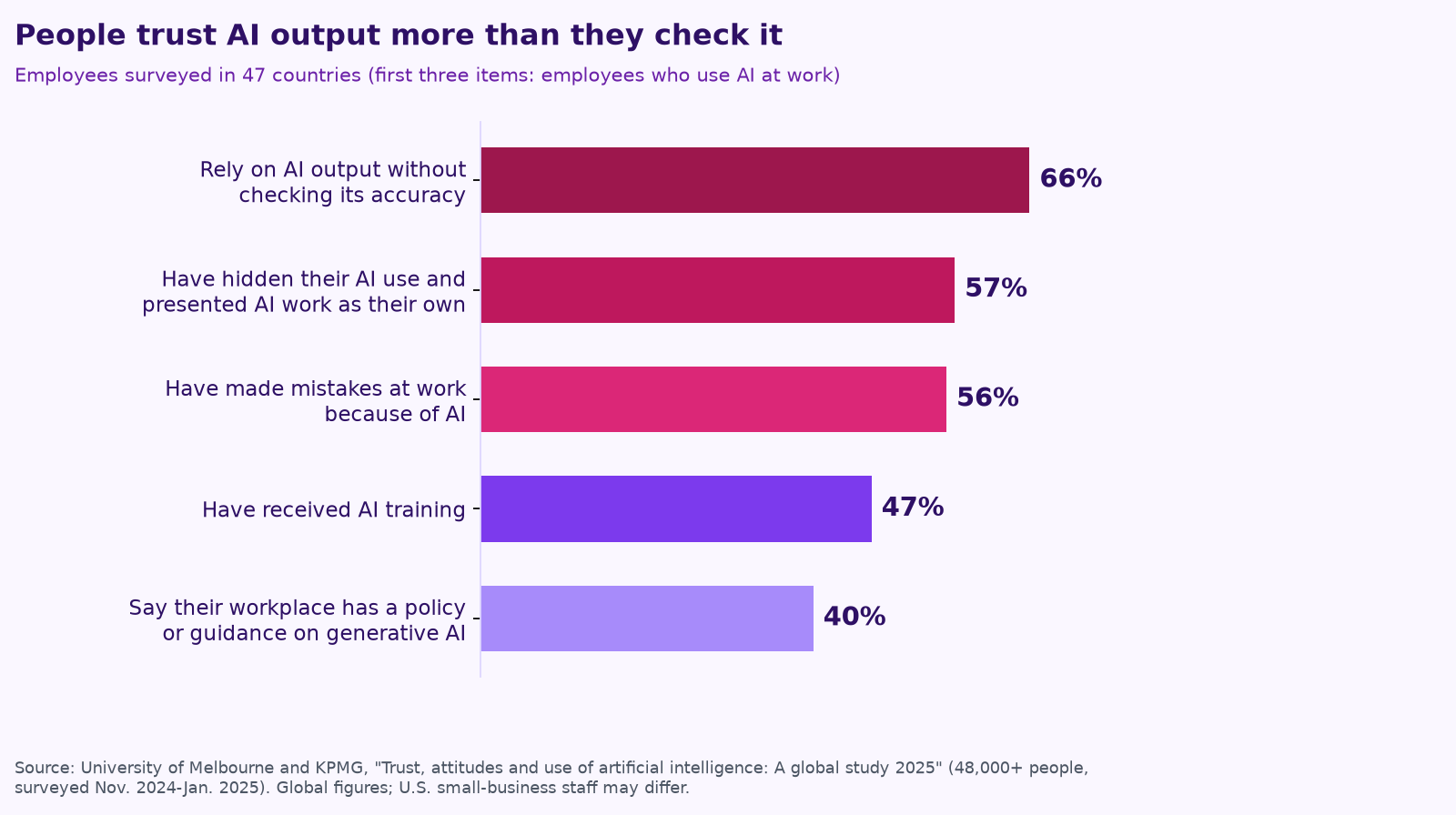
People already trust AI output more than they check it. In a global study of more than 48,000 people by the University of Melbourne and KPMG, 66% of employees who use AI at work said they rely on its output without evaluating its accuracy, and 56% said they had made mistakes in their work because of AI. Only 40% said their workplace had a policy or guidance on generative AI (KPMG and University of Melbourne, Trust, attitudes and use of AI: A global study 2025).
When the AI is acting, not just drafting, the stakes go up. And “the AI did it” isn’t a defense. In a well-known 2024 case, Air Canada argued that its website chatbot, which had given a customer wrong information about bereavement fares, was “a separate legal entity that is responsible for its own actions.” The British Columbia tribunal disagreed: “It should be obvious to Air Canada that it is responsible for all the information on its website,” and ordered the airline to pay (CBC News). Your agents speak for your business.
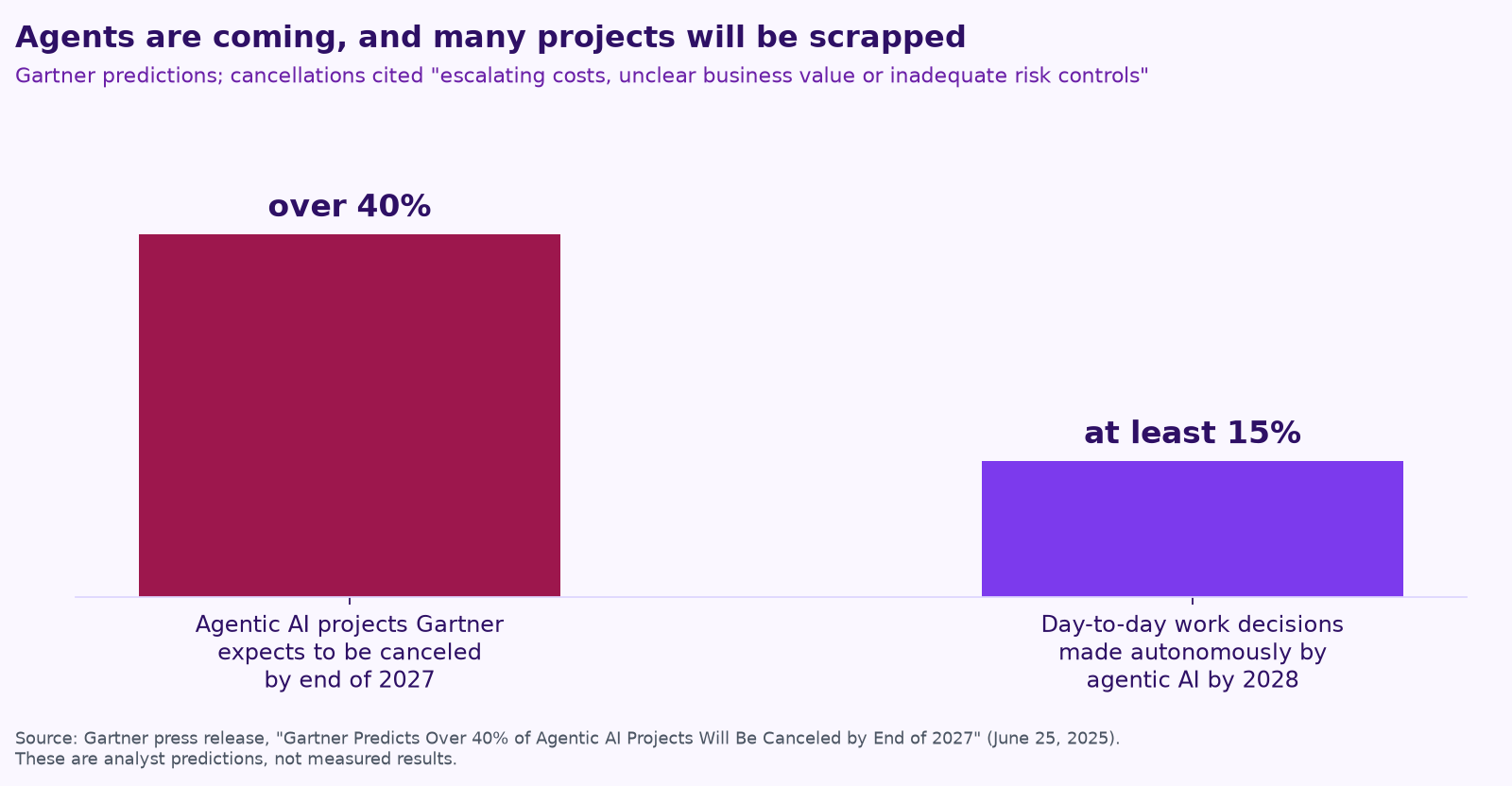
Weak controls also sink projects. Gartner predicts that over 40% of agentic AI projects will be canceled by the end of 2027, citing “escalating costs, unclear business value or inadequate risk controls” (Gartner).
Layer 1: Guardrails, or what the agent can touch
The security community has a name for the most common agent mistake: excessive agency. OWASP, the nonprofit behind widely used security checklists, lists its root causes as “excessive functionality; excessive permissions; excessive autonomy” (OWASP Top 10 for LLM Applications). In plain terms, the agent can do more, reach more or decide more than its job needs.
- Give each agent its own account, not yours, so you can see what it did and shut it off without locking yourself out.
- Grant the minimum. Read-only access wherever reading is enough. A drafts folder instead of the power to send. One shared folder instead of the whole drive.
- Set hard limits in the tools themselves where you can: dollar caps, approved recipient lists, business hours.
- Keep your data in your systems. Agents should work inside the tools you already own and control, not copy everything somewhere new.
Layer 2: Approvals, or who signs off
Not everything needs an approval, or the agent saves you nothing. Sort actions into three buckets and write them down:
| The agent can do it alone | A person approves first | The agent never does it |
|---|---|---|
| Sort and label incoming email | Any message to a customer, owner or vendor | Pay, refund or move money |
| Draft reports, quotes and replies | Prices, discounts and dates you promise | Delete records or files |
| Update internal notes and logs | Anything posted publicly | Sign contracts or legal notices |
| Send internal reminders | Replies to an unhappy customer | Change its own permissions |
Make approving easy: one place where requests land, with the draft, the reason and a one-click yes or no. Wharton professor Ethan Mollick described the kind of system teams need: one “with appropriate permissions, where your AIs (& invited others) can work, comment to each other and bring things to your attention if needed.” Over time, as an agent proves reliable on a task, you can move it from “approve first” to “do alone, spot-check weekly.” Start strict and loosen with evidence.
Layer 3: Audit trails, or what happened
Every action an agent takes should leave a record: what it did, when, using which information, and who approved it. That’s how you answer a customer’s question a month later, catch a pattern of mistakes early and prove to yourself that it’s working. AWS’s Shawn Bice frames the test simply: can you “reconstruct what it did afterward” (AWS, Trust in Depth).
The people building enterprise AI are saying the same thing. Box CEO Aaron Levie wrote on X that as agents take on more work, “our need to secure, govern, control, and audit that work will become paramount,” including “ways of containing the blast radius” when something goes wrong. Mollick has also suggested independent “audit” agents that check the results of other AIs. For a small business, a second, simpler check works well too: a weekly report of everything the agent did, read by a person.
Layer 4: Testing and a regular review
- Test before launch on 10 or so real past examples where you know the right answer.
- Spot-check weekly for the first month, then monthly.
- Keep an off switch that anyone on the team knows how to use.
- Review quarterly: what it handled, what it got wrong and whether its limits still fit. The NIST AI Risk Management Framework is a good reference if you want more structure.
Human-in-charge checklist
- ☐ Each agent has its own account and only the access its job needs.
- ☐ There’s a written list of what it does alone, what needs approval and what it never does.
- ☐ Approvals land in one place and take one click.
- ☐ Every action is logged with who approved it.
- ☐ It was tested on real examples before launch.
- ☐ A named person owns it, reviews it and can switch it off.
“You stay in charge” is how we build
At Purple AI, this is the core of how we work. Human sign-off: agents draft the work, and a person on your team approves anything that matters before it goes out. Your data stays in your tools: we build inside the systems you already run, like Google Workspace, Microsoft 365 and QuickBooks, and you own everything we build. And every plan is month-to-month, so you’re never locked in.
To see how these limits look for a specific job, read Give your AI agent a job, not a to-do list, or see the examples for construction companies, trades businesses and property managers.
Keep reading
- AI agents vs. chatbots vs. automation: what a small business actually needs
- Your AI team shouldn’t copy your org chart
- How to run an AI assessment for your small business in one week
- What does fractional AI cost?
- AI for property management: maintenance, leasing follow-up and owner reports
- Procore, ServiceTitan, Jobber and Buildertrend have AI now. Where does an agent team fit?
- Missed calls cost trades businesses jobs: AI answering, intake and follow-up done right
- AI for accounting and bookkeeping firms: close, client follow-up and document chase
- AI receptionists for contractors: Jobber vs. ServiceTitan vs. standalone tools
- A free AI use policy template for small businesses
- AI for construction estimating and takeoffs
- How to measure AI agent ROI with the hours-back method
- AI for HVAC maintenance agreements and renewals
- AI for construction safety documentation and toolbox talks
- AI for lien waivers and pay applications
- AI for roofing storm-season leads and claim reports
How we do this at Purple AI
Purple AI is an AI consulting firm for small businesses, and we start with construction and trades. We set up a small team of AI agents inside the tools you already use, give each agent one job, and keep a person in charge of anything that matters. Then we stay on to tune it as your business and the AI tools change.
The easiest first step is a free 15-minute AI mini-audit. We’ll look at where your week goes and name the one or two jobs we’d hand to an agent first. Book your mini-audit here.
If it’s a fit, ongoing plans are Starter at $750 a month (one workflow or dashboard), Core at $1,000 a month (an ongoing agent team, our most popular plan) and Growth at $1,250 a month (agents across several departments). If you want a deeper look first, there’s an optional $2,500 assessment, and $1,000 of it is credited to your first month.
Sources
- University of Melbourne and KPMG, Trust, attitudes and use of artificial intelligence: A global study 2025.
- CBC News, Air Canada found liable for chatbot’s bad advice on plane tickets (Feb 2024), on Moffatt v. Air Canada.
- Gartner, Gartner Predicts Over 40% of Agentic AI Projects Will Be Canceled by End of 2027 (June 25, 2025).
- OWASP Gen AI Security Project, LLM06:2025 Excessive Agency.
- Ethan Mollick (@emollick), posts on X about shared workspaces with permissions for people and agents and audit agents (Oct 4-5, 2026, Central time).
- Shawn Bice, AWS, Trust in Depth: Giving agents more autonomy without losing control (Oct 15, 2026).
- Aaron Levie (@levie), post on X about governing and auditing agents (Oct 10, 2026).
- National Institute of Standards and Technology, AI Risk Management Framework (AI RMF 1.0).
Free checklist
Find 10 hours a week: the AI checklist for contractors
30 places construction and trades businesses lose time every week, and what an AI agent can take off your plate. On the page or as a printable PDF.
Get the checklist →