
Most small businesses already use AI. Far fewer have written down the rules for it. An AI use policy doesn’t need to be long or legalistic. It needs to answer four questions your team is already asking: which tools can I use, what can I paste in, what has to be checked by a person, and who do I ask. Below is a free one-page-style template you can download and edit, and a plain-English walkthrough of each section.
Download the free template
AI use policy template (Word, .docx), editable · AI use policy template (PDF), for reading and printing. Replace everything in [brackets], delete what doesn’t apply, and have your attorney review it before you adopt it. It’s a starting point, not legal advice.
Why bother: use is ahead of the rules
Three surveys published this year point the same way.
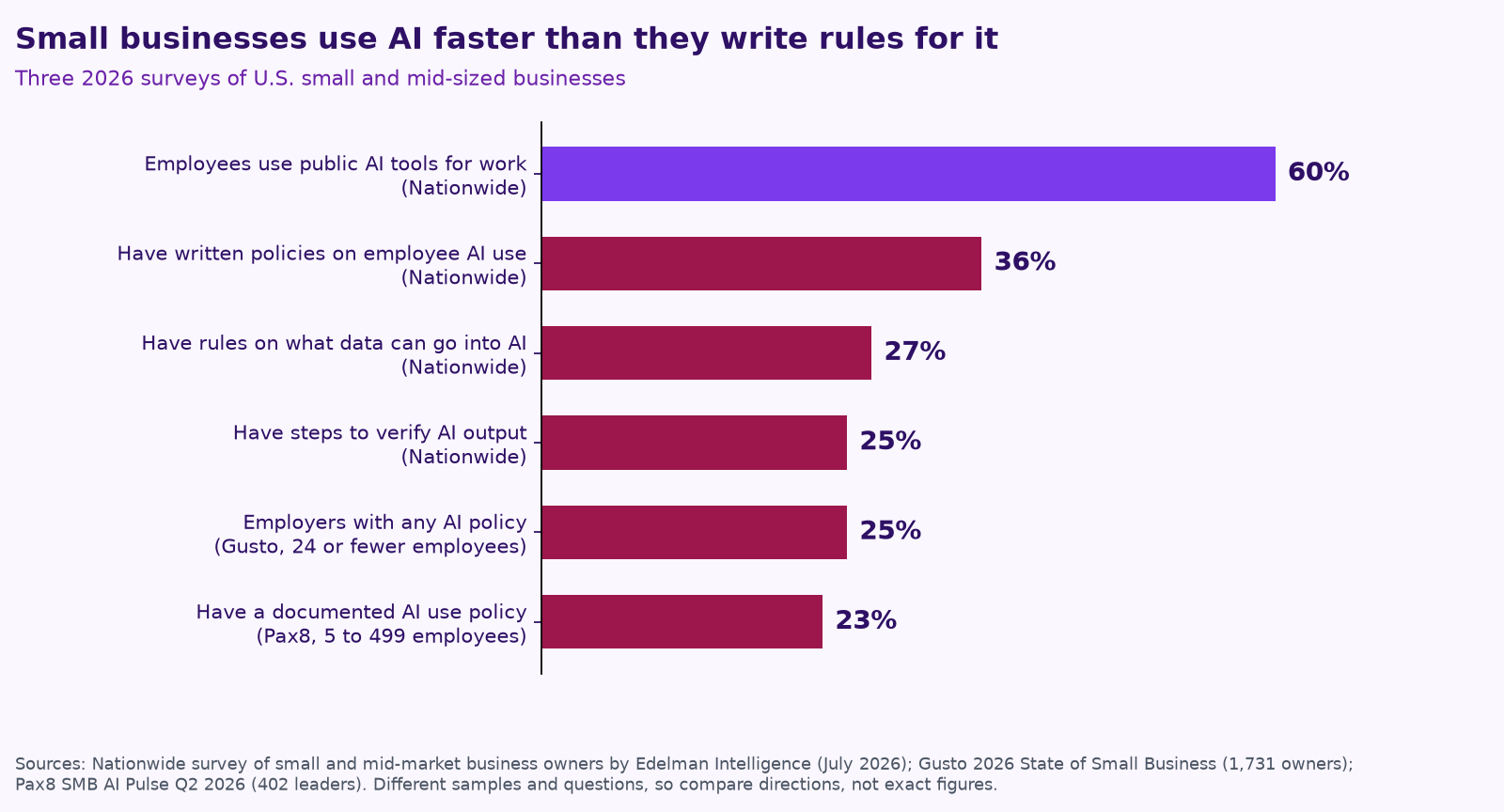
- Nationwide surveyed small and mid-market business owners in July 2026. Six in 10 say employees use public AI chatbots or writing tools for work, but only 36% have written policies on employee AI use. Just 27% have rules on what company or customer information can be entered into AI tools, and 25% have steps for checking AI-generated information before it’s used for decisions. More than a third (35%) believe employees are using unauthorized AI tools (Nationwide).
- Gusto surveyed 1,731 owners of businesses with 24 or fewer employees. 67% use AI tools, and 25% of businesses with employees have any kind of AI policy, up from 15% a year earlier. Another 28% are considering one (Gusto).
- Pax8 surveyed 402 U.S. leaders at companies with 5 to 499 employees. 61% actively use AI, but only 23% have a documented AI use policy; another 28% have informal guidelines and 24% are working on one (Pax8).
A written policy isn’t a legal requirement for most small businesses, and not having one doesn’t mean your team is careless. But it’s the cheapest guardrail you can put in place. It also matters more once AI talks to your customers: in a widely reported 2024 case, a Canadian tribunal held Air Canada responsible for wrong refund information its website chatbot gave a customer (CBC).
What’s in the template, section by section
1. Purpose and who it covers
Two short paragraphs: why you use AI, why you have rules, and that the policy covers employees, contractors and temps on any device used for work.
2. Approved tools
A table of the AI tools your team may use, what each is approved for, and which account to use. The point is to move people from personal free accounts to company accounts where you control the settings. Where a tool offers business settings that keep your data out of model training, turn them on.
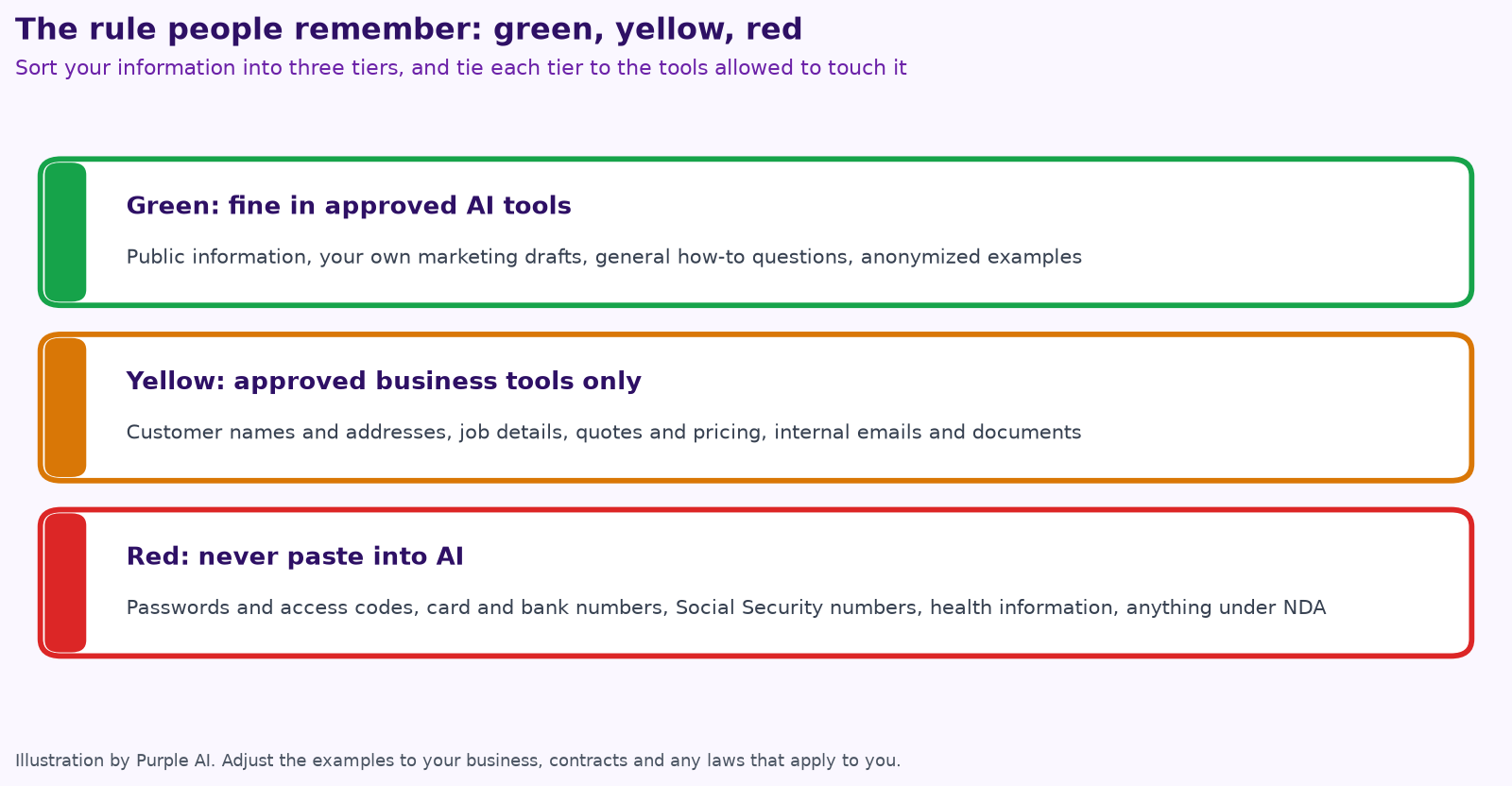
3. What information can go in: green, yellow, red
This is the section people actually remember. Sort information into three tiers and tie each tier to the tools allowed to touch it.
4. A person checks before it goes out
List what always gets human review: messages to customers and the public, anything involving money (quotes, invoices, change orders, contracts), changes to records, decisions about people, and safety or technical instructions. The rule underneath is simple: AI drafts, and the person who sends it owns it. This lines up with the NIST AI Risk Management Framework’s emphasis on clear human roles and accountability for AI systems (NIST AI RMF 1.0).
5. AI that talks to customers
If an AI answers your phone, chat or texts, it says it’s an automated assistant, a person is always available on request, and safety calls (a gas smell, a carbon monoxide alarm, sparking, flooding) go straight to a person. It books and quotes only within your rules. The template also flags consent for AI calls: the FCC ruled in 2024 that AI-generated voices count as “artificial” voices under federal robocall law (FCC). For how the receptionist products handle this, see our fair comparison of AI receptionists for contractors.
6. Accounts, access and security
Company accounts with multi-factor sign-in, no shared logins, AI agents on their own accounts with only the access their job needs, activity logs turned on, and access removed the same day someone leaves. Our security page describes how we set this up for clients.
7. Honesty and ownership
No fake reviews, no AI images passed off as photos of your real jobs, no claims about your work you can’t back up. When the FTC announced a crackdown on deceptive AI claims in 2024, its chair said “there is no AI exemption from the laws on the books” (Nextgov).
8. Mistakes and incidents
Say who to tell and how fast if red information goes into an AI tool or an AI message goes to the wrong person, and say plainly that reporting quickly is never the problem.
9 and 10. New tools, training, review and sign-off
One person owns the policy, approves new tools and reviews it every six months. Everyone gets a short walkthrough and signs the acknowledgment.
How to roll it out in a week
- Day 1: ask your team which AI tools they already use. Expect more than you think; in Nationwide’s survey, 35% of owners believe employees use unauthorized AI tools.
- Day 2: pick the approved tools and set up company accounts.
- Day 3: fill in the green, yellow and red examples for your business.
- Day 4: list what always needs a person to approve it.
- Day 5: have your attorney review it, walk the team through it in 20 minutes, and collect signatures.
AI policy checklist
- ☐ We list the AI tools that are approved, and which accounts to use.
- ☐ Everyone knows what’s green, yellow and red.
- ☐ Customer messages, money and records always get a person’s review.
- ☐ Any AI that talks to customers says it’s AI and hands off to a person.
- ☐ AI tools use company accounts with multi-factor sign-in.
- ☐ One person owns the policy and reviews it every six months.
- ☐ Everyone has signed it.
How Purple AI uses these rules
Every AI agent we build for clients follows the same pattern: its own least-access account, your data staying in your tools, a log of what it did, and a person approving anything that matters. See how to keep a human in charge of AI agents for the approval tiers we use. If you’d like help filling in the template for your business, it’s a good topic for a free mini-audit.
Keep reading
- AI receptionists for contractors: Jobber vs. ServiceTitan vs. standalone tools
- How to run an AI assessment for your small business in one week
- AI for accounting and bookkeeping firms
- AI agents vs. chatbots vs. automation
- Give your AI agent a job, not a to-do list
- Your AI team shouldn’t copy your org chart
- What does fractional AI cost?
- 7 AI workflows for small contractors
- AI for dispatch and quotes: where trades shops save hours
- Missed calls cost trades businesses jobs
- Procore, ServiceTitan, Jobber and Buildertrend have AI now
- AI for property management
- AI for construction estimating and takeoffs
- How to measure AI agent ROI with the hours-back method
- AI for HVAC maintenance agreements and renewals
- AI for construction safety documentation and toolbox talks
- AI for lien waivers and pay applications
- AI for roofing storm-season leads and claim reports
How we do this at Purple AI
Purple AI is an AI consulting firm for small businesses, and we start with construction and trades. We set up a small team of AI agents inside the tools you already use, give each agent one job, and keep a person in charge of anything that matters. Then we stay on to tune it as your business and the AI tools change.
The easiest first step is a free 15-minute AI mini-audit. We’ll look at where your week goes and name the one or two jobs we’d hand to an agent first. Book your mini-audit here.
If it’s a fit, ongoing plans are Starter at $750 a month (one workflow or dashboard), Core at $1,000 a month (an ongoing agent team, our most popular plan) and Growth at $1,250 a month (agents across several departments). If you want a deeper look first, there’s an optional $2,500 assessment, and $1,000 of it is credited to your first month.
Sources
- Nationwide, Nationwide Survey: Businesses Are Using AI Faster Than They Are Managing Its Risks (survey by Edelman Intelligence, July 10-26, 2026).
- Gusto, 2026 State of Small Business (1,731 owners, Aug. 17-Sept. 7, 2026).
- Pax8, SMB AI Pulse Report, Q2 2026 (402 U.S. business leaders).
- CBC News, Air Canada found liable for chatbot’s bad advice on plane tickets (Feb. 2024).
- National Institute of Standards and Technology, Artificial Intelligence Risk Management Framework (AI RMF 1.0) (2023).
- Federal Communications Commission, FCC Confirms that TCPA Applies to AI Technologies that Generate Human Voices (Feb. 8, 2024).
- Nextgov/FCW, FTC takes action against 5 AI companies under new initiative (Sept. 2024), quoting the FTC’s announcement.
Free checklist
Find 10 hours a week: the AI checklist for contractors
30 places construction and trades businesses lose time every week, and what an AI agent can take off your plate. On the page or as a printable PDF.
Get the checklist →