
Do not take a vendor’s “80% faster” claim and call it your return on investment. The only hours that count are hours you can point to on a real job, after you subtract the time someone spent checking the work. Below is a simple hours-back method any small business can run in a month, using official labor-cost figures and a clearly labeled worked example. It is the same idea we use when we pick a first agent job with a client.
Why theoretical savings are a weak story
Even the companies that sell agents warn about this. Microsoft’s guidance on measuring agent impact calls out “the time-savings trap”: claiming value from theoretical time savings alone undermines credibility. It tells teams to build a chain from actual use, through operational measures, to a business outcome, and to price efficiency as productive hours returned times a fully loaded hourly rate (Microsoft).
Published research is more modest than the marketing, once you read the caveats.
- Anthropic analyzed 100,000 Claude.ai conversations and, based on Claude’s own estimates, put the average task at about 90 minutes without AI and the speedup at about 80%. The authors say they cannot account for time spent outside the chat, “including validating the quality or accuracy of Claude’s work,” and that the figures may overstate current effects (Anthropic).
- A field experiment by researchers at Microsoft and Harvard Business School assigned Microsoft 365 Copilot at random to knowledge workers at 66 firms. In the second half of the six-month study, the 80% of treated workers who used the tool spent two fewer hours on email each week and cut some work outside regular hours. The authors did not detect shifts in the quantity or composition of those workers’ tasks (Dillon, Jaffe, Immorlica and Stanton, 2026).
- MIT’s NANDA initiative found that 60% of the organizations it studied had evaluated enterprise AI tools, 20% reached a pilot, and only 5% got them into production (summary of MIT’s 2025 report). Those were mostly larger companies, but the lesson travels: a pilot that never becomes a repeated job rarely pays off.
Two hours a week of real, measured relief is a result you can plan around. An 80% speedup that ignores review time is not.
The hours-back method
You only need one job, a notebook or a simple spreadsheet, and a labor rate you trust.
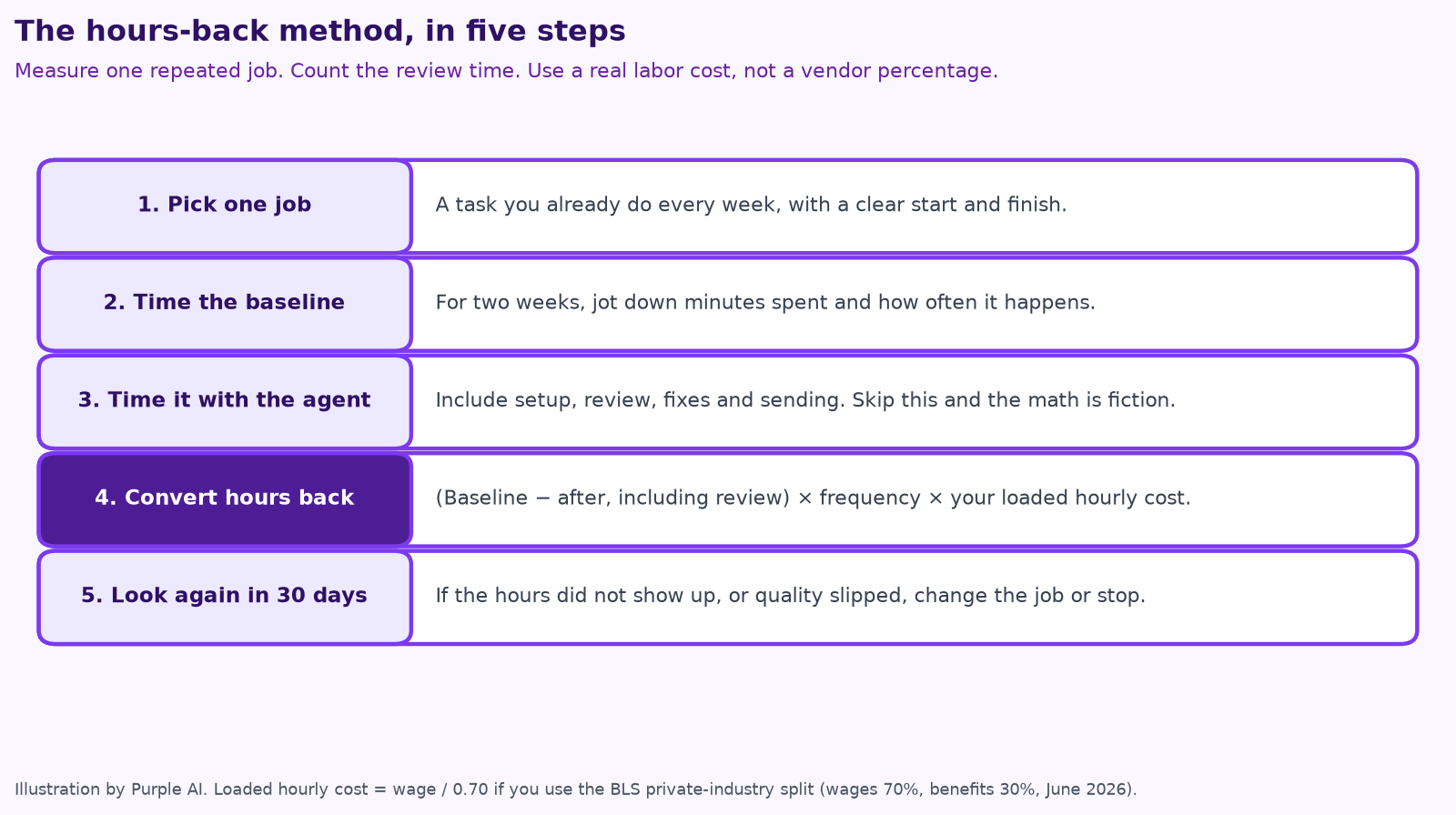
- Pick one repeated job. It should already happen every week, have a clear start and finish, and be easy to check. Bid follow-up, invoice reminders, review requests, appointment confirmations and document chase are good candidates. A one-off “strategy” task is a poor first measurement. The same method works for a contractor’s bid follow-up, an HVAC shop’s membership renewals, or a remodeling office’s quote tracking. If you need help choosing the job, see give your AI agent a job, not a to-do list, the contractor AI checklist, and the pages on AI for construction and AI for trades, including HVAC, plumbers, electricians, roofers and remodelers.
- Time the baseline for two weeks. Write down how many minutes the job takes and how often it happens. Use the way you work today, not how long you wish it took.
- Time it again with the agent, including review. Setup, corrections, approvals and sending all count. If you skip this step, the math is fiction.
- Convert hours back to a dollar figure. Hours back = (baseline minutes − minutes with the agent, including review) × frequency, divided by 60. Then multiply by a fully loaded hourly cost.
- Look again in 30 days. If the hours did not show up, or quality slipped, change the job or stop.
How to get a loaded hourly cost
Wages are not the full cost of an hour. In the Bureau of Labor Statistics’ June 2026 Employer Costs for Employee Compensation data, wages and salaries made up 70.0% of total compensation for private-industry workers, and benefits made up the other 30% (BLS ECEC). A simple way to gross up an hourly wage is to divide it by 0.70.
If you do not want to use a person’s actual pay, a public benchmark is fine as long as you label it. The median wage for U.S. cost estimators was $37.86 an hour in May 2025 (BLS). Grossed up by the 70% wage share, that is about $54.09 an hour in wages and benefits, before recruiting, software or your time managing the work. Office staff and technicians will have different rates. Use the rate that matches the person who actually does the job.
A worked example, not a promised result
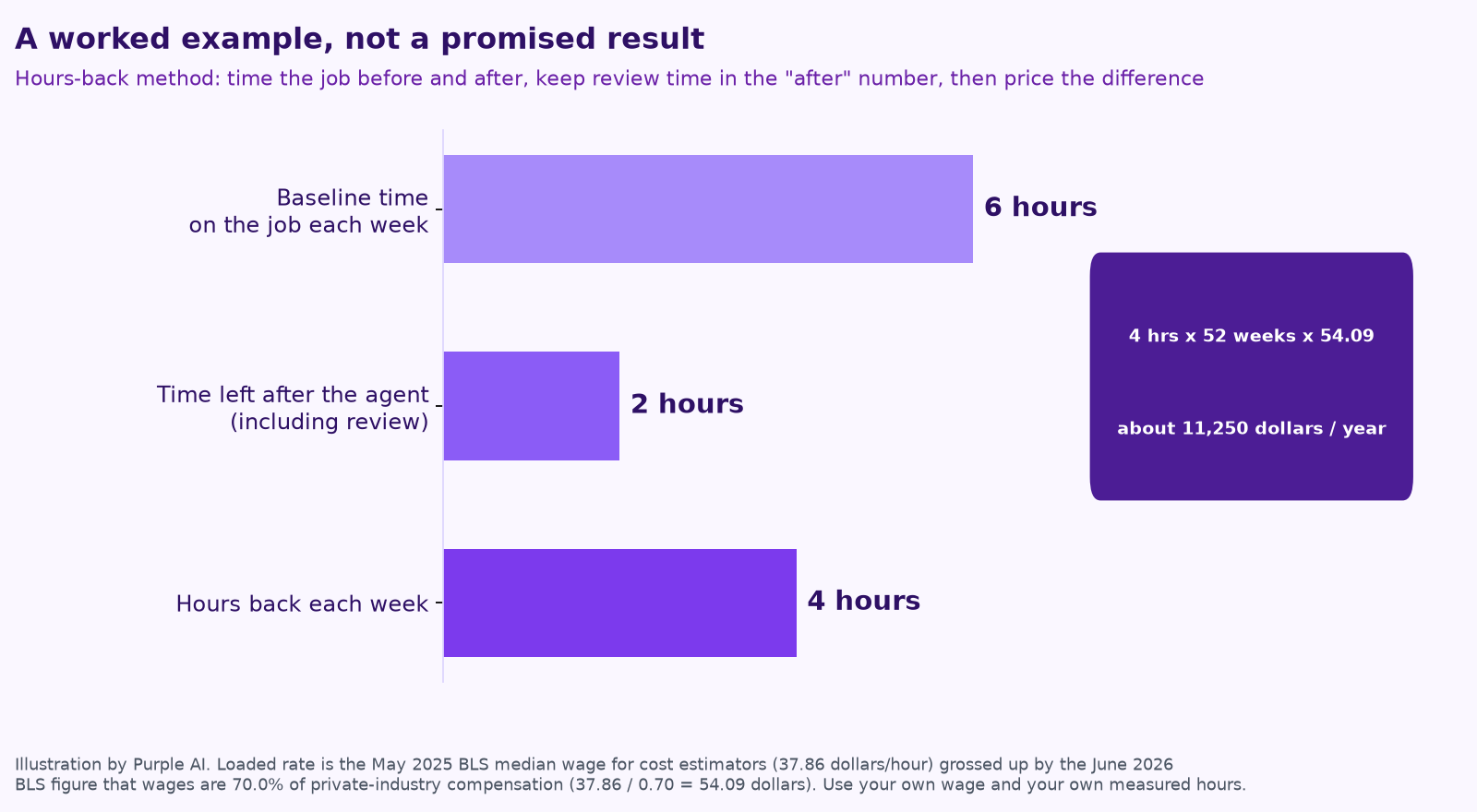
Suppose your estimator currently spends six hours a week on bid follow-up and quote comparison. After an agent drafts the emails and the comparison sheet, the estimator spends two hours a week reviewing and sending. That is four hours back each week, or 208 hours over 52 weeks.
208 × $54.09 is about $11,250 a year. That is in the same neighborhood as a year of our Core plan at $1,000 a month ($12,000). The comparison only means something if the hours are real, the review is in the “after” number, and the work stays good enough to send. If you only get two hours back, the figure is about $5,625. If the person doing the job is paid less than an estimator, it is lower still.
Microsoft prices efficiency the same way: hours returned times a fully loaded rate. Its own default example uses $72 an hour from BLS compensation data and a default time-savings multiplier for a different kind of agent, which is a reminder not to copy someone else’s assumptions. Salesforce’s research on seller tasks makes a similar point: the best return is on work that is both frequent and effortful, not on rare tasks that are merely easy to automate (Salesforce).
What not to count, and what the method misses
- Hours you did not actually get back, because the person filled the time with more of the same busywork.
- Time “saved” that created rework, missed scope, or a bad customer message. A bad bid or a wrong renewal can wipe out a year of hours-back math. See AI for construction estimating and takeoffs and keeping a human in charge.
- Software you already paid for, hoped-for revenue you cannot attribute, and one-off experiments you will not repeat.
Hours are not the only kind of value. Microsoft groups the rest as quality (fewer errors), revenue (retained or new work) and strategic effects (speed, morale). Those are real, and they are harder to measure cleanly. If you claim them, tie them to a number you already track: renewal rate, days sales outstanding, callback rate, bid hit rate. For a walk-through of picking the job before you spend, use a one-week AI assessment. For what the ongoing help costs, see what fractional AI cost looks like.
Hours-back checklist
- ☐ We picked one job that already happens every week.
- ☐ We timed it for at least two weeks before changing anything.
- ☐ The “after” time includes review, fixes and sending.
- ☐ We used a loaded labor rate, not a vendor percentage.
- ☐ We wrote down a quality check (errors, complaints, rework) so we do not buy speed that costs us later.
- ☐ We have a date on the calendar to look at the numbers again.
If you want a second set of eyes on the baseline, that is a fair thing to bring to a free 15-minute mini-audit. We would rather show you how we would measure one job than sell you a stack of agents you cannot audit.
Keep reading
- How to run an AI assessment for your small business in one week
- What does fractional AI cost?
- Give your AI agent a job, not a to-do list
- AI for construction estimating and takeoffs
- AI for HVAC maintenance agreements and renewals
- How to keep a human in charge of AI agents
- AI agents vs. chatbots vs. automation
- 7 AI workflows for small contractors
- Your AI team shouldn’t copy your org chart
- A free AI use policy template for small businesses
- AI for construction safety documentation and toolbox talks
- AI for lien waivers and pay applications
- AI for roofing storm-season leads and claim reports
How we do this at Purple AI
Purple AI is an AI consulting firm for small businesses, and we start with construction and trades. We set up a small team of AI agents inside the tools you already use, give each agent one job, and keep a person in charge of anything that matters. Then we stay on to tune it as your business and the AI tools change.
The easiest first step is a free 15-minute AI mini-audit. We’ll look at where your week goes and name the one or two jobs we’d hand to an agent first. Book your mini-audit here.
If it’s a fit, ongoing plans are Starter at $750 a month (one workflow or dashboard), Core at $1,000 a month (an ongoing agent team, our most popular plan) and Growth at $1,250 a month (agents across several departments). If you want a deeper look first, there’s an optional $2,500 assessment, and $1,000 of it is credited to your first month.
Sources
- Microsoft, Measure the impact of your agents, Copilot Studio guidance (Microsoft Learn).
- Anthropic, Estimating AI productivity gains from Claude conversations (Nov. 25, 2025).
- Dillon, E. W., Jaffe, S., Immorlica, N., and Stanton, C. T., Shifting Work Patterns with Generative AI (updated Aug. 24, 2026).
- Mind the Product, Why most AI products fail: Key findings from MIT’s 2025 AI Report, and Fortune, MIT report: 95% of generative AI pilots at companies are failing (Aug. 18, 2025), on MIT NANDA’s “The GenAI Divide: State of AI in Business 2025.”
- U.S. Bureau of Labor Statistics, Employer Costs for Employee Compensation, June 2026 (released Sept. 9, 2026).
- U.S. Bureau of Labor Statistics, Occupational Outlook Handbook: Cost Estimators (2025 median pay).
- Salesforce, Do Agents Save You Time? Here’s How to Measure Effort and ROI.
Free checklist
Find 10 hours a week: the AI checklist for contractors
30 places construction and trades businesses lose time every week, and what an AI agent can take off your plate. On the page or as a printable PDF.
Get the checklist →