
If you run ServiceTitan, Housecall Pro or Jobber, the best AI receptionist for your shop may already be in your software. If you don’t, standalone AI answering services cost less than a part-time hire and work with almost any phone line. Here’s a fair comparison of what each option does, what it costs where the price is public, and what you still have to set up yourself.
We don’t resell any of these tools, and we don’t get paid by any of these vendors. Prices and features below come from each company’s own pages, checked on November 19, 2026. They change often, so confirm before you buy.
The short version
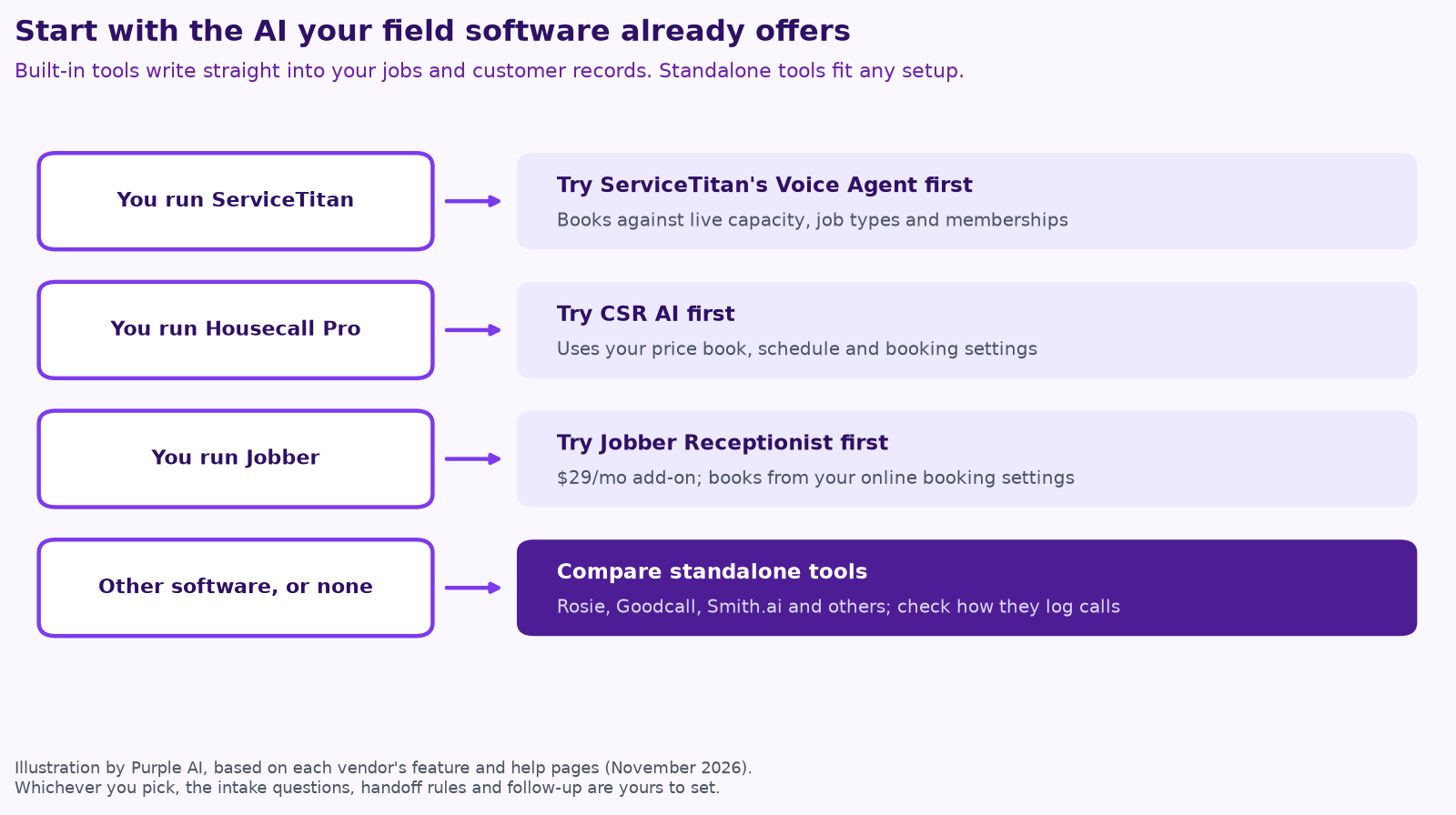
- On ServiceTitan: start with its Voice Agent. It books against your live capacity, job types and memberships, and writes straight into your account.
- On Housecall Pro: start with CSR AI. It uses your services, price book and booking settings.
- On Jobber: start with Receptionist, a $29-a-month add-on that books from the online booking settings you already have.
- On something else, or nothing: compare standalone tools like Rosie, Goodcall and Smith.ai on your call volume, and check how each one gets call details into your system.
Built into your field software
ServiceTitan Voice Agent
ServiceTitan’s Voice Agent answers inbound calls, creates and updates customer records, confirms and reschedules appointments, and books jobs using your Adaptive Capacity rules, business units and job types. For members, it personalizes the greeting and books against recurring service events. It escalates to a live agent when the caller asks, when it detects frustration or when the request is outside its scope (ServiceTitan help center).
- Works with: Contact Center Pro, Phones Pro or a third-party phone system, according to ServiceTitan (ServiceTitan).
- What ServiceTitan reports: a 70% booking rate including calls lost to capacity, such as a customer wanting an earlier slot than was open, and 90% without capacity issues. That’s the vendor’s own figure from its customers.
- Price: not published. ServiceTitan’s help center notes that billing starts once you start using the voice agent, and test calls count.
- Worth knowing: its help center says the agent plays a pre-set disclaimer about service or diagnostic fees at the end of calls that book an appointment, and that telling callers they’re talking to AI is a legal requirement in some places.
Housecall Pro CSR AI
CSR AI answers calls and chats 24/7, with text answering listed as coming soon. It uses your services, schedule and business info, books jobs or creates estimates within your booking settings, and lets you set scripts, hours and where calls go when someone asks for a person (Housecall Pro, help center).
- Price: CSR AI chat is included in every plan. 24/7 call answering is a paid feature that’s “sold separately,” with no public price (Housecall Pro AI Team).
Jobber Receptionist
Jobber’s Receptionist answers calls and texts 24/7, books visits using your existing online booking settings, takes requests and messages, and files the details in Jobber. You choose keywords such as “emergency,” “no heat” or “burst pipe,” or a commercial account name, and it transfers the call or texts you an alert (Jobber).
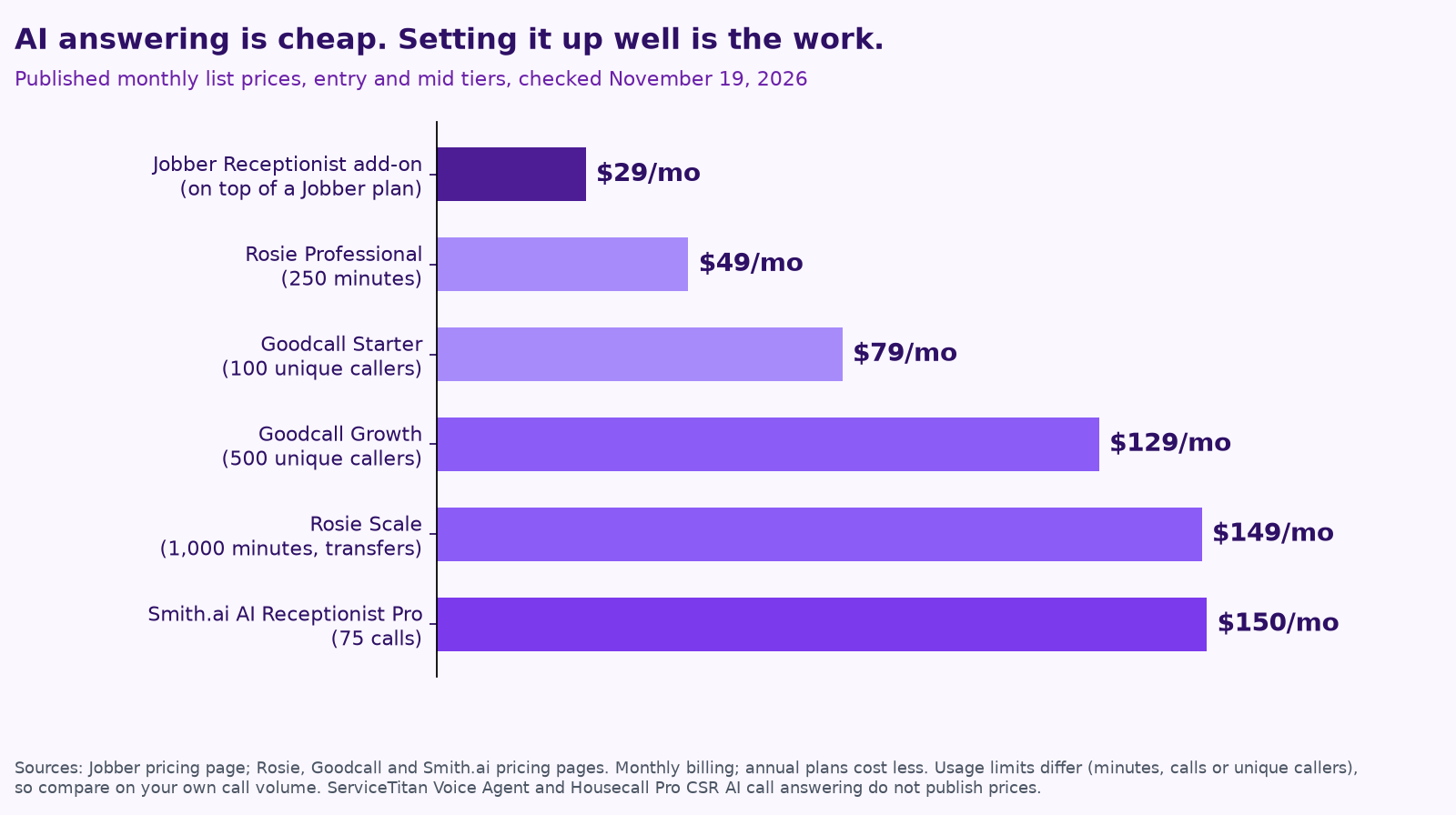
- Price: $29 a month as an add-on to a Jobber plan (Jobber pricing).
Standalone AI answering services
These work with most phone setups, usually by forwarding your calls. They’re a good fit if your field software has no AI receptionist, or if you want to answer calls before a job ever reaches your software.
- Rosie: $49 a month for 250 minutes with message taking and booking links by text; $149 for 1,000 minutes with calendar booking and warm and live transfers; $299 for 2,000 minutes with transfers that try several numbers until someone answers. Annual billing costs less (Rosie pricing).
- Goodcall: $79 a month for 100 unique customers a month (it estimates about 150 calls), $129 for 500 unique customers and $299 for larger teams, with no per-minute charges (Goodcall pricing).
- Smith.ai AI Receptionist: free for 25 calls a month; Pro starts at $150 a month for 75 calls, about $2 a call, with larger tiers above that (Smith.ai pricing).
- CallRail Voice Assist: if you already use CallRail for call tracking, its AI answering and texting opened to every business in July 2026 (CallRail).
Side by side
| Option | Best fit | Books into | Human handoff | Published price |
|---|---|---|---|---|
| ServiceTitan Voice Agent | ServiceTitan shops | ServiceTitan, using live capacity | Escalates on request, frustration or out-of-scope requests | Not published |
| Housecall Pro CSR AI | Housecall Pro shops | Housecall Pro jobs or estimates | You set where calls escalate | Chat included; calls sold separately |
| Jobber Receptionist | Jobber shops | Jobber, using online booking settings | Keyword transfer or text alert | $29/mo add-on |
| Rosie | Any phone line | Your calendar on mid tiers | Warm and live transfers on mid tiers | $49 to $299/mo |
| Goodcall | Any phone line | Depends on connected tools | Varies by setup | $79 to $299/mo |
| Smith.ai AI Receptionist | Any phone line | Depends on connected tools | Varies by plan | Free for 25 calls; Pro from $150/mo |
What none of them do for you
Every one of these tools needs the same decisions from you, and those decisions matter more than which logo you pick.
- Your intake questions. What a good CSR asks for your trade: equipment age, symptoms, access, photos, whether they have a service plan.
- Your booking rules. Which job types and time slots the AI can book, and which become a request for a person to confirm.
- Your handoff triggers. Safety calls (a gas smell, a carbon monoxide alarm, sparking, flooding) go to a person right away, with instructions for the caller. So do upset customers, key accounts and anyone who asks.
- Your follow-up. Texting back missed calls and chasing unsold estimates happen after the call, and most receptionists only cover the call itself.
- Your weekly check. Answer rate, booking rate, handoffs and mistakes. Read a handful of transcripts every week.
We cover these in detail in missed calls cost trades businesses jobs: AI answering, intake and follow-up done right. If you’re putting AI in front of customers, it’s also worth writing down the rules your team follows; our free AI use policy template has a section for exactly that.
Rules to check before you switch it on
- Tell callers it’s AI. ServiceTitan’s own help center notes that this is a legal requirement in some locations, and it’s good practice everywhere.
- AI voice calls out need consent. The FCC ruled in 2024 that AI-generated voices count as “artificial” voices under federal robocall law (FCC). Answering inbound calls is different from outbound campaigns, but ask your attorney about your follow-up.
- Recording notice. Some states require everyone on a call to agree to recording, so announce it at the start.
How Purple AI helps
We’ll help you set up the receptionist you already pay for before suggesting anything new. Then we handle the work around it: intake questions for your trade, handoff rules, missed-call text-backs, estimate follow-up and a weekly report on answer rate, booking rate and what the AI got wrong. A person on your team approves anything that matters. See how this works for HVAC companies, plumbers, electrical contractors, roofing companies and remodelers, or across all trades.
For what the big platforms’ AI covers beyond the phone, read Procore, ServiceTitan, Jobber and Buildertrend have AI now.
Keep reading
- AI for dispatch and quotes: where trades shops save hours
- How to keep a human in charge of AI agents
- 7 AI workflows for small contractors
- AI agents vs. chatbots vs. automation
- What does fractional AI cost?
- How to run an AI assessment for your small business in one week
- Give your AI agent a job, not a to-do list
- Your AI team shouldn’t copy your org chart
- AI for property management
- AI for accounting and bookkeeping firms
- AI for construction estimating and takeoffs
- How to measure AI agent ROI with the hours-back method
- AI for HVAC maintenance agreements and renewals
- AI for construction safety documentation and toolbox talks
- AI for lien waivers and pay applications
- AI for roofing storm-season leads and claim reports
How we do this at Purple AI
Purple AI is an AI consulting firm for small businesses, and we start with construction and trades. We set up a small team of AI agents inside the tools you already use, give each agent one job, and keep a person in charge of anything that matters. Then we stay on to tune it as your business and the AI tools change.
The easiest first step is a free 15-minute AI mini-audit. We’ll look at where your week goes and name the one or two jobs we’d hand to an agent first. Book your mini-audit here.
If it’s a fit, ongoing plans are Starter at $750 a month (one workflow or dashboard), Core at $1,000 a month (an ongoing agent team, our most popular plan) and Growth at $1,250 a month (agents across several departments). If you want a deeper look first, there’s an optional $2,500 assessment, and $1,000 of it is credited to your first month.
Sources
- ServiceTitan help center, Voice Agent onboarding, part 1: set up.
- ServiceTitan, Introducing AI Virtual Agents: Never Miss a Call with the Smartest AI CSR (April 17, 2026).
- Housecall Pro, CSR AI, AI Team and Getting started with CSR AI.
- Jobber, Receptionist and pricing.
- Rosie pricing; Goodcall pricing; Smith.ai AI Receptionist pricing (all checked November 19, 2026).
- CallRail, CallRail Opens Voice Assist to Every Business, Now With Contextual AI Texting (July 28, 2026).
- Federal Communications Commission, FCC Confirms that TCPA Applies to AI Technologies that Generate Human Voices (Feb. 8, 2024).
Free checklist
Find 10 hours a week: the AI checklist for contractors
30 places construction and trades businesses lose time every week, and what an AI agent can take off your plate. On the page or as a printable PDF.
Get the checklist →