

If you run Procore, ServiceTitan, Jobber or Buildertrend, you already have AI agents in your software, or you can buy them. That’s good news, and you should use them. The honest question isn’t “vendor AI or an agent team?” It’s which work your platform’s AI already covers, and which work falls between your systems where nobody’s AI is looking. Here’s a fair look at the construction software AI each vendor has shipped, based on their own announcements, and where a small agent team adds value on top.
What the big four have shipped
All four companies have moved fast in 2026, and all four describe their AI the same way: it works on the data already in their platform, and a person reviews before anything important happens.
| Platform | What its AI does today (vendor-reported) | How it’s sold |
|---|---|---|
| Procore | Procore AI agents for deep search across drawings, specs and RFIs; submittal review against specs; RFI completeness checks; daily logs drafted from photos, emails and voice notes; contract review. Agents can act inside Procore and respond to events like a new submittal. Procore also showed a voice-first jobsite app, Procore AI Go, this fall. | Procore AI comes with a Digital Coworker package, with credit-based pricing. |
| ServiceTitan | Max, a package of 30-plus agents across calls and booking, dispatch, the field and the back office, including AI phone agents, an invoice agent and a daily log agent. Atlas, a “chief-of-staff” agent, answers questions about the business, builds reports and monitors numbers you choose. | Max is open to residential in-home contractors, with a limited pilot for commercial and roofing. Atlas is in closed alpha. |
| Jobber | Receptionist answers calls and texts around the clock, books visits within your settings and escalates urgent calls. Jobber Teammate (beta) prepares a morning digest, drafts quotes and campaigns for your review, and learns routines like rescheduling for weather. AI-built reports and marketing plans round it out. | Receptionist launched on the Plus plan and as an add-on for Grow. Teammate is in early access. |
| Buildertrend | AI Client Updates turns daily logs, schedule items, change orders and invoices into a client summary. AI Bill Capture reads bills and receipts. AI Submittals builds the submittal log from specs and plans, and AI Plans organizes plan sets. | Built into the platform, with more features rolling out after its August 2026 purchase of BizJet AI. |
Procore’s May announcement is clear about the guardrails: “agents require human consent before actions are finalized,” and answers cite the source documents (Procore). ServiceTitan says the agents in Max share one picture of the business: “What the voice agent hears, the dispatch agent will know,” CEO Ara Mahdessian said at Pantheon (ServiceTitan). Jobber says Teammate brings work to the owner “ready for review and approval” (Jobber). And Buildertrend’s CEO Dan Houghton describes the goal as “building AI into the workflows they already use every day” (Buildertrend).
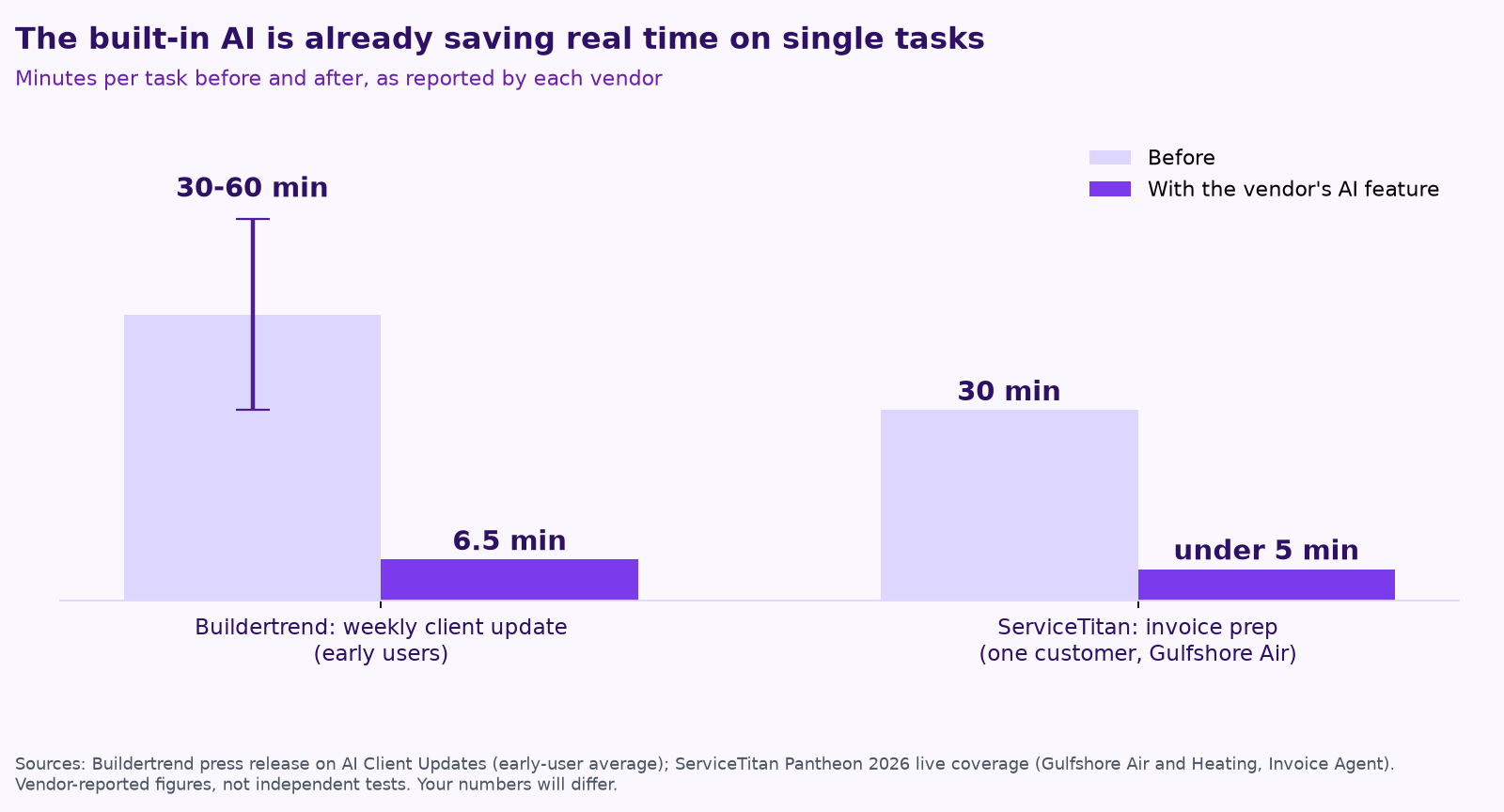
The early numbers are real, too, even if they come from the vendors themselves.
Step one: use what you already pay for
Before you add anything, turn on and set up the AI in the platform you already run. It knows your jobs, customers and schedule, it lives where your team already works, and the vendor maintains it. If your software’s AI covers a job well, that’s the cheapest and simplest answer, and a good consultant should tell you so.
Setup matters more than the switch. ServiceTitan shared that AI dispatch “fell short” at HomeX Services Group until the team standardized technician skills and job types, and then came a “huge leap” (ServiceTitan on X). Built-in AI is only as good as the data and settings it reads.
Where an agent team adds value on top
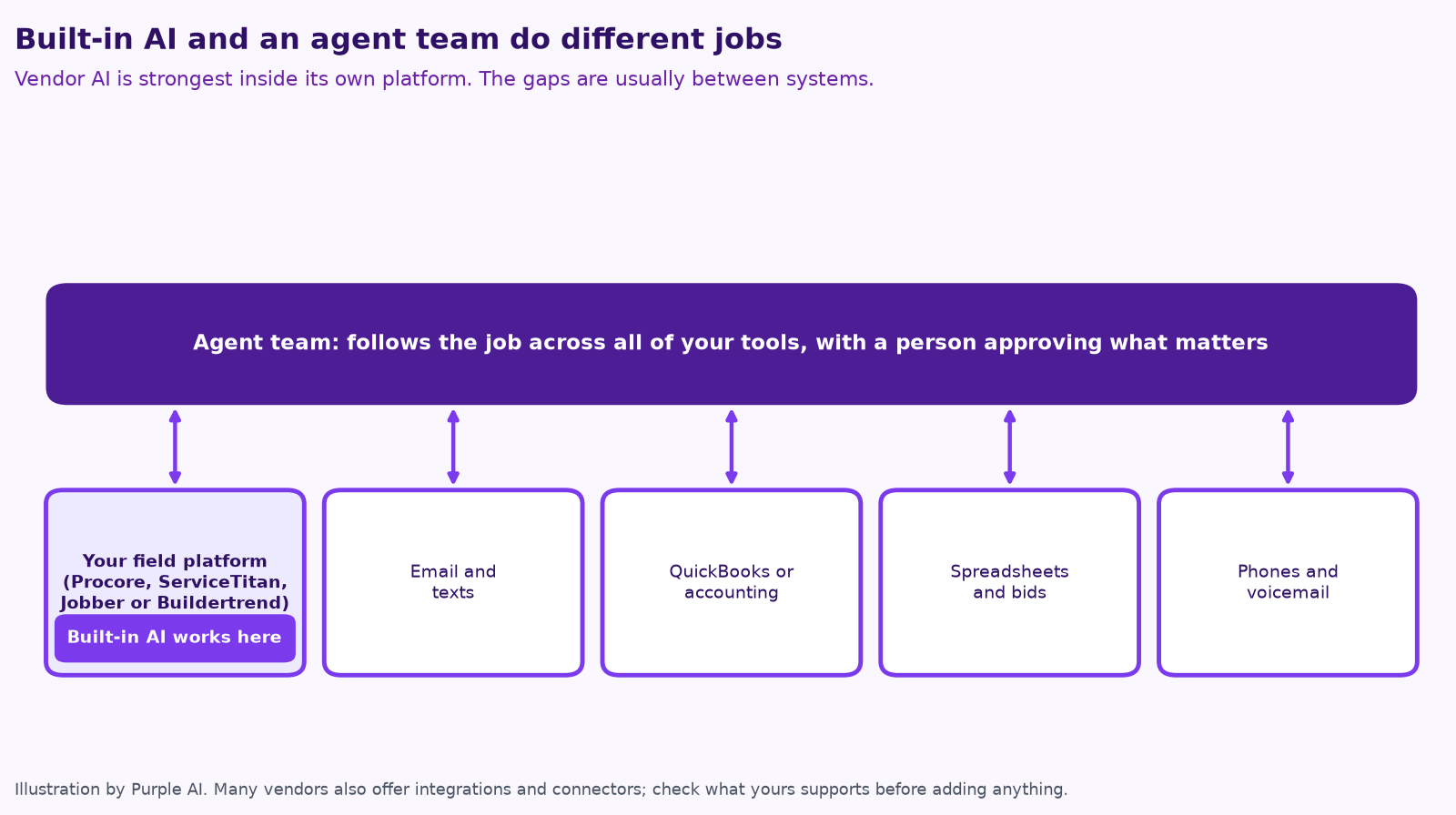
Vendor AI is strongest inside its own walls. Most small contractors run their business across five or six systems, and the slow, error-prone work usually happens in the handoffs between them.
- The inbox. Bid invitations, supplier quotes, change requests and owner questions arrive by email, not in your platform. An agent can sort them, pull out the details, create or update the record in your platform and draft the reply for you to approve.
- Money across systems. Matching what was billed in the field platform with what was paid in QuickBooks, chasing late payments and lien waivers, and flagging jobs where costs are drifting. Some platforms do parts of this; few see the whole picture when the books live elsewhere.
- Paperwork from outside your walls. Certificates of insurance from subs, permit status on city websites, supplier lead times and warranty registrations. None of it lives in your platform until someone puts it there.
- Bids and estimates. Following up on every open bid, logging why you won or lost, and comparing estimated with actual job costs so the next number is better.
- One owner report. A Monday summary that pulls from the field platform, accounting, the phone system and reviews, instead of four dashboards.
- Making the vendor AI work. Cleaning up job types and price books, setting escalation keywords and approval rules, and checking monthly whether the built-in features are actually paying off.
The rule we use: if the job starts and ends inside your platform, use your vendor’s AI. If it crosses systems, people or companies, that’s where an agent team earns its keep.
How to decide, job by job
- List the 10 tasks that eat the most office hours. Note which systems each one touches.
- Check your vendor’s AI first. Read its feature list and ask your account rep what’s included in your plan, what costs extra and what’s still in beta.
- Mark the cross-system jobs. Anything that needs email, accounting, spreadsheets or outside websites as well as your platform is a candidate for an agent.
- Price both options. Add-on packages and usage credits add up, and so does outside help. Compare the cost with the hours saved.
- Start with one job, approvals on. Prove it on real work before you add the next one.
Before you add anything checklist
- ☐ We know which AI features our current plan already includes.
- ☐ Our job types, price book and customer records are clean enough for AI to use.
- ☐ We’ve listed which jobs stay inside our platform and which cross systems.
- ☐ Every agent, built-in or added, has written approval rules.
- ☐ We’ll measure hours saved and errors caught after 30 days.
How Purple AI works with your platform
We don’t replace Procore, ServiceTitan, Jobber or Buildertrend, and we won’t ask you to switch. We start by making sure you’re getting full value from the AI you already pay for. Then we build a small agent team for the work between your systems, inside the tools you already run, with a person on your team approving anything that matters. You own what we build, and every plan is month-to-month.
For more on the jobs agents handle in your industry, see AI for construction companies and AI for trades businesses. If the difference between built-in features, automation and agents is still fuzzy, start with AI agents vs. chatbots vs. automation.
Keep reading
- Missed calls cost trades businesses jobs: AI answering, intake and follow-up done right
- How to keep a human in charge of AI agents
- Your AI team shouldn’t copy your org chart
- What does fractional AI cost?
- How to run an AI assessment for your small business in one week
- Give your AI agent a job, not a to-do list
- AI for property management: maintenance, leasing follow-up and owner reports
- AI for accounting and bookkeeping firms: close, client follow-up and document chase
- AI receptionists for contractors: Jobber vs. ServiceTitan vs. standalone tools
- A free AI use policy template for small businesses
- AI for construction estimating and takeoffs
- How to measure AI agent ROI with the hours-back method
- AI for HVAC maintenance agreements and renewals
- AI for construction safety documentation and toolbox talks
- AI for lien waivers and pay applications
- AI for roofing storm-season leads and claim reports
How we do this at Purple AI
Purple AI is an AI consulting firm for small businesses, and we start with construction and trades. We set up a small team of AI agents inside the tools you already use, give each agent one job, and keep a person in charge of anything that matters. Then we stay on to tune it as your business and the AI tools change.
The easiest first step is a free 15-minute AI mini-audit. We’ll look at where your week goes and name the one or two jobs we’d hand to an agent first. Book your mini-audit here.
If it’s a fit, ongoing plans are Starter at $750 a month (one workflow or dashboard), Core at $1,000 a month (an ongoing agent team, our most popular plan) and Growth at $1,250 a month (agents across several departments). If you want a deeper look first, there’s an optional $2,500 assessment, and $1,000 of it is credited to your first month.
Sources
- Procore, New Procore AI Experience Embeds Datagrid into Procore (May 21, 2026), and Procore AI support documentation.
- Procore (@procoretech), post on X introducing Procore AI Go (Nov 17, 2026).
- ServiceTitan, ServiceTitan Announcing New and Expanded Capabilities at Pantheon 2026 (Oct 6, 2026); Max, Atlas, and Homh take the next step at Pantheon; Pantheon 2026 keynote coverage; Pantheon 2026 live coverage.
- ServiceTitan (@ServiceTitan), post on X about AI dispatch at HomeX Services Group (Nov 3, 2026).
- Jobber, Jobber Unveils Jobber Teammate (Sept 23, 2026); Receptionist feature page; Receptionist launch release (Aug 18, 2025).
- Buildertrend, Buildertrend expands platform with AI and financial tools (Sept 29, 2026); Buildertrend Launches AI Tool for 97% Faster Client Updates; Buildertrend acquires BizJet AI (Aug 14, 2026).
Free checklist
Find 10 hours a week: the AI checklist for contractors
30 places construction and trades businesses lose time every week, and what an AI agent can take off your plate. On the page or as a printable PDF.
Get the checklist →