
You don’t need a six-month “AI strategy” to find out where AI could help your business. You need one focused week and a willingness to write down how the work actually gets done. This is the checklist we’d use for a 10- to 50-person company, construction and trades especially, and you can run it yourself.
Why a short assessment beats jumping in
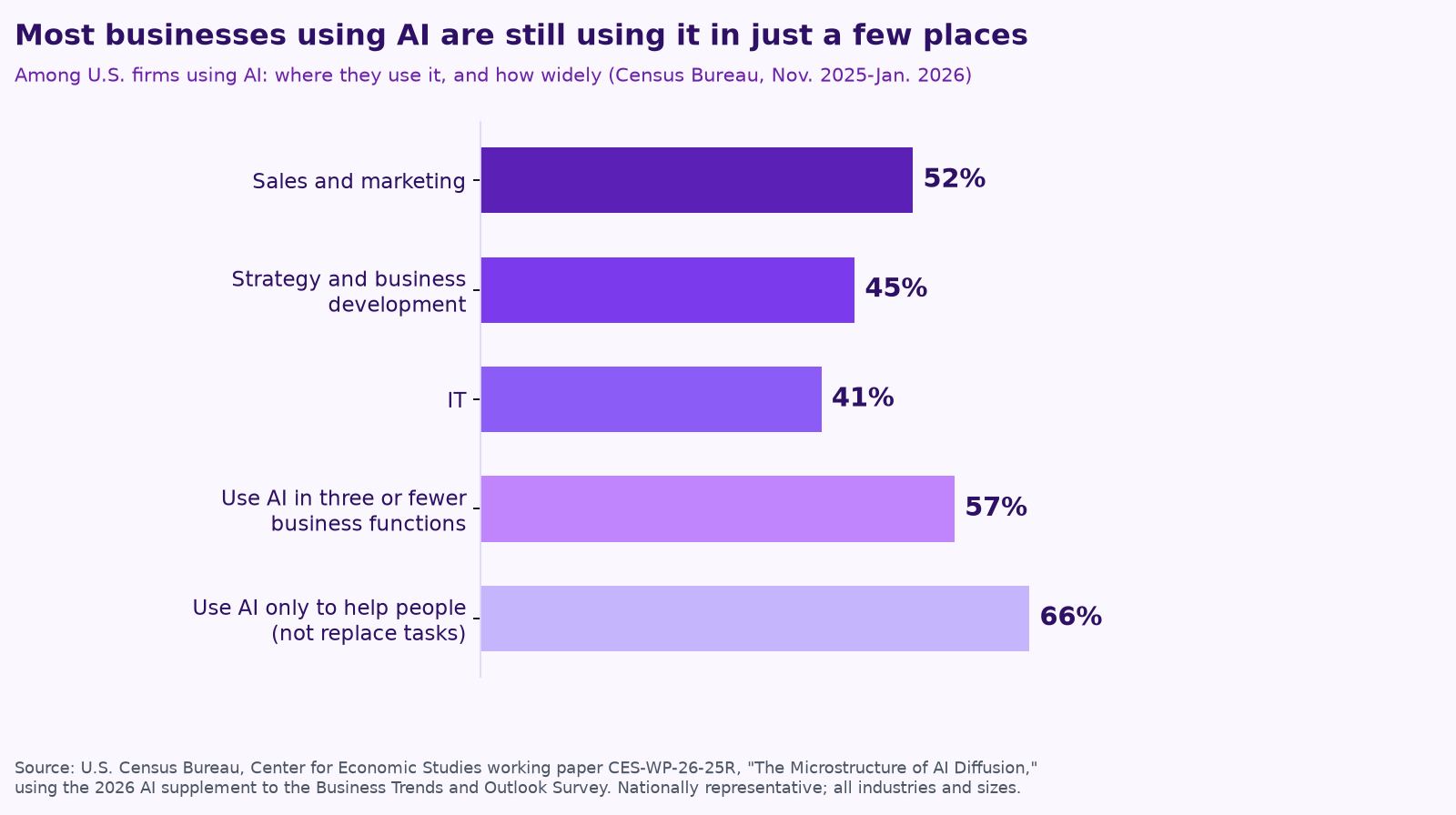
Most small businesses are still early. In the U.S. Census Bureau’s 2026 AI supplement to its Business Trends and Outlook Survey, 18% of firms used AI in a business function between November 2025 and January 2026, and among those that did, 57% used it in three or fewer functions, most often sales and marketing (Census Bureau working paper CES-WP-26-25R). Use is growing fast, but for most companies it’s still a few people using a chatbot here and there.
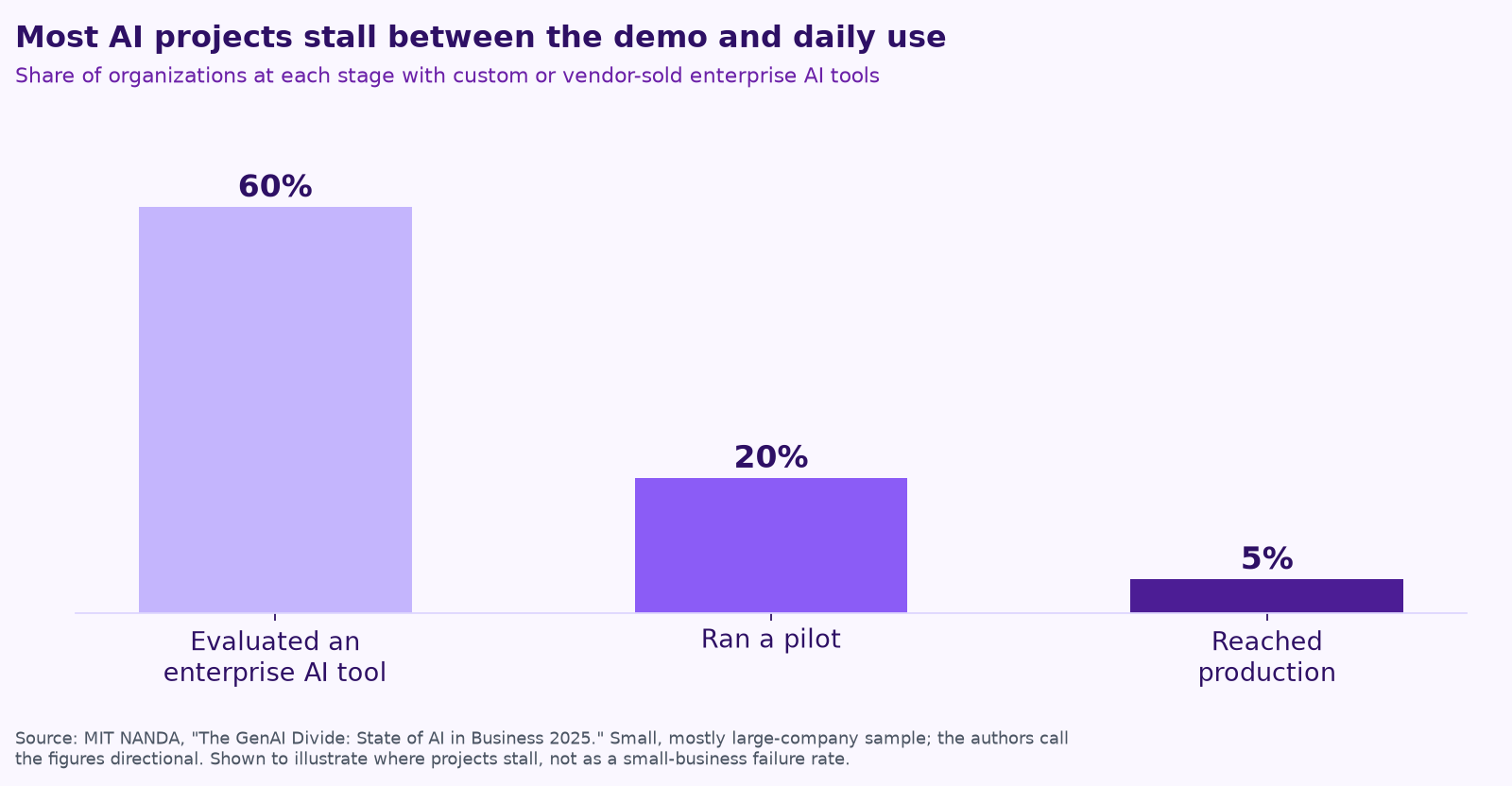
The risk isn’t starting too late. It’s starting with the wrong thing. MIT’s NANDA initiative found that 60% of the organizations it studied had evaluated enterprise AI tools, 20% reached a pilot, and only 5% got them into production (summary of MIT’s 2025 report). Those were mostly large companies, but the lesson travels: pilots that never get wired into a real, repeated job rarely pay off. An assessment exists to pick that job before you spend money.
The one-week plan
Monday: Map where the week goes
Get the owner and two or three key people in a room for an hour. List every job that repeats at least weekly: estimates, scheduling, daily reports, invoicing, following up on quotes, answering the same customer questions, chasing paperwork. For each one, write down who does it, roughly how many hours it takes, and which tools it touches (email, spreadsheets, your job management software, texts).
Output: a list of 15 to 30 recurring jobs with hours and owners. Don’t judge them yet.
Tuesday: Capture how the work is really done
Pick the five jobs that eat the most hours and get each one out of someone’s head. Two methods work well:
- Record it. Allie Miller, who advises companies on AI, suggested on X that for non-coding work like “a billing process or doc filing,” you record a video of yourself doing it, talk through why you make each choice, “do it three times,” and give AI the finished results. Those recordings become the examples you’ll test an agent against later.
- Let the AI interview you. In ENR, Brantley Brumley recommends a seven-word prompt: “Interview me one question at a time” about how a task is done, then ask the AI to turn the conversation into reusable instructions.
Output: a one-page written procedure for each of the five jobs, plus a few real examples of finished work.
Wednesday: Score and pick
Score each of the five jobs from 1 to 5 on these questions:
| Question | A 5 looks like |
|---|---|
| How often does it happen? | Daily |
| How many hours a week? | 5 or more across the team |
| How easy is it to check? | A person can spot a bad result in minutes |
| How low is the risk of a wrong draft? | Nothing leaves without review |
| Is the information reachable? | It lives in email, a shared drive or software with a connection |
The highest total is usually your first workflow. Pick one, maybe two. If you need ideas, our lists for construction companies and trades businesses cover the most common winners.
Thursday: Check the data, the tools and the guardrails
For the job you picked, confirm where every input lives and whether an agent can reach it safely. Then write the guardrails. A light version of the NIST AI Risk Management Framework works fine for a small company. Its four functions, Govern, Map, Measure and Manage, translate to four plain questions:
- Govern: who owns this agent, and who can switch it off?
- Map: what data will it touch, and who’s affected if it gets something wrong?
- Measure: how will we test it before launch and spot-check it after?
- Manage: what must it never do without a person’s approval, such as sending a price, promising a date, paying anything or contacting an upset customer?
Output: a short “never do” list and a named owner. We cover how to write an agent’s job description in Give your AI agent a job, not a to-do list.
Friday: Set the yardstick and plan 30 days
Write down today’s baseline: hours per week, turnaround time, errors or misses. Gather 10 real examples of a good result to test against. Decide what “working” means at 30 days and what would make you stop. Keep the first version to one agent with a few tools; we explain why in Your AI team shouldn’t copy your org chart.
Then put a date on the calendar to look again. Box CEO Aaron Levie wrote on X that with AI “you need to check back in on the latest with every 3 to 6 months to try something that wasn’t possible before.” A job that scored low this week may be a good fit by spring.
What you should have by Friday
- ☐ A list of recurring jobs with hours and owners.
- ☐ Written procedures and real examples for your top five.
- ☐ A scored shortlist and one chosen first workflow.
- ☐ A data map, a “never do” list and a named owner.
- ☐ A baseline, 10 test examples and a 30-day success measure.
- ☐ A date to reassess in three to six months.
Doing it yourself vs. getting help
Everything above can be done in-house. Where outside help tends to pay off is speed and pattern recognition: someone who has seen the same daily report or quote follow-up set up many times can tell you quickly what will work and what will stall. If you’re weighing that choice, we lay out the honest numbers in What does fractional AI cost?
Keep reading
- AI for construction companies: 7 workflows a small contractor can hand to AI agents
- AI for trades businesses: where agents save hours on dispatch, quotes, follow-ups and reviews
- What does fractional AI cost? Hiring vs. a fractional AI partner vs. DIY
- AI agents vs. chatbots vs. automation: what a small business actually needs
- AI for property management: maintenance requests, leasing follow-up and owner reports
- How to keep a human in charge of AI agents
- Procore, ServiceTitan, Jobber and Buildertrend have AI now. Where does an agent team fit?
- Missed calls cost trades businesses jobs: AI answering, intake and follow-up done right
- AI for accounting and bookkeeping firms: close, client follow-up and document chase
- AI receptionists for contractors: Jobber vs. ServiceTitan vs. standalone tools
- A free AI use policy template for small businesses
- AI for construction estimating and takeoffs
- How to measure AI agent ROI with the hours-back method
- AI for HVAC maintenance agreements and renewals
- AI for construction safety documentation and toolbox talks
- AI for lien waivers and pay applications
- AI for roofing storm-season leads and claim reports
How we do this at Purple AI
Purple AI is an AI consulting firm for small businesses, and we start with construction and trades. We set up a small team of AI agents inside the tools you already use, give each agent one job, and keep a person in charge of anything that matters. Then we stay on to tune it as your business and the AI tools change.
The easiest first step is a free 15-minute AI mini-audit. We’ll look at where your week goes and name the one or two jobs we’d hand to an agent first. Book your mini-audit here.
If it’s a fit, ongoing plans are Starter at $750 a month (one workflow or dashboard), Core at $1,000 a month (an ongoing agent team, our most popular plan) and Growth at $1,250 a month (agents across several departments). If you want a deeper look first, there’s an optional $2,500 assessment, and $1,000 of it is credited to your first month.
Sources
- U.S. Census Bureau, Center for Economic Studies, The Microstructure of AI Diffusion: Evidence from Firms, Business Functions, and Worker Tasks (CES-WP-26-25R, 2026).
- Mind the Product, Why most AI products fail: Key findings from MIT’s 2025 AI Report, and Fortune, MIT report: 95% of generative AI pilots at companies are failing (Aug 18, 2025).
- Allie K. Miller (@alliekmiller), post on X about recording business processes for AI evaluations (Nov 18, 2026).
- Brantley Brumley, ENR, Contractors Don’t Need an AI Strategy, They Need an AI Owner (Nov 18, 2026).
- National Institute of Standards and Technology, Artificial Intelligence Risk Management Framework (AI RMF 1.0).
- Aaron Levie (@levie), post on X about rechecking AI every 3 to 6 months (Nov 8, 2026).
Free checklist
Find 10 hours a week: the AI checklist for contractors
30 places construction and trades businesses lose time every week, and what an AI agent can take off your plate. On the page or as a printable PDF.
Get the checklist →