

Most contractors have tried AI by now. Far fewer have it doing a job the same way every week. In a column for ENR on November 18, Brantley Brumley described asking a room of contractors at a construction technology summit how many were using AI. Most hands went up. Then he asked how many had a workflow that ran the same way every time, and “almost every hand went down.”
That gap is where the time is. This guide covers seven jobs a small general contractor or specialty contractor can realistically hand to AI agents this quarter, what the agent does, what stays with your people, and how to tell whether it’s working. None of it requires replacing your project management software or hiring an engineer.
Running a construction business? Our AI for construction companies page lays out the workflows we build (daily logs, crew and sub scheduling, bid follow-up, RFIs, change orders and COIs), how it works and plans.
Why the paperwork matters more than ever
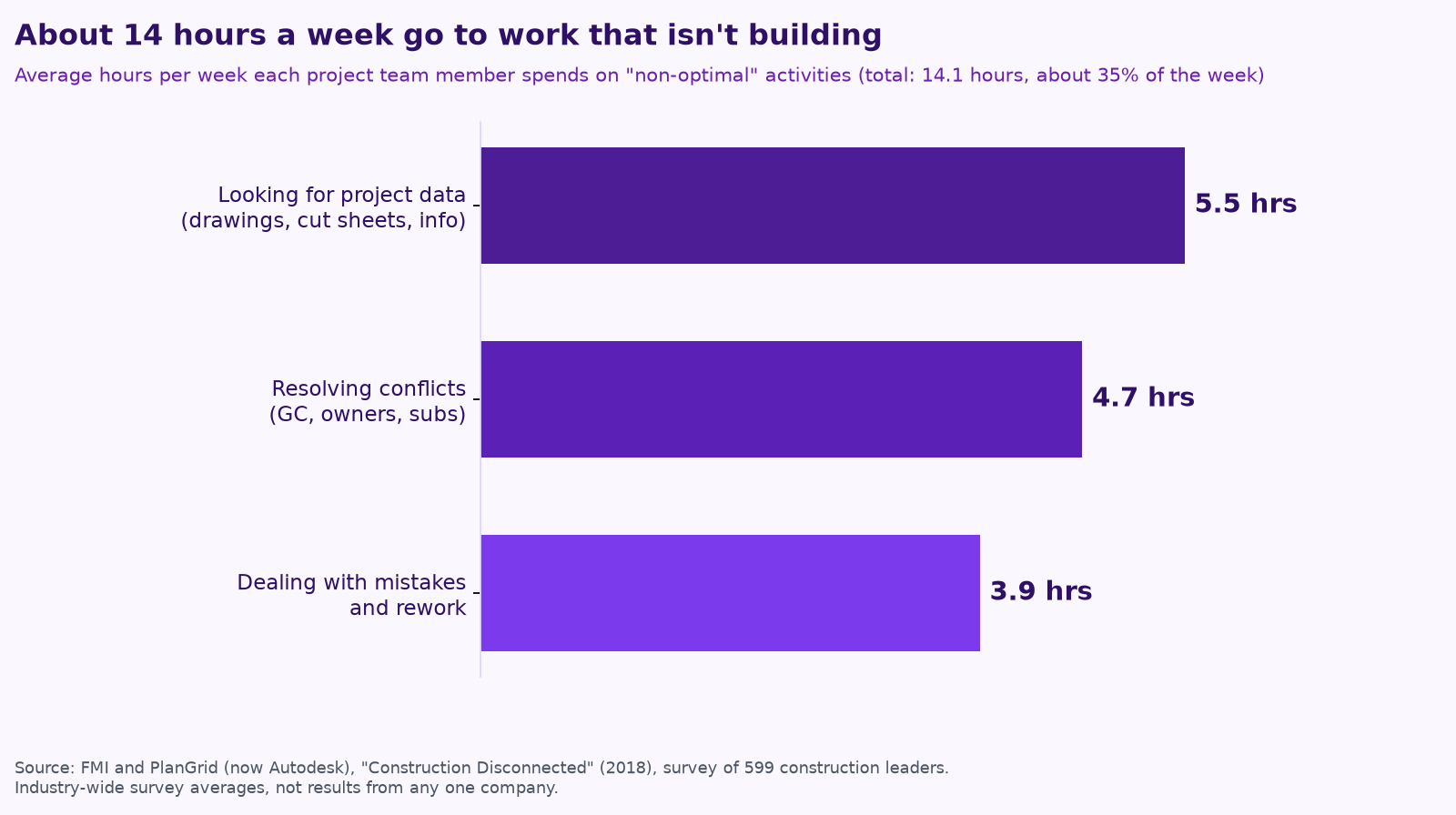
The office side of construction has always eaten field time. In a survey of 599 construction leaders by FMI and PlanGrid (now part of Autodesk), project team members said they spend about 14 hours a week on what the researchers called non-optimal work: hunting for project data, resolving conflicts and dealing with rework (FMI and PlanGrid, “Construction Disconnected”).
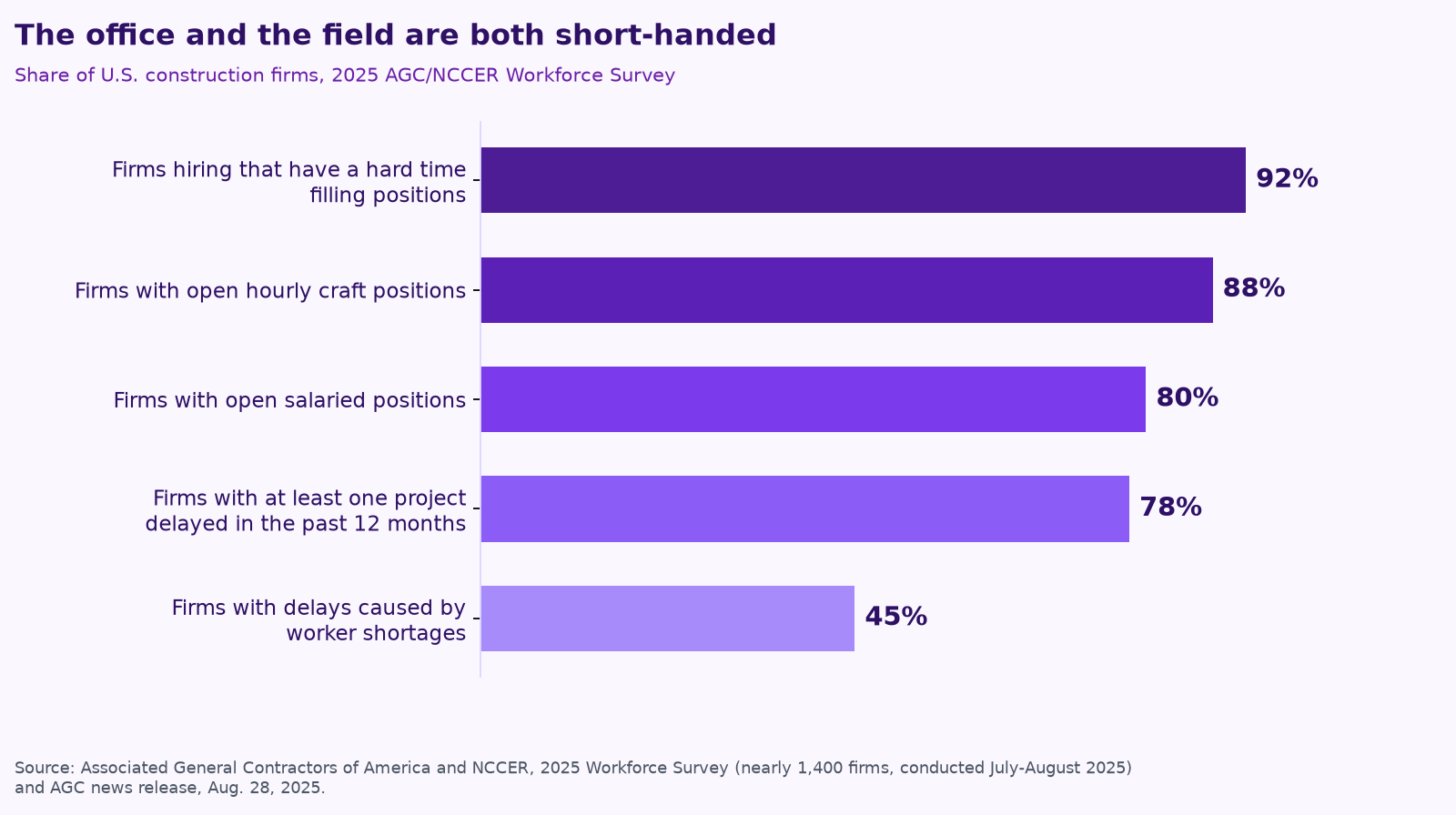
Meanwhile, there are fewer people to do it. In the 2025 AGC and NCCER Workforce Survey of nearly 1,400 firms, 92% of contractors that are hiring said they’re having a hard time filling positions, and 45% said worker shortages had delayed projects. The shortage isn’t only in the field: 80% of firms had open salaried positions, the project managers, estimators and office staff who carry the paperwork.
AI agents don’t pour concrete. But they’re now good at the reading, drafting, chasing and logging that pulls your PMs and supers away from the work. As Box CEO Aaron Levie put it on X in October, “the vast majority of enterprise workflows have not actually had agents applied to them in any meaningful way.” That’s even more true for a 15-person contractor, which is exactly why there’s room to get ahead.
What “hand it to an agent” means here
An AI agent is software that can take a goal, use your tools (email, a shared drive, your PM software or a spreadsheet) and work through the steps. In every workflow below, the agent drafts, organizes and follows up, and a person approves anything that leaves the building: a price, a date, a signature, a safety sign-off. We cover how to set those limits in Give your AI agent a job, not a to-do list.
The 7 workflows
1. Daily reports
What the agent does: takes the foreman’s voice memo, texts and jobsite photos and turns them into your daily report format: crew counts, weather, work completed, deliveries, delays and visitors. It flags what’s missing, like a toolbox talk that didn’t get logged.
What stays with you: the super reviews and signs. Anything that could become a delay claim gets a human read.
Why it’s a good first job: it happens every day, follows a pattern and is easy to check. Brumley’s ENR column uses a daily safety report as his example of a short, reusable AI instruction: ask for the job number, crew size, weather and incidents, pull the day’s activities from the foreman’s notes and “flag a missing toolbox talk.”
2. Bid follow-up
What the agent does: keeps a running list of bid invitations, due dates and addenda; reminds you which subs haven’t quoted; drafts the follow-up emails; and after bid day, drafts the “checking in on our proposal” note to the owner or GC.
What stays with you: deciding what to bid and approving every message before it goes out under your name.
What to measure: bids with complete sub coverage, and proposals that got a follow-up within a week.
3. RFIs and submittals
RFIs are a quiet cost center. A study by the Navigant Construction Forum of 1,362 projects found an average of 796 RFIs per project, about 8 hours and $1,080 to review and answer each one, and a median of 9.7 days to get a reply (Navigant, “Impact & Control of RFIs on Construction Projects”). Those were mostly larger projects, but the pattern holds on small jobs too: questions sit in someone’s inbox while the crew waits.
What the agent does: drafts RFIs from field notes and photos with the right drawing and spec references, keeps the RFI and submittal logs current, and chases overdue answers on a schedule you set.
What stays with you: the technical question itself and anything that changes scope or price.
4. Scheduling and look-aheads
The big software vendors are moving here fast. On November 9, Trimble launched Trimble Connect Scheduling, which uses agentic AI to connect a master schedule to RFIs, weather, daily reports and submittals and “suggests actionable schedule adjustments for teams to review and approve.” Note that last part: even the vendors keep a person on the approval.
For a smaller contractor: an agent can draft next week’s crew schedule from your job list, delivery dates and the forecast, flag conflicts (two jobs needing the same crew, an inspection that isn’t booked) and send the PM a short list of decisions to make.
5. Invoicing and collections
What the agent does: assembles pay application backup, tracks which lien waivers you’ve received from subs and which you owe, and drafts polite reminders for invoices past due, escalating on the schedule you choose.
What stays with you: the numbers, any change to an amount, and every payment. An agent should never move money on its own.
What to measure: days to get paid, and how many pay apps went out complete the first time.
6. Safety documentation
What the agent does: drafts toolbox talks for the week’s actual tasks, turns a scope of work into a draft job hazard analysis, tracks who signed in and who’s missing training, and keeps certificates and inspection records filed where you can find them.
What stays with you: your competent person reviews and owns every safety document. AI is a drafting tool here, not a safety program.
7. Estimating prep
What the agent does: organizes the bid documents, pulls the scope into a checklist by trade, finds similar past jobs and what they actually cost, and lines up sub quotes side by side so gaps and exclusions are obvious.
What stays with you: the takeoff review and the number. The estimator’s judgment is the product; the agent just clears the table so there’s more time for it.
How to pick your first one
Brumley’s ENR column lists three traits shared by the contractors seeing real results: one person owns it (not a committee), the team treats AI as a prediction engine rather than magic, and they make workflows repeatable by turning a good result into saved instructions the whole team uses. In a smaller firm, he notes, the owner might be an operations manager or a tech-minded estimator.
We’d add a simple scoring test. Pick the workflow that is:
First-workflow checklist
- ☐ Done at least weekly, so you’ll see results within a month.
- ☐ Already has a format or template, even an informal one.
- ☐ Easy to check: a person can tell good output from bad in under five minutes.
- ☐ Low risk if a draft is wrong, because a person reviews it before it goes anywhere.
- ☐ Owned by one named person who wants the time back.
- ☐ Measurable: you know roughly how long it takes today.
For most contractors, that points to daily reports or RFI and submittal chasing first, then bid follow-up. Once one agent is running reliably, add the next job, and resist building a big multi-agent system up front. We explain why in Your AI team shouldn’t copy your org chart.
What not to hand off yet
- Anything that commits you. Prices, schedules promised to an owner, contract language and change order approvals.
- Safety sign-offs. Drafting is fine; the responsibility stays with your people.
- Moving money. Agents can prepare and remind, but people pay and approve.
- Jobs nobody has written down. If the process lives in one person’s head, start by having the AI interview that person. Brumley’s seven-word prompt is a good start: “Interview me one question at a time.”
Running a remodeling company? See AI for remodelers for selections, change orders and weekly client updates, or AI for construction companies for how we work with GCs and specialty contractors.
Keep reading
- How to run an AI assessment for your small business in one week
- AI for trades businesses: where agents save hours on dispatch, quotes, follow-ups and reviews
- What does fractional AI cost? Hiring vs. a fractional AI partner vs. DIY
- AI agents vs. chatbots vs. automation: what a small business actually needs
- AI for property management: maintenance requests, leasing follow-up and owner reports
- How to keep a human in charge of AI agents
- Procore, ServiceTitan, Jobber and Buildertrend have AI now. Where does an agent team fit?
- Missed calls cost trades businesses jobs: AI answering, intake and follow-up done right
- AI for accounting and bookkeeping firms: close, client follow-up and document chase
- AI receptionists for contractors: Jobber vs. ServiceTitan vs. standalone tools
- A free AI use policy template for small businesses
- AI for construction estimating and takeoffs
- How to measure AI agent ROI with the hours-back method
- AI for HVAC maintenance agreements and renewals
- AI for construction safety documentation and toolbox talks
- AI for lien waivers and pay applications
- AI for roofing storm-season leads and claim reports
How we do this at Purple AI
Purple AI is an AI consulting firm for small businesses, and we start with construction and trades. We set up a small team of AI agents inside the tools you already use, give each agent one job, and keep a person in charge of anything that matters. Then we stay on to tune it as your business and the AI tools change.
The easiest first step is a free 15-minute AI mini-audit. We’ll look at where your week goes and name the one or two jobs we’d hand to an agent first. Book your mini-audit here.
See how this works for your business on our AI for construction companies page, or grab the free AI checklist for contractors.
If it’s a fit, ongoing plans are Starter at $750 a month (one workflow or dashboard), Core at $1,000 a month (an ongoing agent team, our most popular plan) and Growth at $1,250 a month (agents across several departments). If you want a deeper look first, there’s an optional $2,500 assessment, and $1,000 of it is credited to your first month.
Sources
- Brantley Brumley, ENR, Contractors Don’t Need an AI Strategy, They Need an AI Owner (Nov 18, 2026).
- FMI and PlanGrid, Construction Disconnected (survey of 599 construction leaders, 2018; release now hosted by Autodesk).
- Associated General Contractors of America and NCCER, 2025 Workforce Survey news release (Aug 28, 2025) and national results.
- Navigant Construction Forum, Impact & Control of RFIs on Construction Projects (2013, hosted by CMAA).
- Trimble, Trimble Launches New AI-Accelerated Scheduling Solution to Help Contractors Protect Project Milestones (Nov 9, 2026).
- Aaron Levie (@levie), post on X about agents and enterprise workflows (Oct 27, 2026, Central time).
Free checklist
Find 10 hours a week: the AI checklist for contractors
30 places construction and trades businesses lose time every week, and what an AI agent can take off your plate. On the page or as a printable PDF.
Get the checklist →