
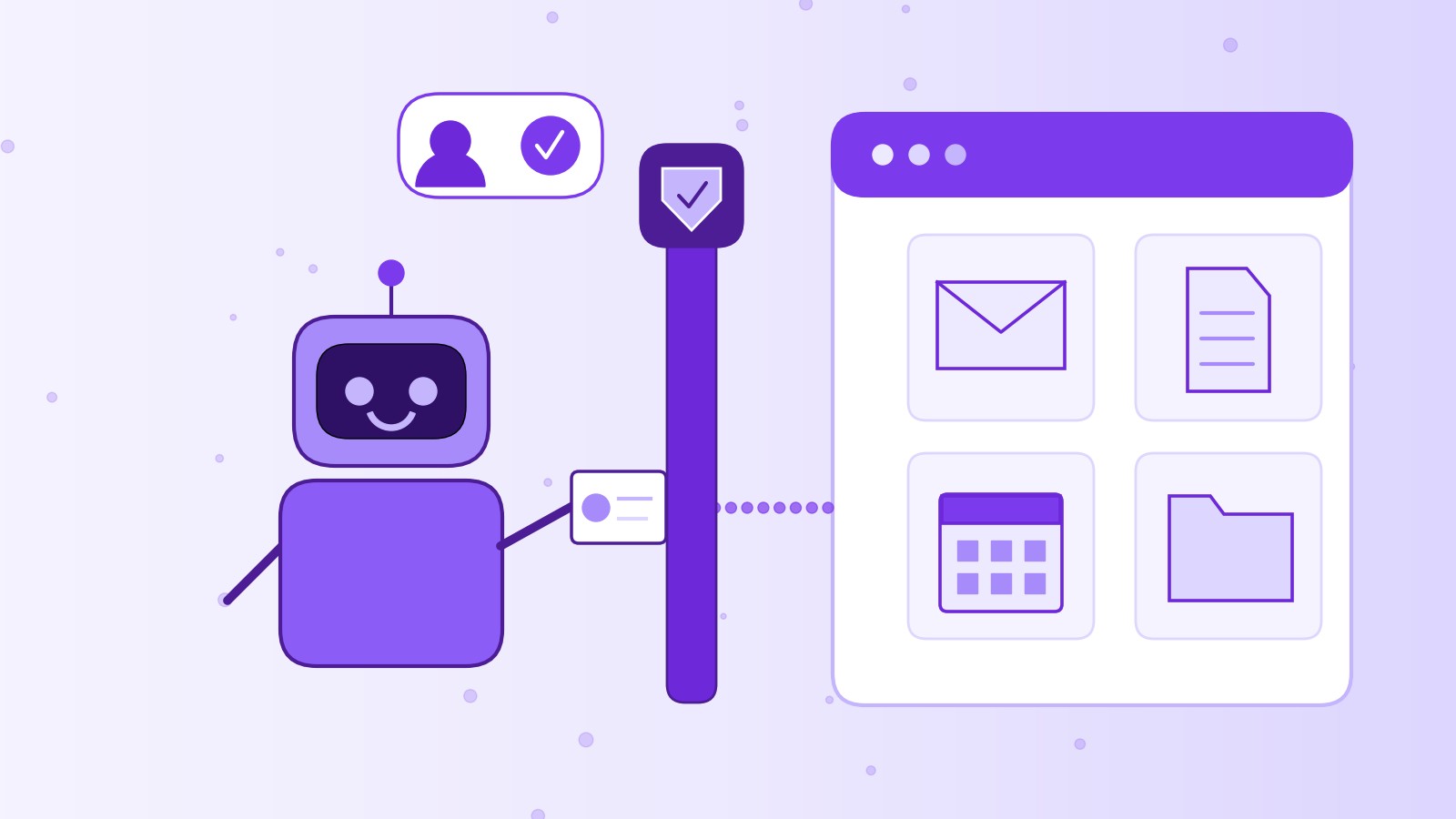
On Monday, Google gave AI agents their own front door into Gmail, Drive, Docs and Calendar. Next to it, Google put a doorbell. Under the new setup, an AI agent can draft an email or summarize a document on its own, but it has to stop and get a person’s OK before it sends that email, changes who can see a file, or makes bulk edits. Google also set a date: from February 1, 2027, AI agents that want into Workspace data have to come through that door instead of the older back routes.
If your business runs on Google Workspace, this is worth ten minutes of your attention, even if you’ve never set up an AI agent. Many owners already have one or two AI tools connected to their inbox or Drive, through a scheduling app, a sales tool or a note-taker, without thinking of them as “agents.”
The practical thesis: before an AI agent touches your email and files, write down what it may do on its own and what it must ask about. Google and Anthropic just built that line into their products. You still have to decide where it goes for your business. Here’s what changed, what it means for a small company, the honest catches, and a short plan you can finish this week.
What actually changed this week
Two announcements landed on the same day, November 24, 2026.
1. Google opened an “agents only” entrance to Workspace
Google made its Workspace MCP servers and Workspace CLI generally available for Gmail, Drive, Docs, Sheets, Slides, Calendar, Chat and Tasks, with Keep coming soon. Chandu Thota, the Google VP who leads Workspace engineering, summed up why:
We are making Workspace MCP servers and the Workspace CLI generally available today, alongside Google Cloud Agent Gateway.
Traditional REST APIs were built for human-paced apps.
Now AI agents get a standard path into Workspace with DLP checks and human in the loop controls (HITL) built in!
— Chandu Thota (@ChanduThota) November 24, 2026
In plain words: MCP (Model Context Protocol) is a shared standard for plugging AI tools into the apps where your data lives. Think of it as one kind of outlet that any AI assistant can plug into, instead of every vendor wiring its own custom connection. Google’s version comes with checks built into the plug itself.
According to Google’s Cloud blog post, here’s what those checks do:
- Every request is checked against your organization’s existing Workspace permissions, data-loss rules and file labels.
- Agents get their own ID. An agent connecting to Workspace has to use a dedicated sign-in identity, so your admin console can tell it apart from a regular app or a person, see what it’s doing and switch it off.
- People stay in charge of high-impact actions. Drafting and summarizing run on their own. Sending email, changing Drive sharing and bulk edits require explicit confirmation from a person.
- There’s a paper trail. Admin audit logs record agent actions and the confirmations people gave.
Google’s reasoning is worth repeating, because it applies to every business, not just Google customers: “As AI agents shift from reading information to acting autonomously at machine speed across email, documents, datasets, and cloud infrastructure, a valid token is no longer enough.” In other words, the fact that you once clicked “Allow” doesn’t mean you meant for an agent to do everything that permission allows, forever.
2. The same standard learned how to say “wait, are you sure?”
MCP turned two the same day, and Anthropic used the anniversary to ship several upgrades in Claude: Skills over MCP (in beta), plus Tasks and Elicitation, now generally available.
MCP turns two! What started as a protocol for connecting AI apps to tools and data is evolving to standardize how agents communicate and orchestrate work.
We’re bringing more of these agentic capabilities to Claude with Skills over MCP and Tasks.
— Claude Devs (@ClaudeDevs) November 24, 2026
“Elicitation” is the one to notice. It lets a connected tool pause in the middle of a job and ask the person for input or sign-off through a form or a link. Anthropic’s own examples are all about risky moments: Supabase confirms the cost before creating a paid project, Railway asks before removing a service, and GitHub makes you type a repository’s name before an agent can delete it. “Tasks” lets a tool run a long job in the background and report back when it’s done, and “Skills” lets a tool ship its own instructions for how to use it well (The New Stack has a good explainer).
Put the two together and the direction is clear: the big platforms are building the “ask a human first” step into the plumbing, rather than leaving it to each app to remember.
“An agent with raw gmail access and no confirm step is how an inbox gets wiped.”
A developer’s reaction to Google’s launch, on X. Blunt, but it’s the whole point of the new approval step.
Why a small business should care now
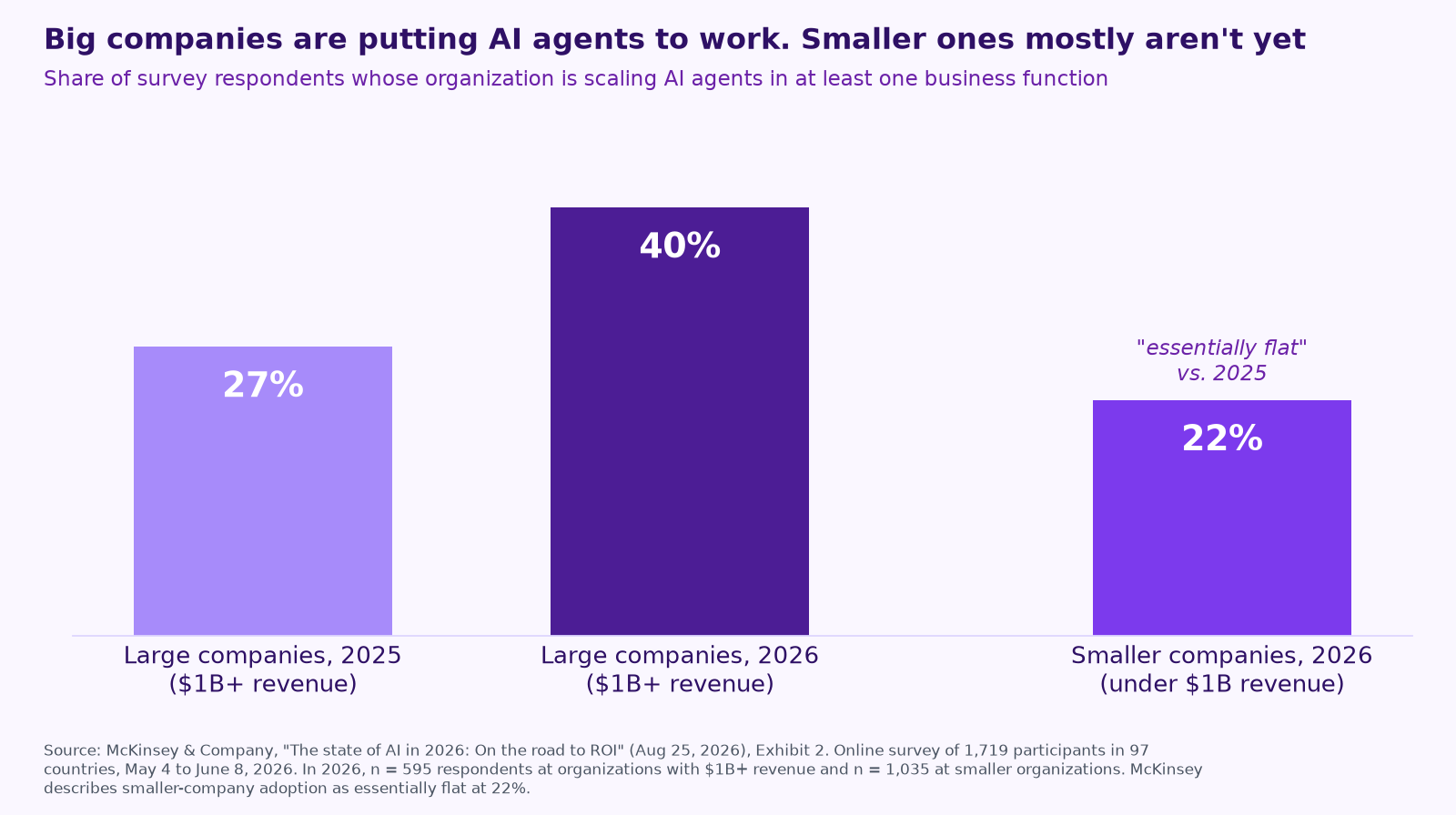
Big companies are moving faster on this than small ones. In McKinsey’s 2026 State of AI survey, 40% of respondents at organizations with more than $1 billion in revenue said they were scaling AI agents in at least one business function, up from 27% a year earlier. Among smaller organizations, the share stayed essentially flat at 22%.
That gap is an opportunity, and the new Google setup lowers one of the biggest reasons owners hold back: fear of an AI tool doing something in your name that you can’t take back. When “draft freely, ask before sending” is enforced by the platform, it’s easier to say yes to the useful parts.
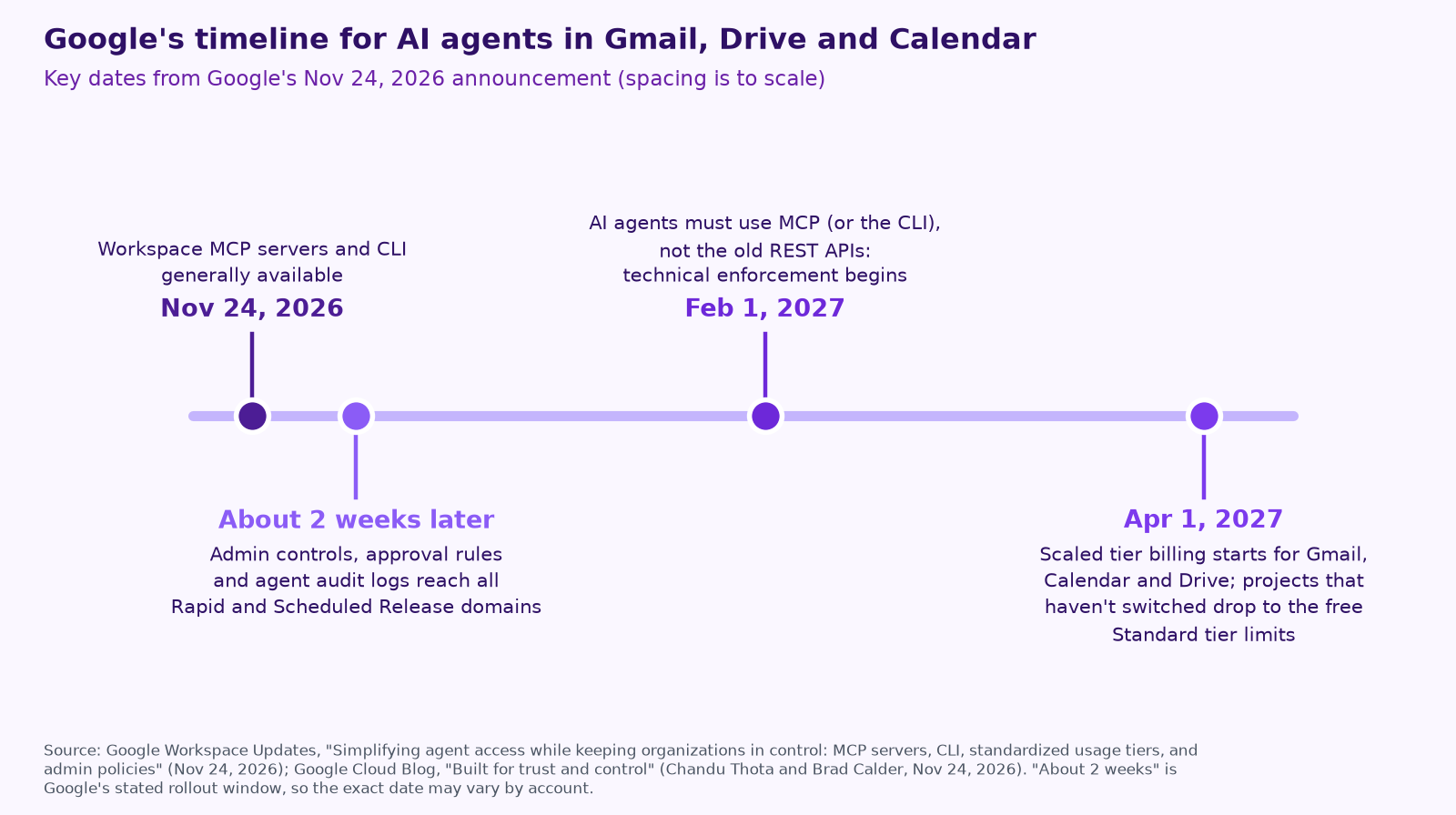
There’s also a deadline that may affect tools you already pay for. Google’s Workspace announcement says AI agents “must use MCP to access Workspace data, rather than calling Workspace REST APIs directly,” with technical enforcement starting February 1, 2027. If an AI product connects to your Gmail or Drive the old way, its maker has a little over two months to move.
The honest catches
This is a good change, but it isn’t magic. A few things to keep in mind:
- The guardrails only cover the doors they guard. Google’s checks apply to agents that come through its MCP servers or CLI. An AI tool that reads your email some other way, or a person who forwards everything to a chatbot, isn’t covered. Your own rules still matter.
- The admin controls are still arriving. Google says the admin console controls for agent access, approval rules and audit logs roll out to all domains over about two weeks. Some promised pieces, like time-limited approvals and blocking agents from specific Gmail messages or Drive folders, are marked “coming soon.”
- Free has limits. The no-cost Standard tier is capped at 5,000 requests per day, per project, per product, according to Google’s developer docs. Some actions count as more than one: on the Gmail MCP server, each search of your threads counts as 10. Google says over 99% of active developers operate within the Standard tier today, so most small setups should be fine, but a chatty agent can burn through it faster than you’d expect. Paid Scaled tier billing starts April 1, 2027.
- Approval fatigue is real. If every tiny step asks for a click, people stop reading and start clicking “yes.” The goal is fewer, better approvals on the things that actually matter.
- Instructions can change under you. With Skills over MCP, a tool’s built-in instructions update when its maker updates them. That’s convenient, but it means an agent’s behavior can shift without you installing anything. Keep an eye on what’s connected.
Agents reading outside content is its own risk; we covered it in how to keep your AI agent from taking orders from strangers.
Draw the line: what an agent may do on its own
Here’s a simple starting point for a small business. Adjust it to your comfort level, and write it down so everyone, people and tools, follows the same rule.
| Let it run on its own | Ask a person first | Don’t connect it yet |
|---|---|---|
| Draft replies and follow-ups | Send any email to a customer, vendor or employee | Payroll, HR and medical files |
| Summarize documents and email threads | Share a file or change who can see a folder | Banking and payment logins |
| Read your calendar and suggest times | Accept, move or cancel a meeting with someone outside | Anything a contract or regulator says must stay private |
| Fill in a spreadsheet or draft a report | Bulk edits, deletes, or anything that spends money | Shared admin or owner accounts |
A simple test: if a mistake would be embarrassing, expensive or hard to undo, it goes in the middle column. Everything in the left column produces a draft a person can still check. For more on designing the approval step itself, see how to keep a human in charge of AI agents.
Your checklist for this week
- List what’s already connected. In Google Workspace, your admin can review connected apps under Security > API Controls. Note every AI tool that can read your email, Drive or calendar.
- Remove what nobody uses. Old trials and abandoned tools are open doors.
- Ask each AI vendor one question: “Will you connect through Google’s Workspace MCP servers before February 1, 2027, and will your agent ask before sending or sharing?” A clear answer is a good sign. A vague one is useful information too.
- Fill in the three-column table above for your business and share it with your team.
- Turn on the approval rules and audit logs in your admin console as soon as they appear in your account.
- Give agents their own access. An agent should never sign in as the owner. Separate identities make it easy to see what it did and to switch it off.
- Put it in your AI policy. If you don’t have one, start with our free AI use policy template.
The bottom line
For a long time, connecting an AI tool to your inbox meant trusting it with everything that inbox could do. That’s starting to change. The platforms are building in a line between “prepare the work” and “act on it,” and they’re giving owners a way to see and switch off what’s connected. The businesses that get the most from AI agents will be the ones that decide where that line sits on purpose, not by default.
How Purple AI can help
This is the way we already build. Purple AI builds and runs teams of AI agents for construction, trades and other small and mid-sized businesses, using the tools you already have. You describe the job once, and a person signs off on what matters: an agent that works with your office email saves drafts, and nothing is sent on its own. If you’d like help taking stock of what’s connected to your business today, or deciding where your own “ask first” line should sit, book a free 15-minute AI mini-audit at gopurple.ai.
Sources
- Google Workspace Updates, Simplifying agent access while keeping organizations in control: MCP servers, CLI, standardized usage tiers, and admin policies (Nov 24, 2026).
- Chandu Thota and Brad Calder, Google Cloud Blog, Built for trust and control: Powering the next wave of AI agents across Google Workspace and Google Cloud (Nov 24, 2026).
- Chandu Thota (@ChanduThota), post on X announcing general availability (Nov 24, 2026).
- Google for Developers, Usage tiers and quotas for Google Workspace APIs and MCP servers and Gmail API and MCP server quotas (retrieved Nov 25, 2026).
- Anthropic, MCP servers can now ship skills, run tasks, and more with Claude (Nov 24, 2026).
- Claude Devs (@ClaudeDevs), “MCP turns two!” post on X (Nov 24, 2026).
- Frederic Lardinois, The New Stack, As MCP turns two, Claude gets Skills over MCP and better support for long-running tasks (Nov 24, 2026).
- McKinsey & Company, The state of AI in 2026: On the road to ROI (Aug 25, 2026).
- Charlie (@clhdev), post on X (Nov 24, 2026).
Free checklist
Find 10 hours a week: the AI checklist for contractors
30 places construction and trades businesses lose time every week, and what an AI agent can take off your plate. On the page or as a printable PDF.
Get the checklist →
