

Every construction company keeps daily logs. Far fewer keep daily logs that would hold up if a job went sideways. The difference usually isn’t effort. It’s that the foreman fills out the report at 6 PM from memory, in a hurry, and writes “rain, reduced work” when what actually happened was “rain from 10 to 2, pour pushed to Thursday, excavation kept going.”
That’s exactly the kind of job AI is getting good at. On November 17, Procore posted on X about Procore AI Go, its voice-first jobsite app, with the line “No more walking back to the trailer just to check a drawing or finish a daily log.”
No more walking back to the trailer just to check a drawing or finish a daily log. 😮💨
Meet Procore AI Go, a voice-first AI mobile app built specifically for the jobsite.
— Procore Technologies (@procoretech) November 17, 2026
You don’t need Procore to use the idea, though. The useful thesis for a small or mid-size contractor: let an AI agent turn the crew’s voice notes, photos and texts into a complete, consistent daily log the same day, and keep a person as the one who checks it and signs it. Done that way, the log stops being a chore and becomes your best evidence. Done carelessly, it becomes a liability. This post covers both.
Why the daily log matters more than most people treat it
A daily log does two jobs. Day to day, it tells the office what happened in the field. When something goes wrong (a delay, a disputed change, an owner who says your crew wasn’t there), it becomes the record everyone argues from.
Construction lawyers are blunt about that second job. Law firm Glaholt Bowles writes that site reports “should be detailed enough for an independent third party to understand what was occurring on site,” and should cover weather, workforce count and hours, equipment use, work planned versus work done, and site constraints and disruptions. When a delay happens, the report should record the cause and the impact, such as their example, “steel erection delayed eight hours due to high winds.”
Law firm McDonald Hopkins makes the same point in plainer words: “your memory of each issue on the project will never be as good as it was on the day you are filling out the reports.” Their list adds a few items people skip: subcontractors on site and their equipment, materials delivered that day, and the name and signature of whoever made the report.
Why this isn’t just a big-project problem
Arcadis’ 2025 Global Construction Disputes Report put the average North American dispute at $60.1 million in 2024, but notes that a few “mega” claims pull that number up: almost half of all claims were under $5 million. Respondents ranked good communication as the second most effective way to avoid claims, and “accurate and timely schedules” as the second most important factor in resolving disputes early. Both depend on good daily records.
Where the time actually goes
The reason logs get rushed is that field leaders are already buried in information work. In the “Construction Disconnected” survey by FMI and PlanGrid (now part of Autodesk), about 600 construction professionals estimated they spent 5.5 hours a week looking for project data, 4.7 hours resolving conflicts and 3.9 hours dealing with mistakes and rework. That’s about 14 hours, or 35% of the week. Respondents also attributed 48% of rework to poor communication and poor project information.
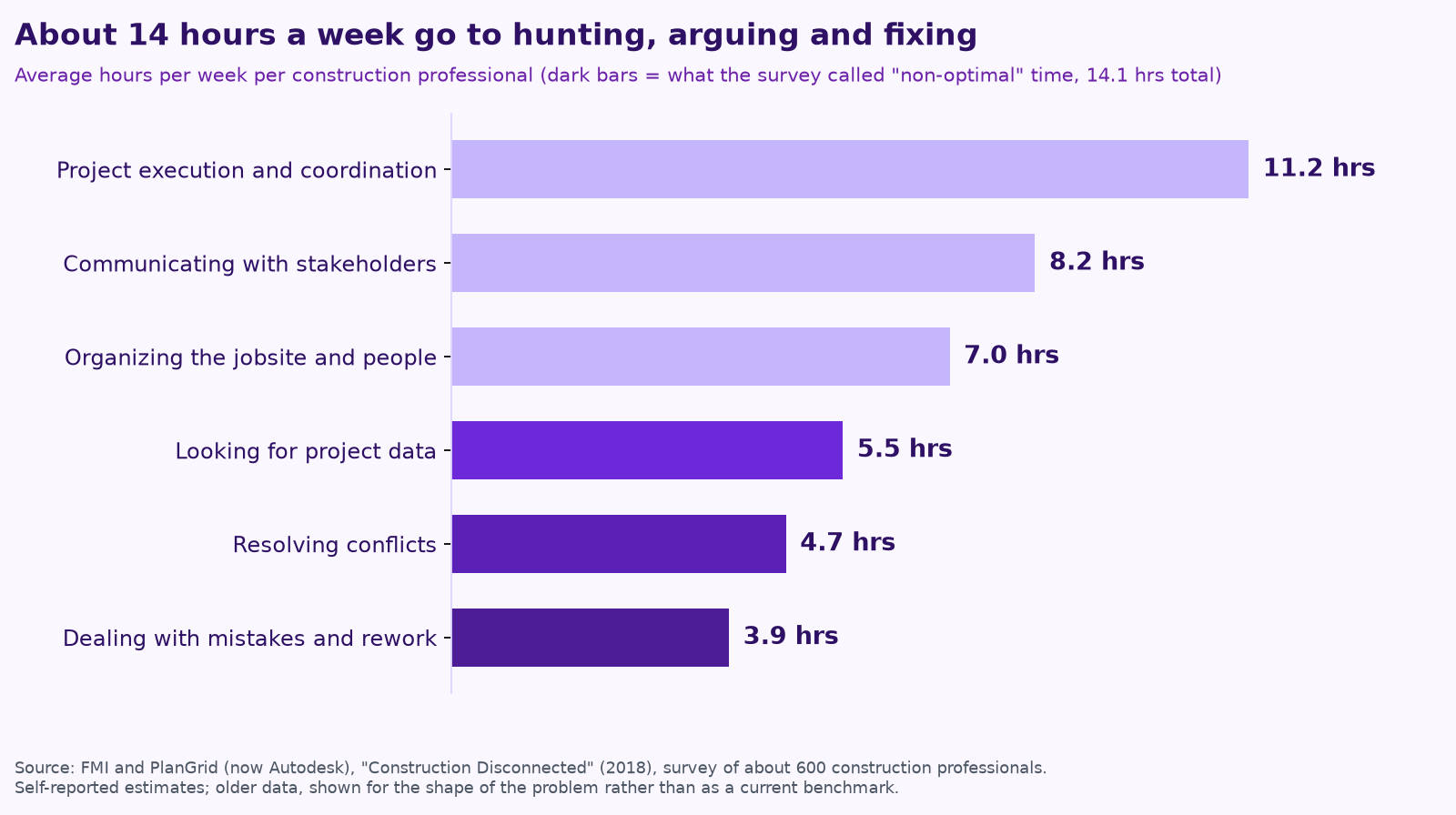
That data is from 2018, so treat it as the shape of the problem rather than today’s exact number. A newer, vendor-sponsored source points the same way. In the 2026 ROI report for specialty contractors by Dodge Data & Analytics and Procore, 447 Procore customers (with annual revenue from $5 million to $5 billion) most often said the platform saved them two to six hours per person per week on admin work: tracking down, entering, communicating and cleaning up information.
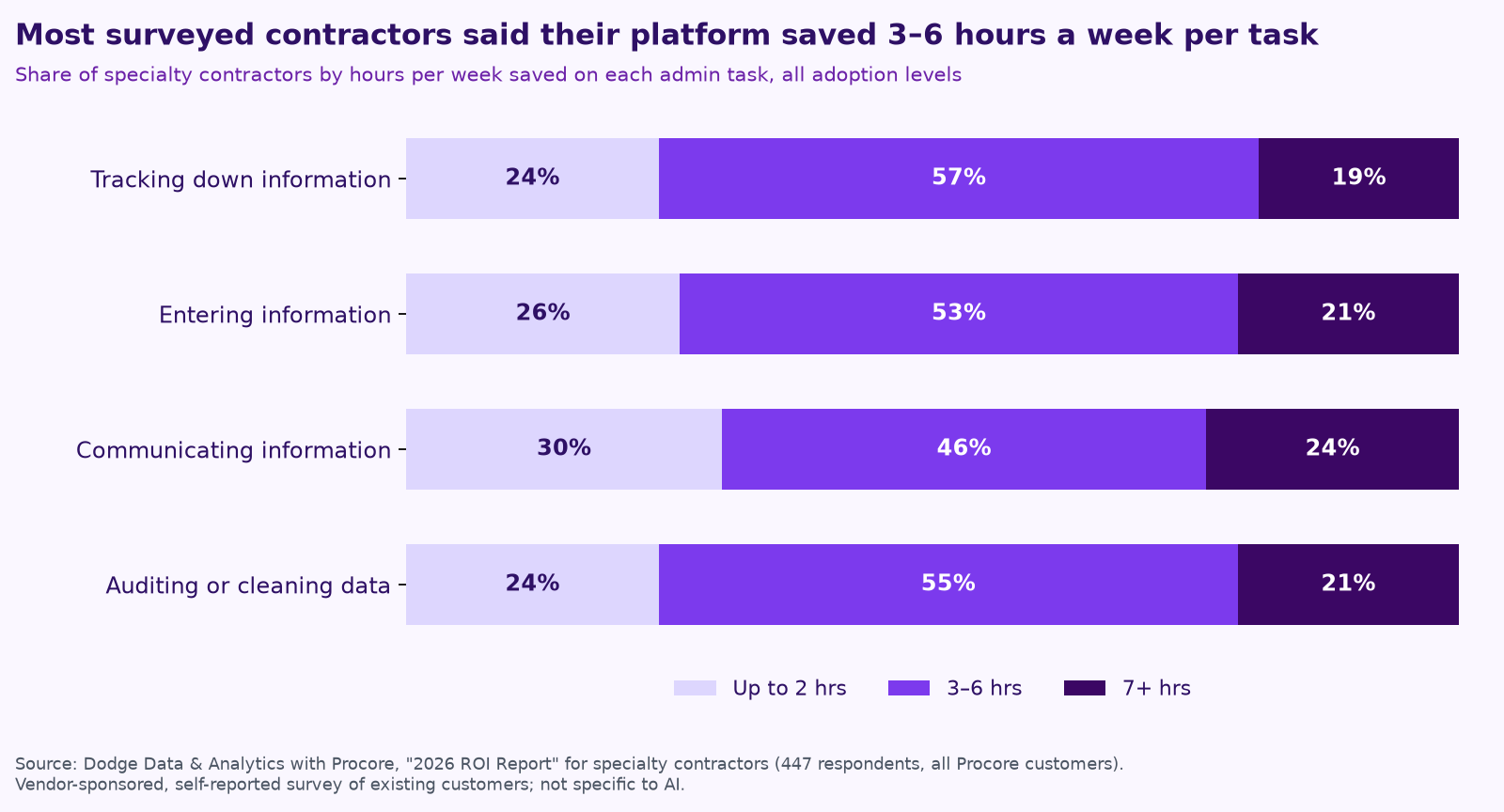
Be skeptical of both numbers. One is old and the other comes from a vendor surveying its own customers. But they agree on the basic point every superintendent already knows: capturing and finding information eats hours that should go to building.
What an AI agent can do with a daily log
Procore’s own roadmap is a good description of the job. The company says a coming “Daily Log Agent” will “organize activity notes, photos, labor data, and site details and flag missing or conflicting information before a report is finalized” (Procore press release, Oct. 21, 2026). Notice the last part: the agent flags problems before a person finalizes the report. It doesn’t sign it.
For a contractor running jobs out of spreadsheets, a job tracker and a group text, a daily log agent can work like this:
1. Capture while it’s fresh
The foreman leaves a two-minute voice memo at lunch and another at the end of the day, and drops photos in the usual job thread. Nobody fills out a form on a phone with gloves on.
2. Turn it into your format
The agent writes the log in the same fields every day: crew and headcount, subs on site, equipment working or idle, deliveries, work planned versus done, inspections, visitors, and delays with their cause and effect. Consistency matters more than polish. Same fields, every day.
3. Fill in the facts it can look up
Weather is the obvious one. Instead of “cold and windy,” the agent can pull readings for the station nearest the job. NOAA’s Climate Data Online offers free daily temperature, precipitation and wind data, and NOAA notes you can order certified copies for legal use. One caveat: NOAA says real-time station data is generally replaced by archive-quality data 45 to 60 days after the month ends, so the log should say which source it used.
4. Flag what’s missing or doesn’t match
This is where the agent earns its keep. Typical flags: “Electrician listed on the schedule, not mentioned in notes, were they on site?” “Delay mentioned, no cause given.” “Photos show a delivery, no delivery recorded.” “Owner’s rep asked for extra outlets, possible change, no change order started.”
5. A person reviews, edits and signs
The superintendent or PM reads it, fixes it and signs. The signed version gets saved with the date in the filename, and it’s never quietly edited afterward. Corrections go in as dated additions.
“The best daily logs reflect all of those impacts, at least the material ones, without regard to whether they might later form the basis for a change order, schedule extension or claim.”
— Institute of Construction Claims Practitioners, Project Documentation Can Make or Break Your Claim
The hard parts (read these before you start)
The agent must never invent anything. This is the big one. A language model will happily fill a blank with something plausible: a headcount, a delivery time, a reason for a delay. In an ordinary email that’s annoying. In a daily log it can damage your credibility in a dispute. Set the rule up front: if it isn’t in the notes, photos or a named data source, the agent leaves the field blank and flags it. Glaholt Bowles also advises keeping records factual and avoiding subjective language, so the agent shouldn’t editorialize either (“sub was lazy” doesn’t belong in a log).
Keep the originals. The voice memo and the photos are the raw evidence, and the AI’s write-up is a summary of them. Glaholt Bowles recommends keeping images as unaltered original files and electronic records in native format, because that preserves metadata like creation dates. Don’t let any tool “enhance” or crop jobsite photos.
The signature means something. If the super signs without reading, you’ve automated the exact problem you were trying to fix. Make review short by keeping the log in the same order every day and putting the flags at the top.
Watch the process creep. If AI makes the log faster and the office responds by adding three new forms, you’ve gained nothing. One agent, one job, one place the log lives.
Mind what goes into the tool. Logs can include names, injuries and owner disputes. Use business accounts with clear data terms, and decide who can see what. Our AI use policy template is a reasonable starting point.
Checklist: is your daily log agent set up right?
- ☐ Same fields every day: weather, crews and headcount, subs, equipment, deliveries, planned vs. done, inspections, visitors, delays with cause and effect.
- ☐ Blank means blank: the agent flags missing facts instead of guessing.
- ☐ Weather from a named source, with the station and data source recorded.
- ☐ Originals kept: voice memos and photos stored unaltered next to the signed log.
- ☐ Flags on top: missing subs, unexplained delays, possible changes.
- ☐ A named person signs every log the same day or the next morning.
- ☐ No silent edits: corrections are dated additions.
- ☐ Possible changes trigger a task, like starting a change order or an RFI, with a person deciding.
- ☐ You measured the before: minutes per log today, so you can tell if it worked. Our hours-back method shows how.
How to start next week
Pick one active job and one foreman who’s willing. For two weeks, have them send voice notes and photos as usual, have the agent draft the log, and have the super compare it against what they would have written. Keep a short list of everything the agent got wrong or left blank. That list becomes your rules. If the drafts are reliably good and review takes a few minutes, add a second job. If not, fix the format before you scale.
Daily logs also connect to other paperwork. The same notes feed your toolbox talk records, your punch list and closeout packet and your pay applications. Get the daily log right first and the rest gets easier. For the bigger picture, see 7 workflows a small contractor can hand to AI agents and how to keep a human in charge of AI agents. If you already use Procore or another platform, our comparison of built-in AI features covers what those tools already do.
Where Purple AI fits
A morning job report built from yesterday’s daily logs is one of the example workflows on our homepage, and “chasing daily logs from six crews every morning” is the kind of headache we hear on calls. Purple AI builds and runs AI agent teams for construction and trades businesses inside the tools you already use, and a person approves anything that matters. If you want to talk through whether your daily logs are a good first job for an agent, book a free 15-minute mini-audit at gopurple.ai.
Sources
- Procore Technologies (@procoretech), post on X about Procore AI Go (Nov 17, 2026).
- Procore, Procore Launches Voice-First AI Mobile App Built for the Jobsite (Oct 21, 2026).
- Glaholt Bowles LLP, Building a Winning Evidentiary Record for Delay Claims.
- McDonald Hopkins, Daily reports can make or break your next claim.
- Institute of Construction Claims Practitioners, Contractors: Project Documentation Can Make or Break Your Claim.
- Arcadis, 2025 Global Construction Disputes Report: Construction Disputes in Motion (via CMAA).
- FMI and PlanGrid, Construction Disconnected (2018).
- Dodge Data & Analytics and Procore, 2026 ROI Report for Specialty Contractors.
- NOAA National Centers for Environmental Information, Climate Data Online and Global Historical Climatology Network daily (GHCNd).
Free checklist
Find 10 hours a week: the AI checklist for contractors
30 places construction and trades businesses lose time every week, and what an AI agent can take off your plate. On the page or as a printable PDF.
Get the checklist →
