

An RFI that sits in someone’s inbox can stall a crew. A sloppy one can stall it twice. An AI agent can draft a request for information from field notes and photos, keep an aging log of what is still open, and track the submittals that have to be approved before the work can start. It should not invent a missing detail, accept an answer or change the work on its own. A person still owns the technical question, the review of the reply and anything that touches the price.
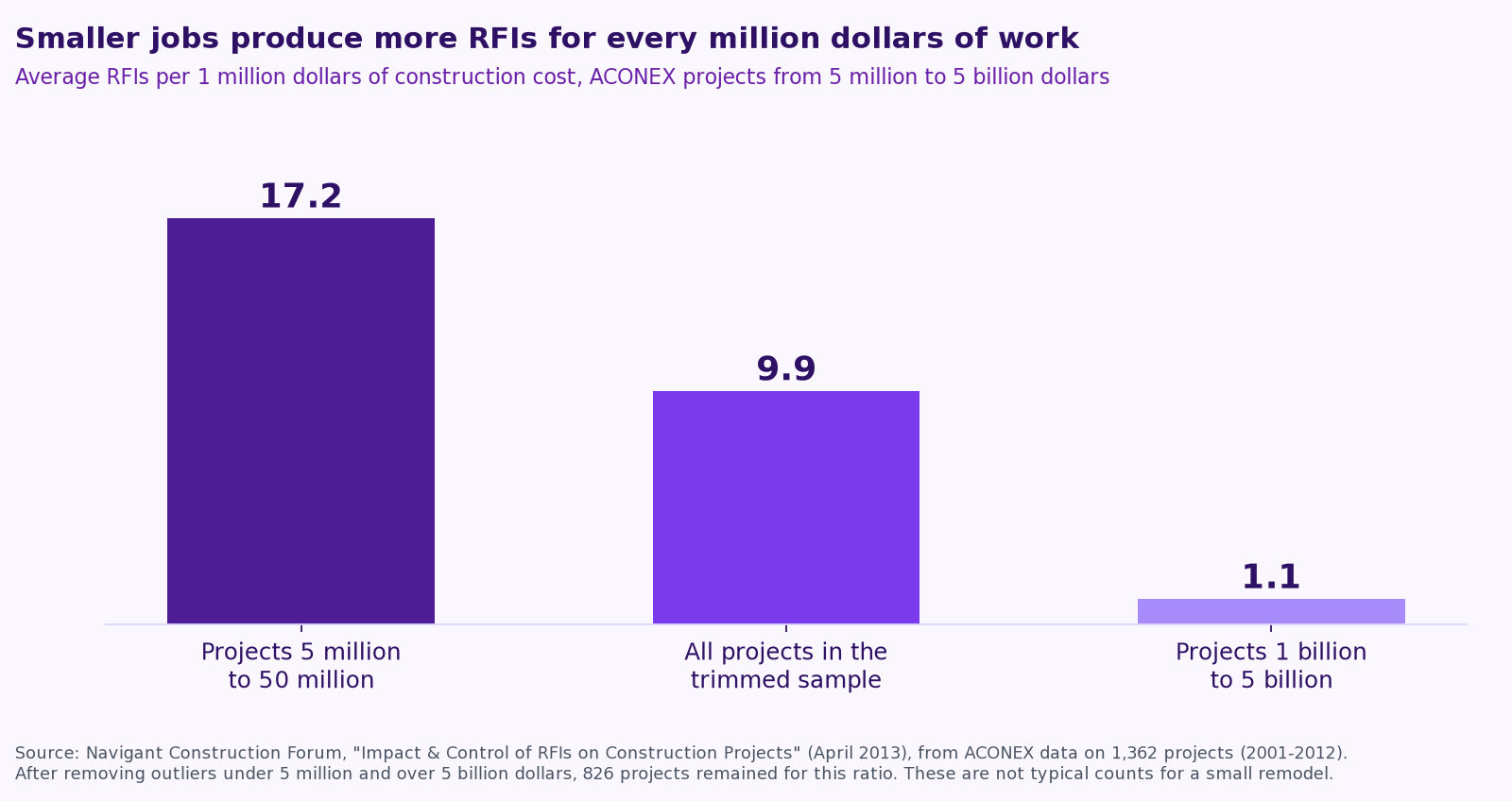
Smaller jobs produce more RFIs for every dollar of work
In April 2013, the Navigant Construction Forum analyzed ACONEX project data on requests for information. The full set covered 1,362 projects started between 2001 and 2012, each with a minimum of 100 RFIs, for about 1.1 million RFIs in all, or 796 per project on average. Most of those projects, 79%, were in Australia and New Zealand. After Navigant removed outliers under $5 million and over $5 billion, 826 projects remained. On that trimmed sample, the average was 9.9 RFIs per $1 million of construction cost. Projects between $5 million and $50 million averaged 17.2 RFIs per $1 million. Projects between $1 billion and $5 billion averaged 1.1 (Navigant Construction Forum, April 2013, via CMAA).
These are not typical counts for a small remodel, and they are more than a decade old. The 100-RFI minimum also means quieter jobs never entered the sample. The useful takeaway is the pattern: on smaller work, unanswered questions are a larger share of the job, and the cost of a late or incomplete RFI is felt sooner. Navigant also estimated, for that large-project sample, an average of eight hours and $1,080 to review and respond to each RFI, in 2013 dollars. That is their estimate for those projects, not a cost you should budget for a small residential job.
A good RFI is a complete question
The field already knows what is unclear. The delay is usually the write-up: the drawing, the detail, the spec section and a photo never make it into one place, so the architect or engineer has to ask again. A complete RFI names the project, the location, the drawing or detail, the spec section if there is one, the question in plain language, and what the crew needs in order to keep working. It should attach the photo or mark-up, propose an answer only when the superintendent actually has one, and leave a date by which a reply is needed.
Submittals are the other half of the same pile. Product data, shop drawings and samples have to go out, come back approved, approved as noted, or marked to revise and resubmit, and get to the people who will install the work. A rejected submittal that nobody logged is just an RFI in slow motion. Use the RFI and submittal tools in the project software you already pay for first, then add an agent for drafting and follow-up. See where an agent team fits next to the AI already in Procore and similar tools, and the short RFI and submittal workflow in 7 AI workflows for small contractors.
Where an agent fits
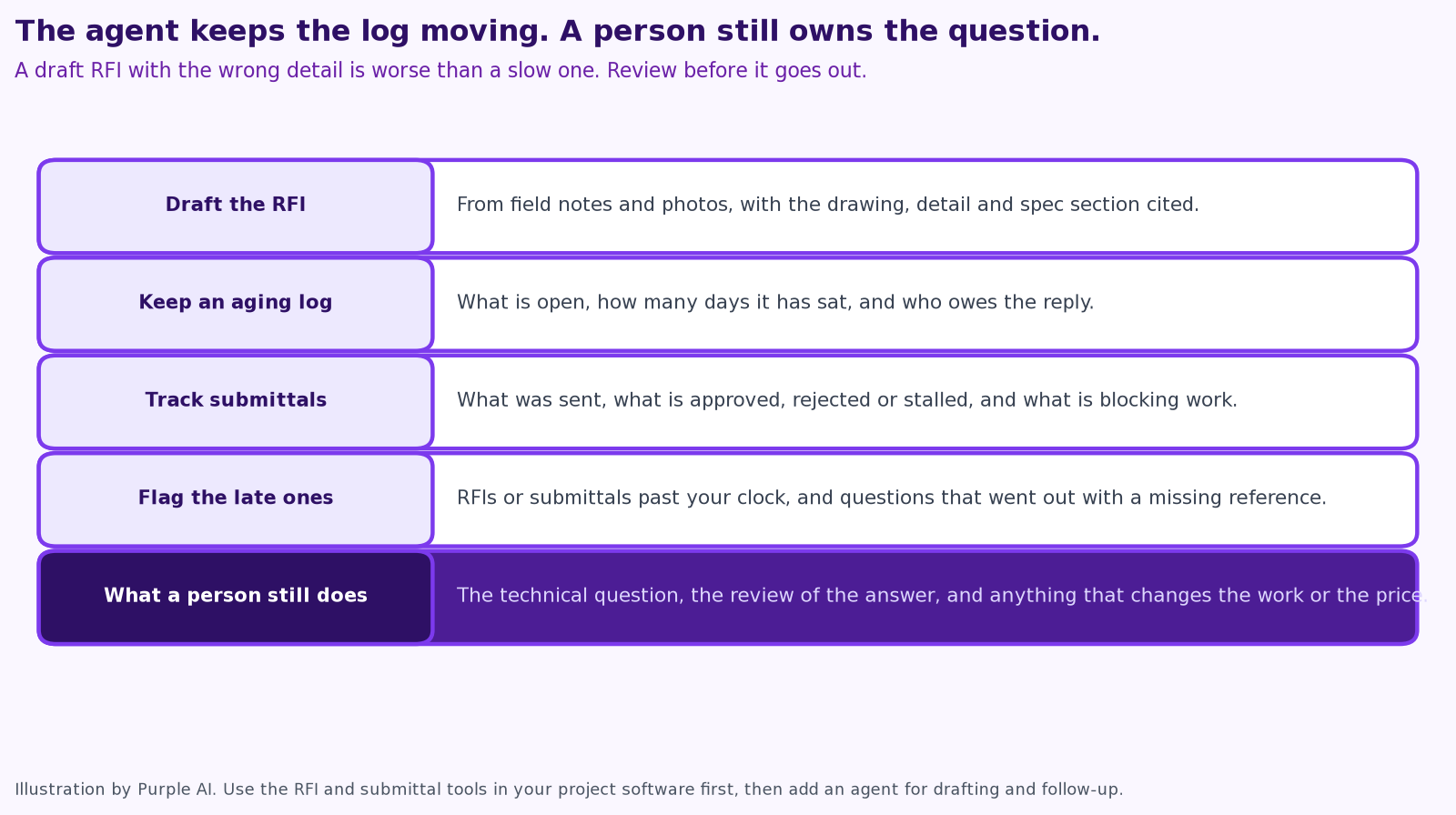
- Draft the RFI from field notes and photos, with the drawing, detail and spec section cited, for a superintendent or project manager to review before it goes out.
- Keep an aging log: what is open, how many days it has sat, and who owes the reply.
- Track submittals: what was sent, what is approved, rejected or stalled, and what is blocking work this week.
- Flag the late ones: RFIs or submittals past the clock you set, and questions that went out with a missing reference or photo.
What a person still does
A draft RFI with the wrong detail is worse than a slow one. The superintendent or project manager still writes or approves the technical question, reviews the answer, and decides whether the reply changes the work, the schedule or the price. If it does, that becomes a change order a person still prices. The agent should not accept a submittal, interpret a drawing or tell a crew to proceed. See how to keep a human in charge and our AI use policy template.
A short weekly scoreboard
Pick a few numbers you can review on Monday:
- Open RFIs, and how many have sat more than the number of days you set as late.
- Submittals still outstanding that are on the critical path for this week’s work.
- Drafts waiting for a person to review before they go out.
- Replies that came in and have not yet been read by the superintendent.
If you want to measure the office time this gives back, use the hours-back method on drafting and log-keeping, not on a delay you cannot clearly attribute to the agent. Navigant’s $1,080 figure is not a savings target for a small contractor.
RFI and submittal checklist
- ☐ Every RFI cites the drawing, detail or spec section and includes the photo or mark-up the reviewer needs.
- ☐ A person reviews the question before it goes out, and reviews the answer before the crew proceeds.
- ☐ The log shows what is open, who owes the reply and how long it has sat.
- ☐ Submittals are tracked through sent, approved, approved as noted, revise and resubmit, or rejected.
- ☐ Anything that changes the work or the price is handled as a change order, not as a quiet note on an RFI.
- ☐ The agent does not accept a submittal or tell a crew to proceed.
This is a construction-first workflow, and it shows up on remodels too. Start with AI for construction and AI for remodelers, then trades, HVAC, plumbers, electricians, roofers and the contractor AI checklist.
Keep reading
- 7 AI workflows for small contractors
- AI for construction estimating and takeoffs
- AI for lien waivers and pay applications
- AI for punch lists and project closeout
- How to keep a human in charge of AI agents
- Procore, ServiceTitan, Jobber and Buildertrend have AI now
- AI for construction safety documentation and toolbox talks
- How to measure AI agent ROI with the hours-back method
- AI for good-better-best service quotes
- How to run an AI assessment for your small business in one week
How we do this at Purple AI
Purple AI is an AI consulting firm for small businesses, and we start with construction and trades. We set up a small team of AI agents inside the tools you already use, give each agent one job, and keep a person in charge of anything that matters. Then we stay on to tune it as your business and the AI tools change.
The easiest first step is a free 15-minute AI mini-audit. We’ll look at where your week goes and name the one or two jobs we’d hand to an agent first. Book your mini-audit here.
If it’s a fit, ongoing plans are sized by who uses them: Starter at $1,000 a month for the owner (one person, one tool), Team at $5,000 a month for one department, and Enterprise starting at $10,000 a month for an organization-wide project. If you want a deeper look first, there’s an optional $2,500 assessment, and $1,000 of it is credited to your first month.
Sources
- Nigel Hughes and James G. Zack, Navigant Construction Forum, Impact and Control of RFIs on Construction Projects (April 2013), from ACONEX data on 1,362 projects initiated between 2001 and 2012, each with a minimum of 100 RFIs. After removal of outliers under $5 million and over $5 billion, 826 projects were used for the RFIs-per-$1-million ratios. About 79% of the original projects were in Australia and New Zealand. The eight-hour and $1,080 review-cost figures are Navigant’s 2013 estimates for that sample, not current costs for a small project. Hosted by the Construction Management Association of America.
Free checklist
Find 10 hours a week: the AI checklist for contractors
30 places construction and trades businesses lose time every week, and what an AI agent can take off your plate. On the page or as a printable PDF.
Get the checklist →
