
When an AI agent messes up, the first instinct is to blame the model and go shopping for a smarter one. Most of the time, that’s the wrong fix. The model is one part of a working agent. The rest is everything wrapped around it: what kicks the job off, what rules it follows, what information it can see, who checks its work and what it’s allowed to touch.
This week, a post on X laying out those surrounding pieces as “six layers” was saved more than 11,000 times in about a day. Its author, Mark Ajzenstadt, runs a company that builds AI systems for large businesses. His point: companies spend their time debating which model to pick, but “almost every production failure happens in the six layers wrapped around it.”
He wrote it for big companies with engineering teams. But the idea matters just as much for a 15-person contractor or a property services company. Here’s what the research says about building reliable AI agents, what each layer means in plain language, and a smaller-business version you can actually use.
The post that got everyone’s attention
There are six layers to a working agentic system.
Most companies spend their time debating which model to pick. The model sits inside a larger operating system, and almost every production failure happens in the six layers wrapped around it.
— Mark Ajzenstadt (@mardehaym) November 26, 2026
That’s the opening of a longer post. His six layers, in his words, are: experience and trigger, orchestration and state, tools and deterministic logic, trusted context, evaluation and human control, and runtime and control plane. If that sounds like jargon, don’t worry. We’ll translate each one below.
One honest note: “almost every failure” is his view from his own client work, not a measured statistic. So we went looking for research that tests the same idea. Two papers point the same way.
What the research says: the setup matters as much as the model
When AI agent teams fail, the setup is usually involved
Researchers at UC Berkeley studied why teams of AI agents fail. They looked at 1,642 recorded runs of seven open-source multi-agent systems and sorted every failure into types. The paper was published at NeurIPS 2025, a major AI research conference.
The biggest group, 44.2% of failures, came from how the system was set up: agents repeating steps they had already done, not knowing when the job was finished, or ignoring the task instructions. Another 32.3% came from agents working against each other, like saying one thing and doing another, or guessing instead of asking a question. The last 23.5% came from checking the work: no check at all, a partial check, or a check that got it wrong.
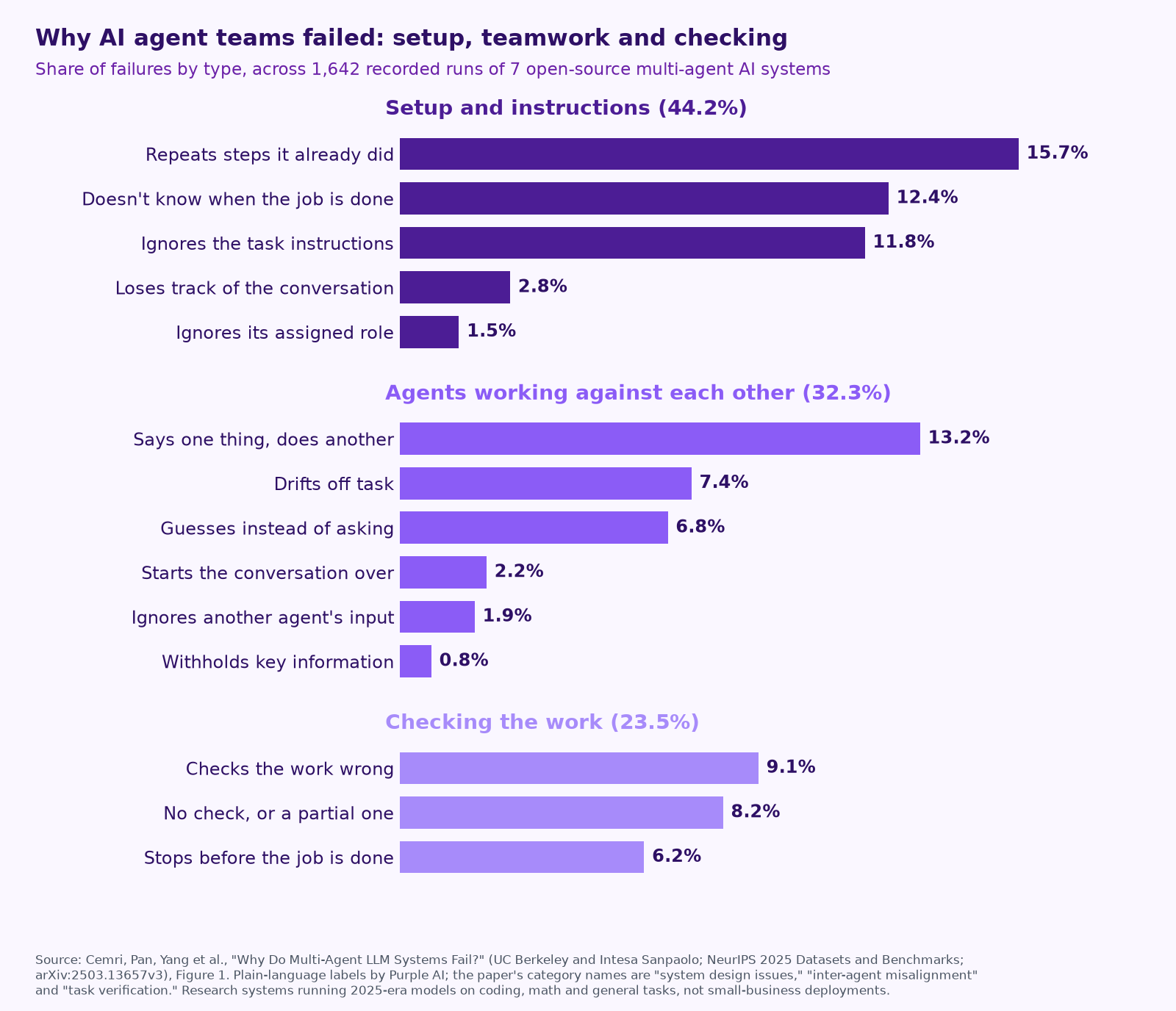
The authors’ own conclusion is worth quoting: “many MAS failures arise from the challenges in organizational design and agent coordination rather than the limitations of individual agents.” (MAS means multi-agent systems.) When they changed only the workflow and instructions, keeping the same model, one system’s success rate went up by as much as 15.6%. They’re also honest that this didn’t fix everything: success rates stayed low, and they say real reliability probably takes both better setups and better models.
Two caveats. These were research systems running 2025-era models on coding, math and general tasks, not a contractor’s office. And the failure counts describe how things broke, not how often the systems worked. Still, the pattern matches what people building agents keep saying.
Same model, different setup, nearly triple the accuracy
A newer paper from NVIDIA, posted November 25, 2026, tested one small piece of the setup: how an agent keeps its notes when its working memory fills up. Usually the surrounding software decides when to shrink the notes into a summary. NVIDIA’s team let the model decide for itself what to keep and what to summarize.
On a set of document research tasks with a tight memory budget, the same model (GPT 6.1) went from 21% accuracy to 56%. Nothing changed about the model. Only how it handled its information. AI researcher Elvis Saravia flagged the paper on X, noting that managing this kind of memory is “an important primitive for long-running agents.”
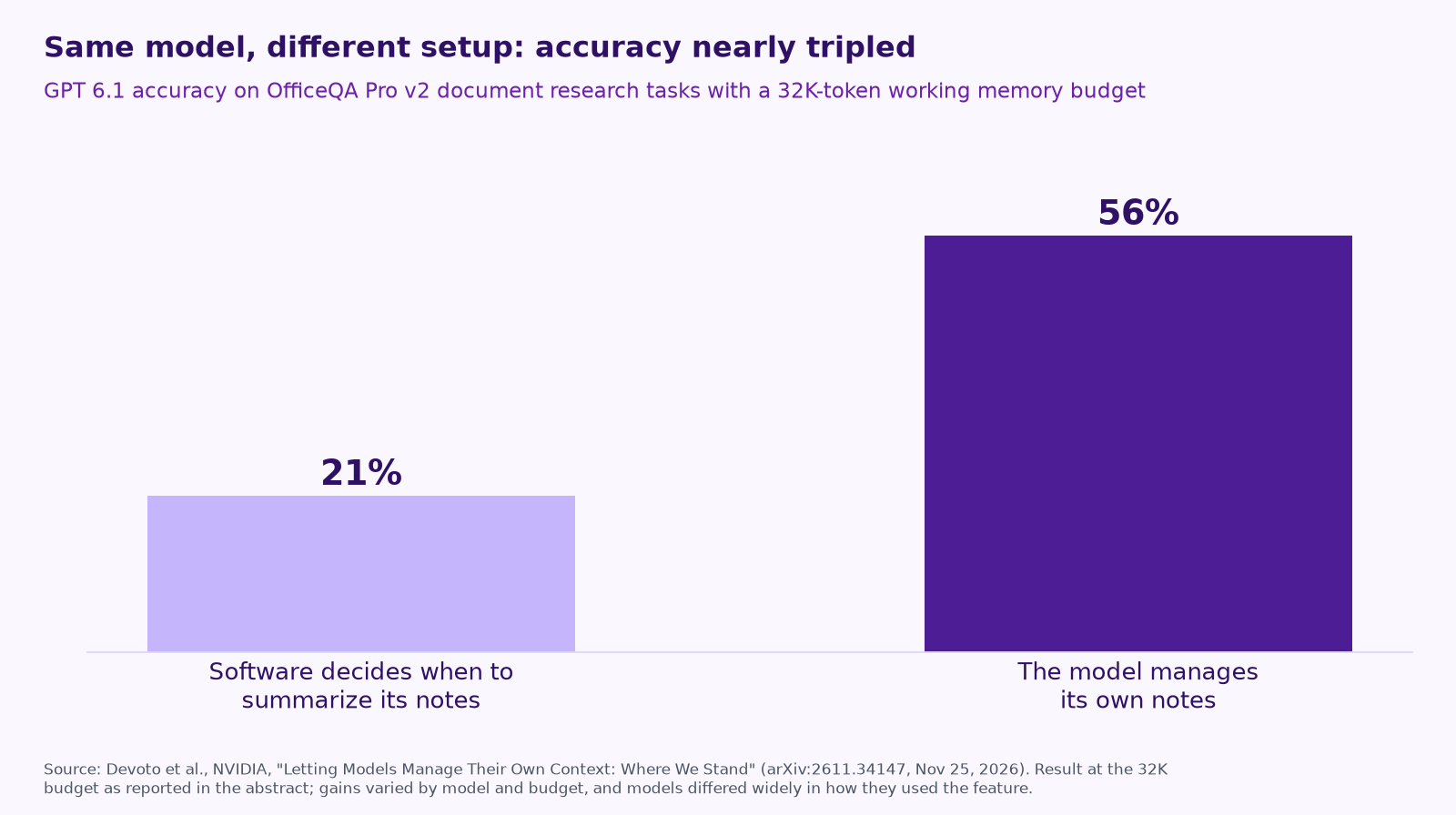
Results varied a lot by model and by memory budget, so don’t read this as “every agent gets 2.7 times better.” The lesson is narrower and more useful: how information flows to and from the model can matter as much as which model you pick.
The six layers, in plain language
Here’s each layer translated for a business owner, with an example from the kind of work our clients do.
1. What starts the job (trigger)
Ajzenstadt says to “stop defaulting to a chat box.” Useful agents start on their own when something happens: a new invoice lands, a web form comes in, a job status changes, or it’s 6 a.m. on a weekday. When the agent gets stuck, the problem goes to one place a person actually checks, not a long chat log nobody reads.
Example: a missed call creates a callback task and a drafted text, and anything unusual lands in the office manager’s inbox.
2. A written playbook and a record of progress (orchestration and state)
The agent’s instructions should be written down, kept in one place and changed on purpose, so you can roll back a bad change. It should also keep a record of where it is in each job, so if something gets interrupted it picks up where it left off instead of starting over or sending the same email twice.
3. Fixed rules stay fixed (tools and deterministic logic)
This one matters most for money. Ajzenstadt’s rule: “The guarantees live in plain, unit-tested code, not in the prompt.” In plain terms, anything with one right answer, like your markup, tax, labor rates or payment terms, should come from your price book or accounting system, not from the AI’s best guess. Use the AI only where judgment is actually needed, like writing the scope description or sorting an odd request.
4. The right information, and only the right information (trusted context)
Don’t hand the agent your whole shared drive and hope. Give it the current price list, the job file and the policies it needs for this task. When your documents are out of date, the agent will confidently repeat the outdated version.
Software engineer Thorsten Ball made the same point in a widely shared list of outdated agent habits this week: “Things you would tell a new colleague you also need to tell the agent.” If it lives only in your head, the agent can’t know it.
5. Test it on past jobs, and keep a person on big decisions (evaluation and human control)
Before an agent touches a customer or moves money, build what Ajzenstadt calls a “golden set”: real past cases your experienced people agree were handled correctly. Run the agent against those cases every time you change something. And keep a human approval step on anything high-impact or hard to undo. We’ve written more about that in how to keep a human in charge of AI agents.
6. One set of controls (runtime and control plane)
All the agent’s AI usage should run through one account you control, with spending limits, a log of what it did, and protection against instructions hidden in emails or web pages (see our post on prompt injection). Set up this way, switching to a different model later is a settings change, not a rebuild.
“Models and frameworks will keep changing. The durable assets are your workflow rules, evaluation sets, context boundaries, and operational ownership.”
Mark Ajzenstadt, on X, Nov 26, 2026
That’s the part small business owners should hold on to. The model you pick this year will be replaced. Your written rules, your test cases and your sign-off steps will not. They’re the part of an AI setup that’s actually yours.
The small-business version
You don’t need enterprise software to get most of the benefit. Here’s how each layer scales down:
| Layer | Enterprise version | Small-business version |
|---|---|---|
| Trigger | Event-driven runs and an exception queue | “When X happens, do Y,” plus one inbox for anything odd |
| Playbook and progress | Versioned agent definitions, checkpoints in a database | One written instruction doc with a change log, and a job status the agent updates |
| Fixed rules | Tested code behind named tools | Prices, rates and terms pulled from your price book or accounting software, never typed by the AI |
| Trusted information | Scoped knowledge graphs and data catalogs | A short, current folder per task, with one owner who keeps it up to date |
| Testing and sign-off | Golden sets, automated grading, approval gates | 20 past jobs you know the right answer to, plus a person who approves anything sent or paid |
| Controls | An AI gateway with keys, spend caps and traces | One company account, a monthly spending cap, and an activity log someone glances at weekly |
The honest hard parts
- This is more work up front than “sign up and chat.” Writing the playbook and pulling together 20 past jobs takes real hours from your most experienced person. That’s also why it works.
- Don’t over-build. Anthropic, which makes the Claude models, found in its work with dozens of customer teams that “the most successful implementations weren’t using complex frameworks” but simple patterns. A once-a-month task may only need two or three of these layers. Save the full setup for work that runs every day or touches money.
- Your documents will drift. Prices change, policies change, crews change. Someone has to own the information the agent relies on, or quality slowly slides.
- The model still matters. Neither paper says models don’t matter. The Berkeley authors say better setups alone didn’t solve everything. The point is where to look first when things go wrong.
- The six layers are one practitioner’s framework. Ajzenstadt builds these systems for a living, and his “almost every failure” is experience, not a study. The research above supports the direction, not his exact number.
A checklist before you blame the model
Next time an agent gets something wrong, walk through these in order:
- Did it start at the right moment with the right input, or did someone paste in half the details?
- Are the instructions written down, and did anyone change them recently?
- Did a number come from the AI that should have come from your price book or accounting system?
- Was the information it used current? Check the price list, the job file and the policy it read.
- Would your test jobs have caught this? If not, add this case to your set of 20.
- Did a person approve it before it went out, and did they know what to check?
- Can you see what it did in a log, and was it within its spending limit?
Only if all seven look fine is it time to try a different model. And when you do, our guide to matching the model to the job will help you avoid paying for more model than you need.
How Purple AI can help
Purple AI builds and runs AI agent teams for construction, trades and other small and mid-sized businesses. You describe the job once, and a person signs off on what matters. If you’d like a second set of eyes on an agent that isn’t working, or help setting up your first one the right way, book a free 15-minute AI mini-audit at gopurple.ai.
Sources
- Mark Ajzenstadt (@mardehaym), “There are six layers to a working agentic system”, post on X (Nov 26, 2026).
- Mert Cemri, Melissa Z. Pan, Shuyi Yang et al., “Why Do Multi-Agent LLM Systems Fail?”, UC Berkeley and Intesa Sanpaolo, NeurIPS 2025 Datasets and Benchmarks Track (arXiv:2503.13657v3, Oct 2025).
- Alessio Devoto et al., NVIDIA, “Letting Models Manage Their Own Context: Where We Stand” (arXiv:2611.34147, Nov 25, 2026).
- Elvis Saravia (@omarsar0), post on X about the NVIDIA context paper (Nov 26, 2026).
- Thorsten Ball (@thorstenball), “How to Not Use Agents in November ’26”, post on X (Nov 26, 2026).
- Anthropic, “Building effective agents” (Dec 19, 2024).
Free checklist
Find 10 hours a week: the AI checklist for contractors
30 places construction and trades businesses lose time every week, and what an AI agent can take off your plate. On the page or as a printable PDF.
Get the checklist →
